49
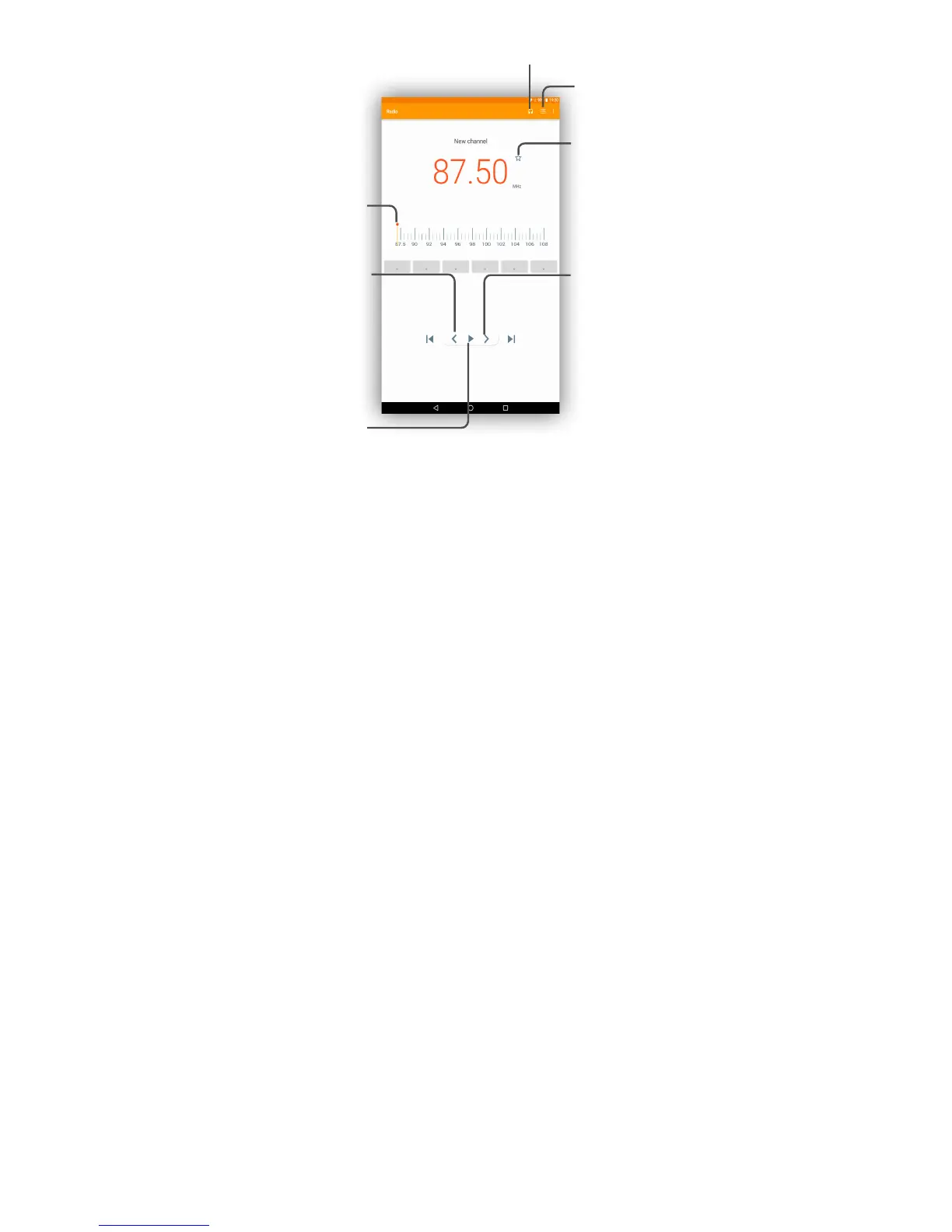
Touch to play/stop.
Touch to enable/disable the
loudspeaker.
Touch to go to next
saved channel.
Touch to open and view the
saved channels list.
Touch to add the current
station to favourites.
Drag to change
current frequency.
Touch to go to previous
saved channel.
Touch to decrease 0.1MHz.
Long press to search and
go to the nearest lower
frequency channel.
Touch to increase 0.1MHz.
Long press to search and
go to the nearest higher
frequency channel.
8.3.1 Available options:
• Save channels
Touch to save the channels you played
• Scan channels
Touch to search for channels.
• Delete
Delete the channel.
• Enter frequency
Enter the frequency manually to turn to
the channel.
• Station Info
Mark the checkbox to show the station
information.
• Exit
Turn off the radio.
8.4 Other applications
(1)
The previous applications in this section are preinstalled on your tablet.
You can also download thousands of 3rd party applications by going to
Google Play Store on your tablet.
(1)
Application availability depends on the country and operator.



 To Next Page