11
• Place your finger on the key with the first letter of the word and drag your
finger to each subsequent letter without lifting your finger off the screen.
• Continue until you have finished the word. Lift your finger after the
last letter.
• If Swype Input can't clearly determine your word, the word choice
window opens. Select an alternative word from the list.
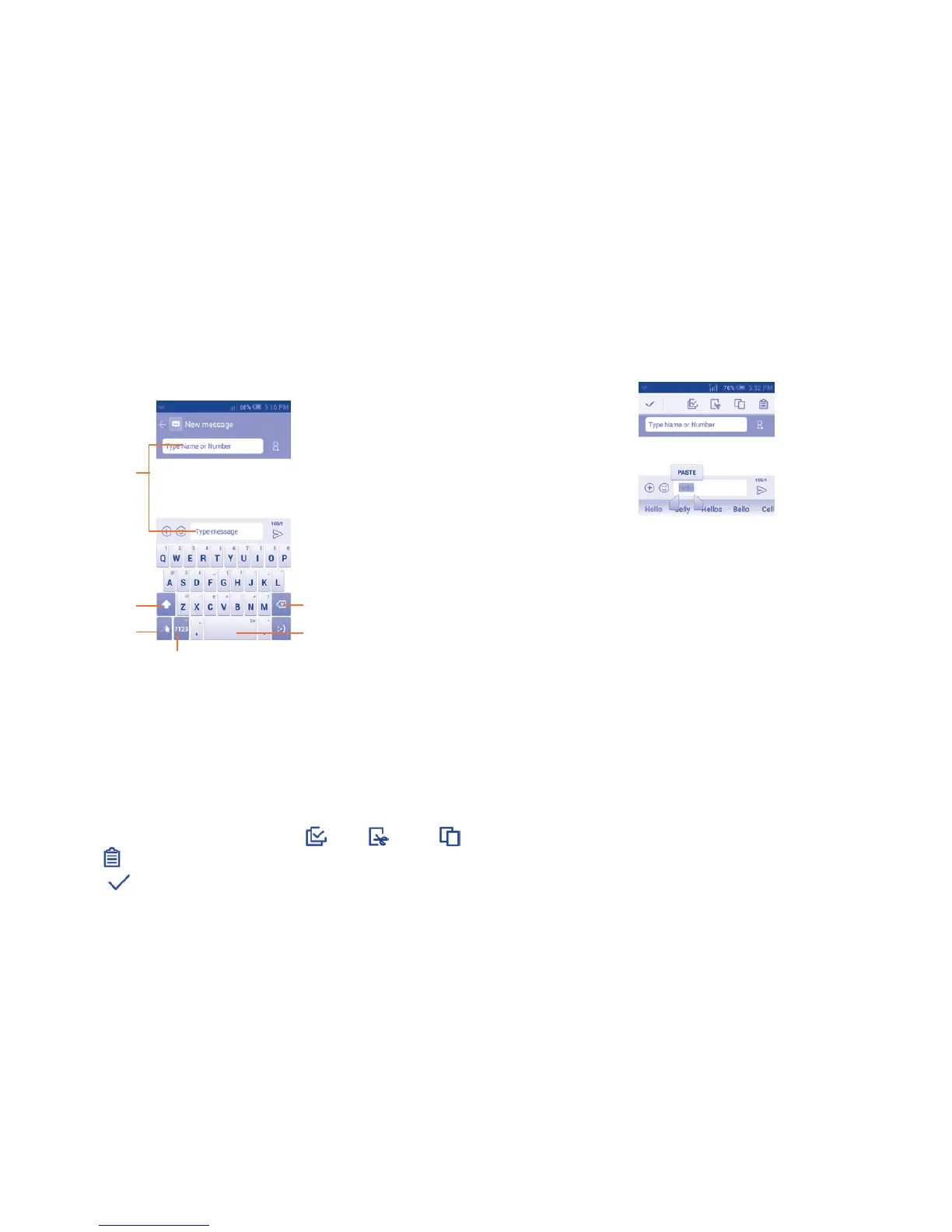
Touch to enter
text or numbers.
Touch to switch
between "abc/
Abc" mode.
Touch to enter symbol.
Touch & hold to edit.
Touch & hold to delete all
contents immediately.
Touch & hold to
enter settings.
Touch & hold to
change language.
2.2 Text editing
You can edit the text you have entered.
• Touch and hold within the text you would like to edit.
• Drag the tabs to change the highlighted selection.
• The following options will show: Select all , Cut , Copy
or Paste .
• Touch the icon to go back without any action.
You can also insert new texts as you prefer
• Touch where you want to type, or touch and hold the blank, the cursor
will blink and the tab will show. Drag the tab to move the cursor.
• If you have selected any text, touch the tab to show PASTE and REPLACE
icon which allows you to complete paste immediately.



 To Next Page