AUTHORITY 105
Tools
Clock
Opening the Clock
1. From the Home screen, tap Apps > Clock.
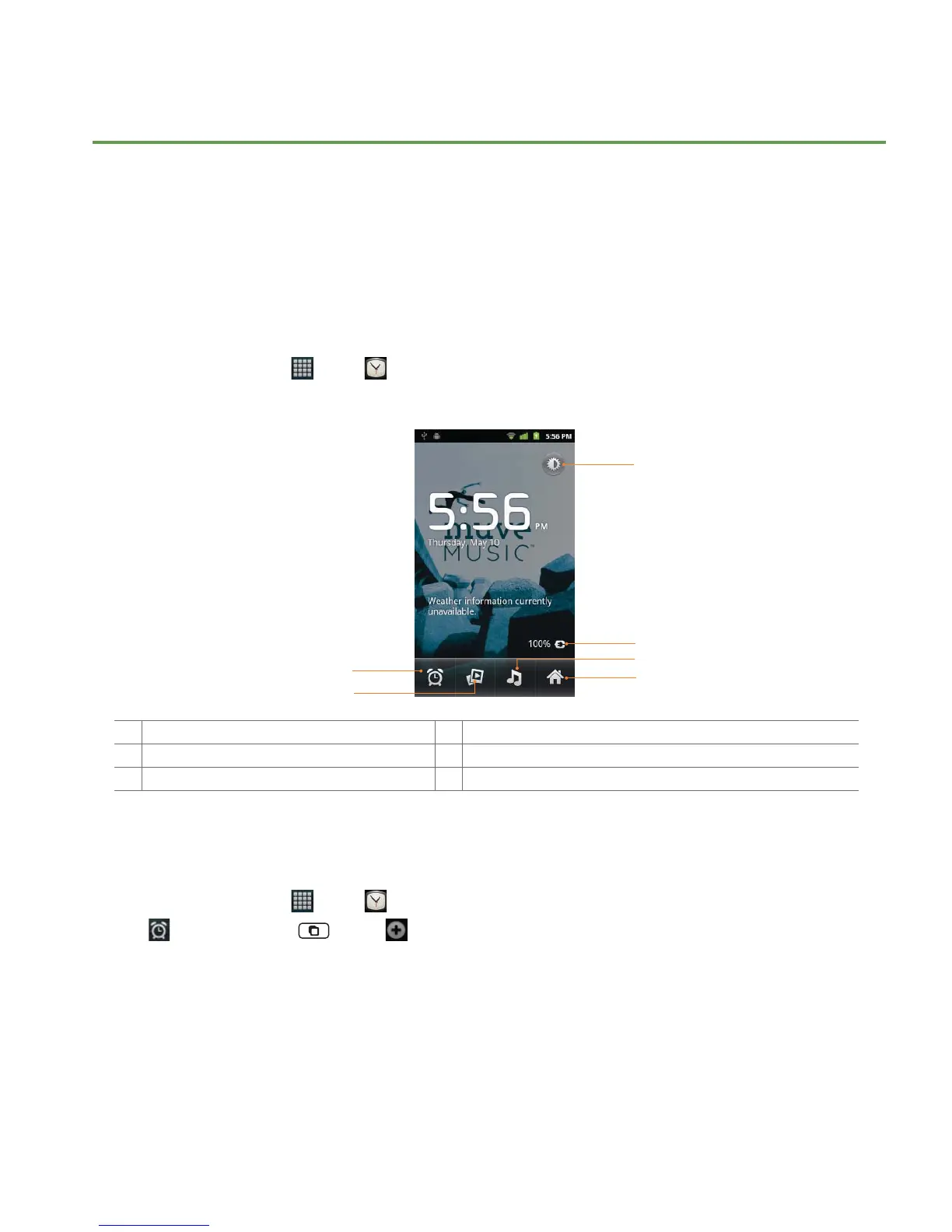
• The Clock application opens and displays the date, time, local weather and other useful information.
6
1
2
3
4
5
1 Tap to dim the screen 2 The battery charge level, displayed only while the phone is charging.
3 Set an alarm and check old alarms 4 View a slideshow
5 Music application 6 Home screen
Managing Alarms
Adding a new alarm
1. From the Home screen, tap Apps > Clock.
2. Tap
> Add alarm. Or tap Menu > Add alarm.
3. To change the alarm time, tap
+/- or type the number using the keyboard. Then toggle AM/PM > Set.
4. Check the checkbox, ‘
Turn alarm on’.
5. Edit
Turn alarm on, Time, Repeat, Ringtone, Vibrate and Label > Done.



 To Next Page