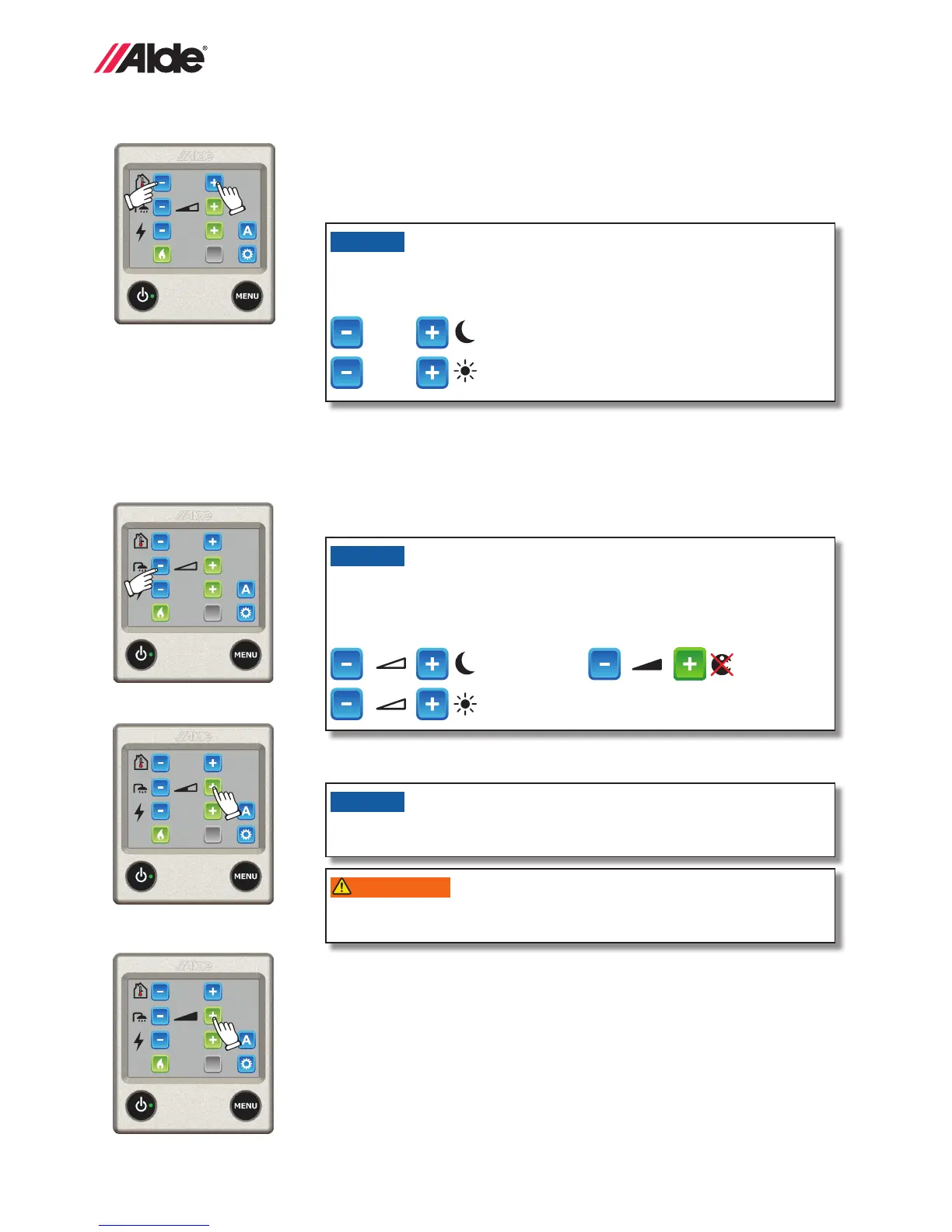
The temperature can be set between +5°C and +30°C, inclusive, in increments of 0.5°C.
1. The temperature displayed is the temperature which is currently set.
2. Increase the temperature by pressing the ”+” button. Reduce the temperature
by pressing the ”-” button.
3. The settings are now complete and the boiler will work at the set temperature.
1 kW
+22°C
ACC
+22°C
1 kW
ACC
1 kW
+22°C
ACC
1 kW
+22°C
ACC
1. No hot water. If domestic hot water is not needed, press the ”-” button (symbol
becomes empty).
2. Normal operation. If there is freshwater in the heater and hot water is required,
press the “+” button (the symbol will then show half-shaded).
3. More hot water. If you need more hot water, the water temperature can be temporar-
ily increased to around 70°C. Press the “+” button so that the symbol shows fully
shaded (black). The boiler returns to normal operation after 30 minutes.
NB. If the pump operation function is set to Cont., see section 2:11 point 17, then the
continuous pump operation function is turned off for 30 minutes, before then return-
ing to continuous pump operation.
NB. If an additional hot water tank
(*Alde Flow part no. 3020 161)
is installed and the panel is
in more hot water mode, the hot water function can then be in operation for longer than
30 minutes.
Info! When hot water only is required, during the summer for instance, or when
there is no requirement for hot water, no settings need to be made; the boiler looks
after this function automatically.
19
GB
2:7 HEATING WITH GAS
Proceed as follows to activate heating with gas. A priority can be set when selecting both electricity and gas, see sec-
tion 2:11 point 3.
1. Start gas operation by pressing the LPG ame symbol. The LPG symbol is
activated and changes colour to green.
2. The settings are now complete and the boiler will work at the set tempera-
ture.
3. To switch off gas operation, press the LPG ame symbol. It will now
change to blue.
1 kW
+22°C
ACC
1. Set the desired temperature.
2. Press the blue ACC button, the button
turns green (see g. 2) and the ACC
function is switched on, but is not
necessarily in operation. If gas and/or
electricity is switched on, AC and the
boiler work to deliver the temperature
set, regardless of whether heat or
cooling is needed in the vehicle. To turn
off the ACC function, press the ACC
button and it becomes blue.
3. To turn AC lighting off and on,
press the button rapidly. When
the button is kept pressed in,
the light changes from dark to
light and then back (light to dark)
and so on in 8 brightness levels.
When the button is released it
stays at the current brightness.
This button is only visible when
an AC* with in-built light is con-
nected.
2:6 HEATING WITH ELECTRICITY
Proceed as follows to activate heating with electricity. The more power (wattage) you select, the quicker heating will
take. A priority can be set when selecting both electricity and gas, see section 2:11 point 3.
The boiler uses no more power than is needed, even if it is set for 3kW.
1. Use the + or - button to switch
on the electric heating and toggle between the various power modes (Off,
1 kW, 2 kW or 3 kW) The set value will be displayed on the screen. The
activated mode is indicated by the + button changing colour to green. If
a *load monitor is installed and set, the boiler will not use more electricity
than it is capable of even if 3 kW is selected.
2. The settings are now complete and the boiler is working at the set
temperature.
3. To switch off electrical operation, use the - button to toggle to Off.
1 kW
+22°C
ACC
NB. Temperature sensors that are used
when fully automatic climate control
is in operation must be positioned so
that they are inuenced equally by the
heat from the Alde heating system and
the air from the AC. In certain cases
it can be an advantage to use Alde’s
temperature sensor
(part no. 3010 638)
.
1 kW
+22°C
ACC
1 kW
+22°C
ACC
1 kW
+22°C
ACC
Figure 1 Figure 3
2:8 *FULLY AUTOMATIC CLIMATE CONTROL (ACC)
If a Truma AC is connected up to the Alde, then the ACC button is visible and it is possible to control ACC from the panel. This
function makes it possible to have fully automated climate control for both heating, cooling and hot water. The button is grey if
not installed or if 230 V is disconnected. With an outside temperature sensor
(part no. 3010 299)
tted, ACC function is improved:
operation of the AC is modied in line with the outdoor temperature.
Figure 2
Functions marked with a (*) are accessories, which are not installed on all vehicles,
refer to the vehicle manufacturer’s instructions.


 To Next Page