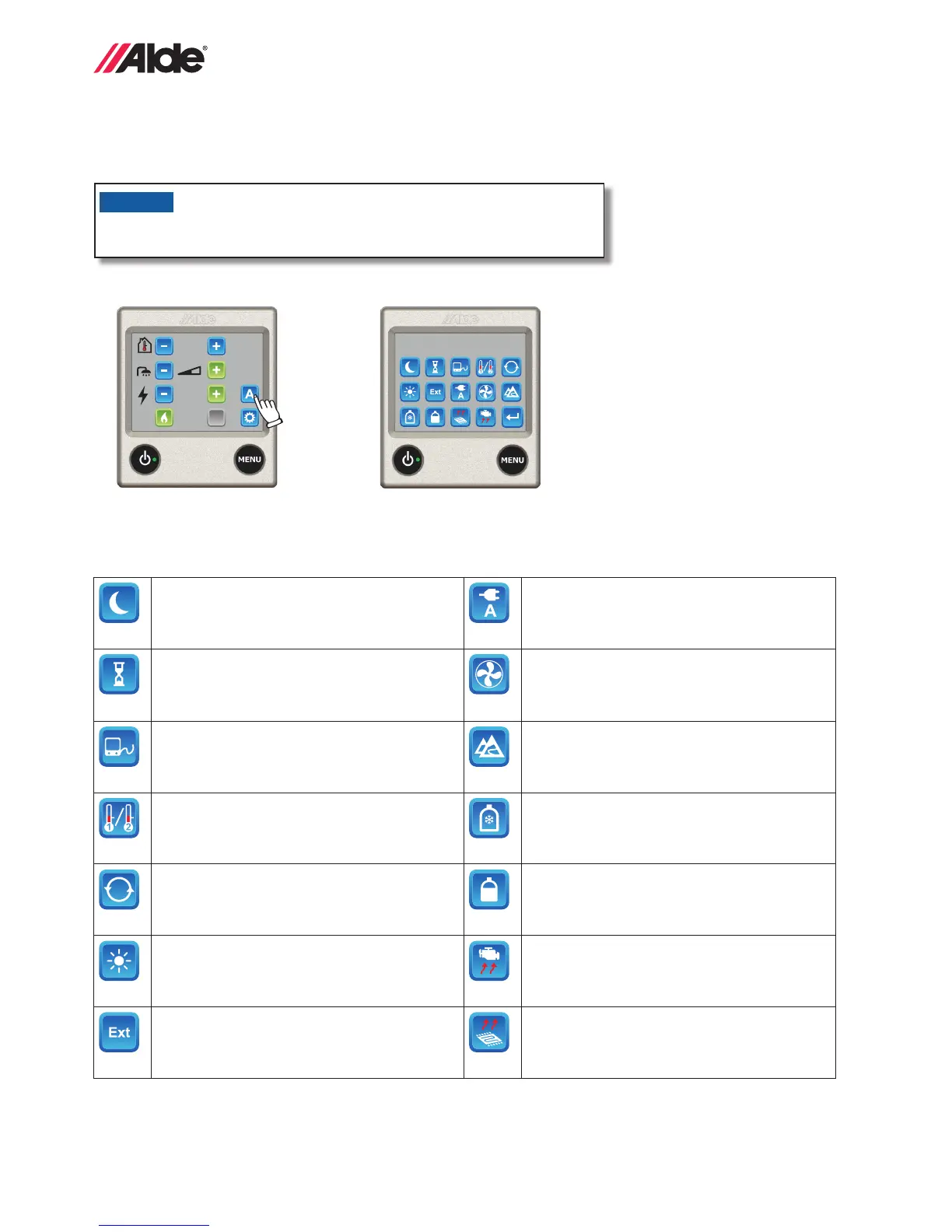
Activated functions (see gure 2) can be accessed by pressing the A symbol (see gure 1). This screen shows the
various functions that are activated. The respective function that is activated can be accessed from here and new set-
tings can be made.
1 kW
+22°C
ACC
Activated Functions
A
Figure 1 Figure 2
Below is a description of the different symbols in the Activated Functions menu.
For more detailed description, see section ”2:11 Tools menu – functions”.
Night mode is activated. However, it does not
have to be within the time/day setting.
* Load monitor is connected and set to limited
current.
Automatic start of the boiler is activated. How-
ever, it does not have to be within the time set-
ting.
* Booster is on.
* This function is used if the heating system is
to be operated via an external panel.
High altitude mode is activated.
* Displayed if one or two external room sensors
are connected.
* EisEx is installed but not necessarily turned
on.
Circulation pump in continuous operation. * DuoControl or DuoComfort is installed and
connected to Alde Compact 3020 HE
Day mode is activated. However, it does not
have to be within the time/day setting.
* Timer for engine heater is set but not neces-
sarily within the set time/day.
* The boiler is set to be started with External
start but has not necessarily been activated.
* Underoor heating is in operation.
21
GB
2:11 TOOLS MENU – FUNCTIONS
The following tools are available from the tools menu.
A grey function button means the function has not been installed and/or activated in ”Installed Accessories”,
see section ”2:15 Activation of installed functions”.
2:10 TOOLS MENU
The tools menu can be accessed from the settings menu.
1. The control panel showing the settings menu.
Press the tool symbol to access the tools menu
1 kW
+22°C
ACC
Settings
1/4
43
8
1
7
2
56
Settings
2/4
9
13
10 11
12
Settings
3/4
14
19
17
1615
18
Settings
4/4
20
24 23
2221
1. Night mode
Automatically changes certain functions during
the night. You can select whether this is to take
place every night or a specic night each week.
The functions that can be changed are:
• Temperature
• *Change to temperature sensor in sleeping
accommodation area.
• Invert display
• Turn off the domestic hot water
• *AC in quiet mode
2. Day mode
Automatically changes certain functions, e.g. if
you are away for a while during the day. Select
that it takes place every day or a specic day
each week. The functions that can be changed
during the day are:
• Temperature
• Turn off the domestic hot water
3. Prio setting
With this function you can choose to priorities
(select) electricity or gas as the main alterna-
tive.
4. Clock
The clock must be set if engine heater start,
night and/or day auto and automatic start
are to work.
If 12 V power is lost, the clock will stop and
will no longer be displayed. Installing *bat-
tery backup (part no. 3010 420) will prevent
this happening.
5. Return
To return to the previous menu, press this
symbol.
6. *Setting room sensor
Select which temperature sensor is to be
active. Here you can select whether the
sensor located in the daytime living area,
the sleeping accommodation or in the panel
is to be active. If Auto is selected, the sensor
in the panel is active and will automatically
switch to a room sensor (sofa and/or bed) if
one of these is connected. If two room sen-
sors are connected, it will be the one for the
daytime living area that is active (sofa).
Functions marked with a (*) are accessories, which are not installed on all vehicles,
refer to the vehicle manufacturer’s instructions.


 To Next Page