connections • chapter 2
22 Ineko Reference Manual
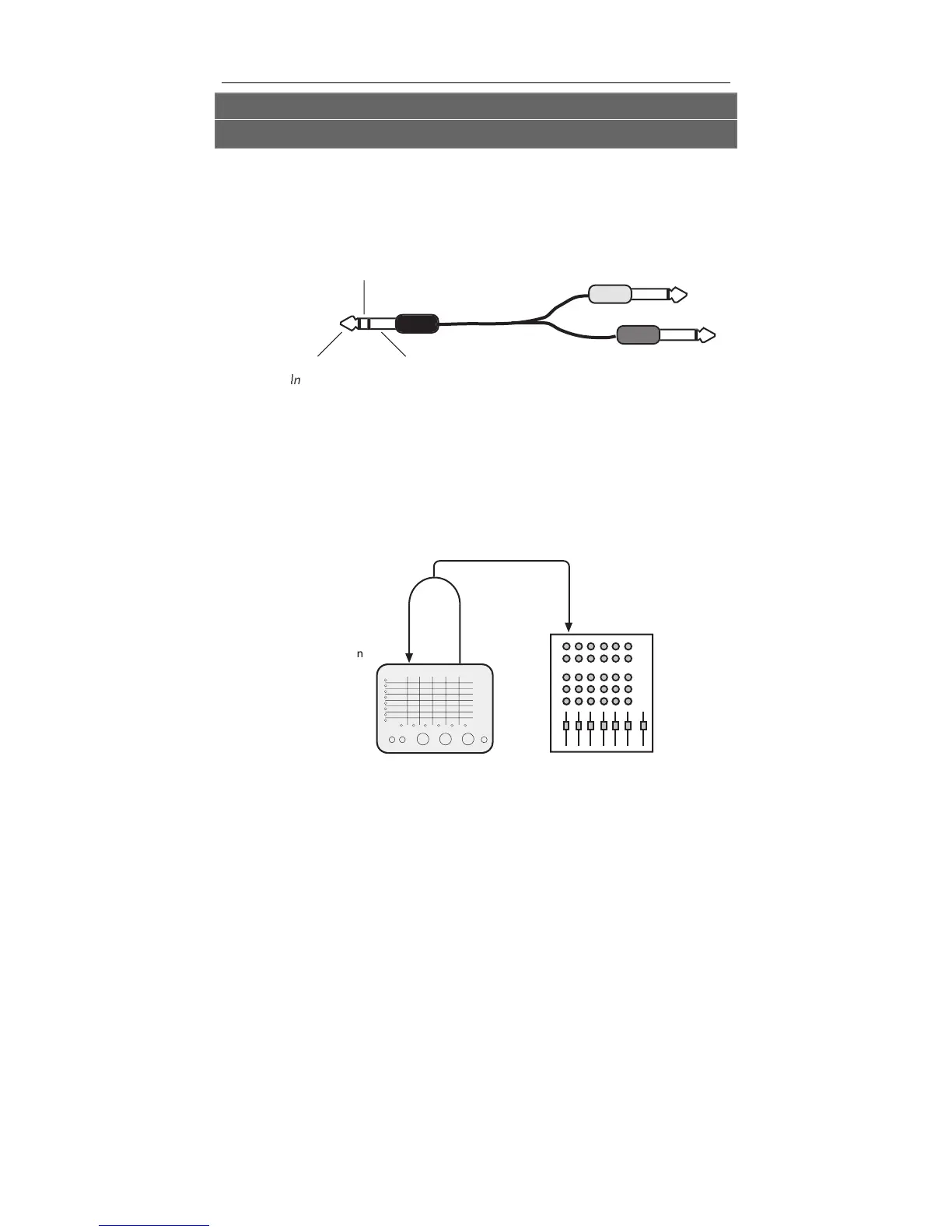
Connecting to the Channel Inserts of a mixing
console:
Most mixing consoles have a jack near the mic and line inputs
labeled "Insert". This is typically a TRS jack with the send and
return on the same jack. To use the Ineko as a channel insert, you
will need an insert cable (not included).
i
nsert
en
Rin
In
rt R
t
r
l
Insert
roun
In
t
n
To Ineko In
u
In
t R
t
rn
Fr
m In
k
Out
u
This cable splits the TRS insert jack into two unbalanced mono
connectors. Usually, the tip is connected to the
INPUT of the
effects processor and the ring is connected to the
OUTPUT of the
effects processor. However, this may be reversed on some
mixing consoles. Check your mixer’s Reference Manual to be
sure or just try it both ways – this won’t damage the Ineko. You
may need to raise the mixer’s input trim if the signal coming
back from the Ineko is too low.
In
k
n
k
I
ix
r In


 To Next Page