Chapter 4
Ineko Reference Manual 41
Troubleshooting
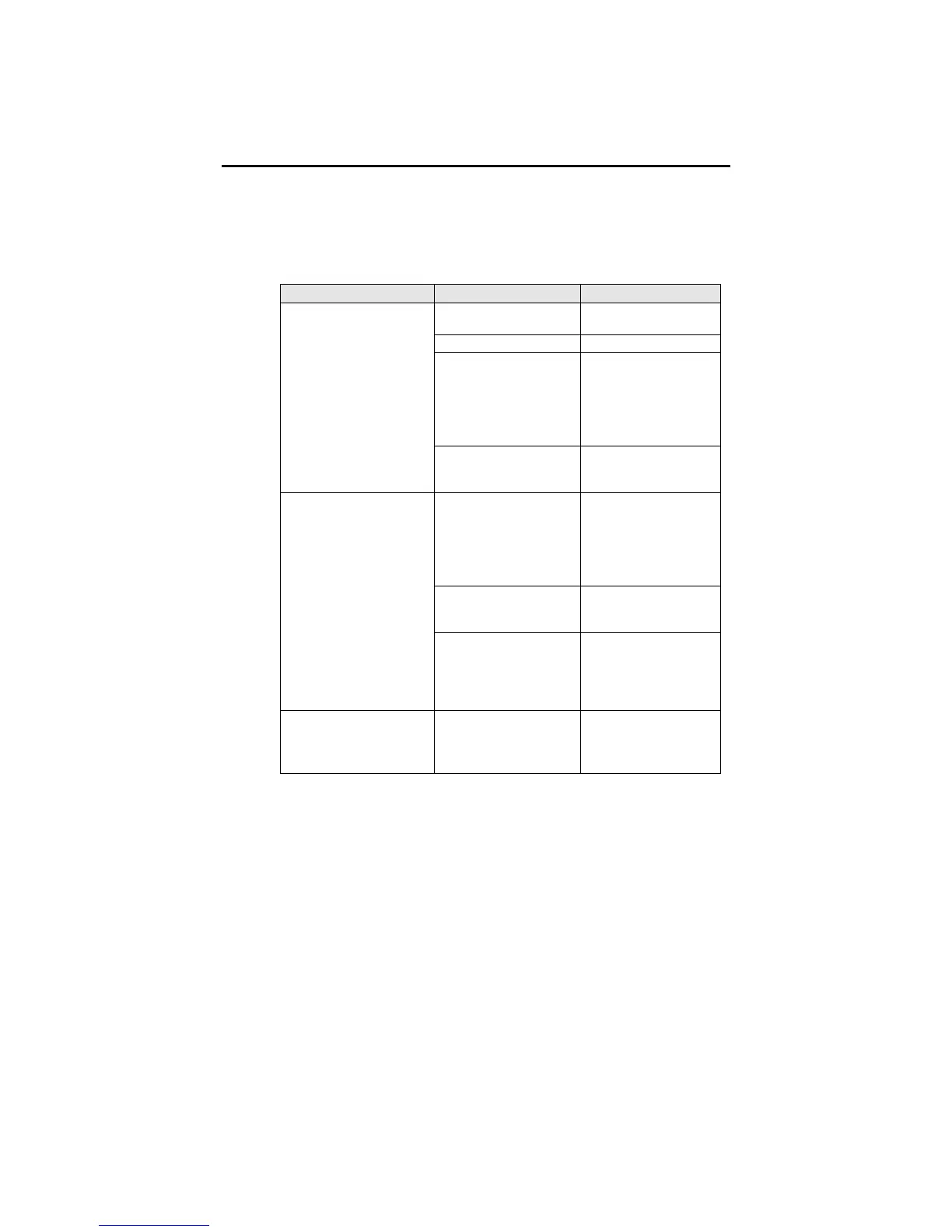
Troubleshooting Index
If you experience problems while operating your Ineko, please
use the following table to locate possible causes and solutions
before contacting Alesis Product Support for assistance.
Symptom Cause Solution
No input audio Test with a known
good input.
Bad cables Replace the cables.
Destination is
turned down
Check the
connections and
the level of the
mixer or amp that
the Ineko is
connected to.
No audio from
outputs
Power is not
connected
Verify that power
supply is plugged
in.
Cables are crossing a
power cable
Make sure that the
Ineko and its audio
cables are kept
away from power
cables, and wall
warts.
Bad cables Replace the cable
with a new, high-
quality cable.
Buzz from outputs
Problem with the
source
Try removing the
Ineko from the
signal path, and see
if the problem
remains.
AC hum Ground loop Place all equipment
in the studio on a
common ground
(see next page)


 To Next Page