16
Troubleshooting
Troubleshooting MIDI Functionality
Q mini has been designed to make working with MIDI on your computer as simple as possible. However,
you may experience some difficulties. In many cases, the keyboard is not at fault, as the problem lies with
the receiving device or software. To counter this, the Panic and Full Reset functions are available to assist
you.
Panic Button (All Notes Off + Reset All Controllers)
If there are notes that will not stop playing, or if you find there is an effect on a voice that you do not want,
you can send a Reset All Controllers MIDI message.
To send a Reset All Controllers message:
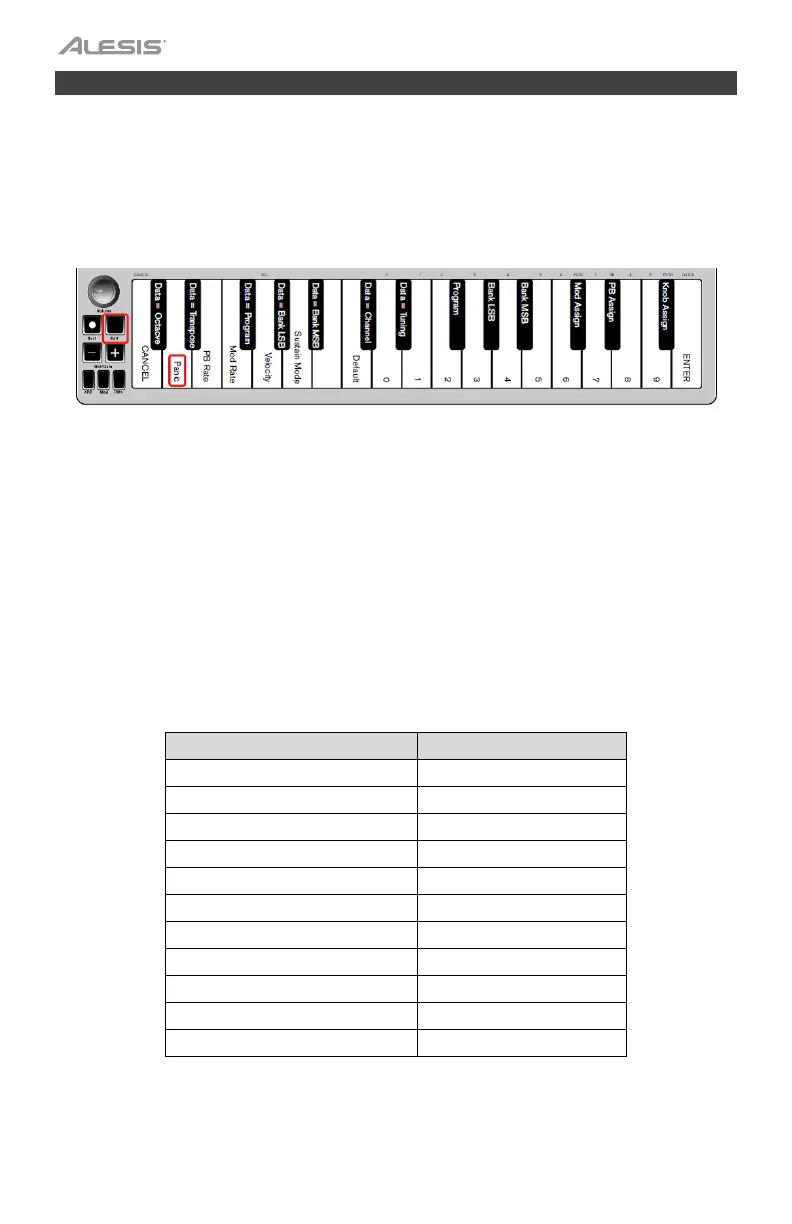
1. Press the Edit button to enter Edit Mode and the Edit button will illuminate to full brightness.
2. Press the “PANIC.” key (D, 2nd white key from the left):
• An “All Notes off” MIDI message is sent.
• MIDI Controller 121, Value 0 and MIDI Controller 123, Value 0 is sent out on ALL MIDI Channels 1 - 16
• Edit Mode will disengage as soon as the Panic button is pressed, the Edit light will go to half
brightness indicating that programming is complete.
Full Reset
To send a Full Reset message:
1. Make sure your computer is running.
2. Switch on the Q mini by plugging in the USB Cable from your computer while simultaneously holding
down the Oct/Data “+” and “-” buttons.
This will reset all Data=_____ and controller assignments to the following values:
Parameter Factory Default
Program Number 000
Bank MSB Number 000
Bank LSB Number 000
Channel Number 00 (channel 1)
Octave shift 000
Transpose shift 000
Modulation Button MIDI CC 001
Volume Knob MIDI CC 007
Pitch Bend Buttons Pitch Bend
Octave Buttons - Assignment Data = Octave
Velocity 1 = Normal












 To Next Page