5
MIDI
26
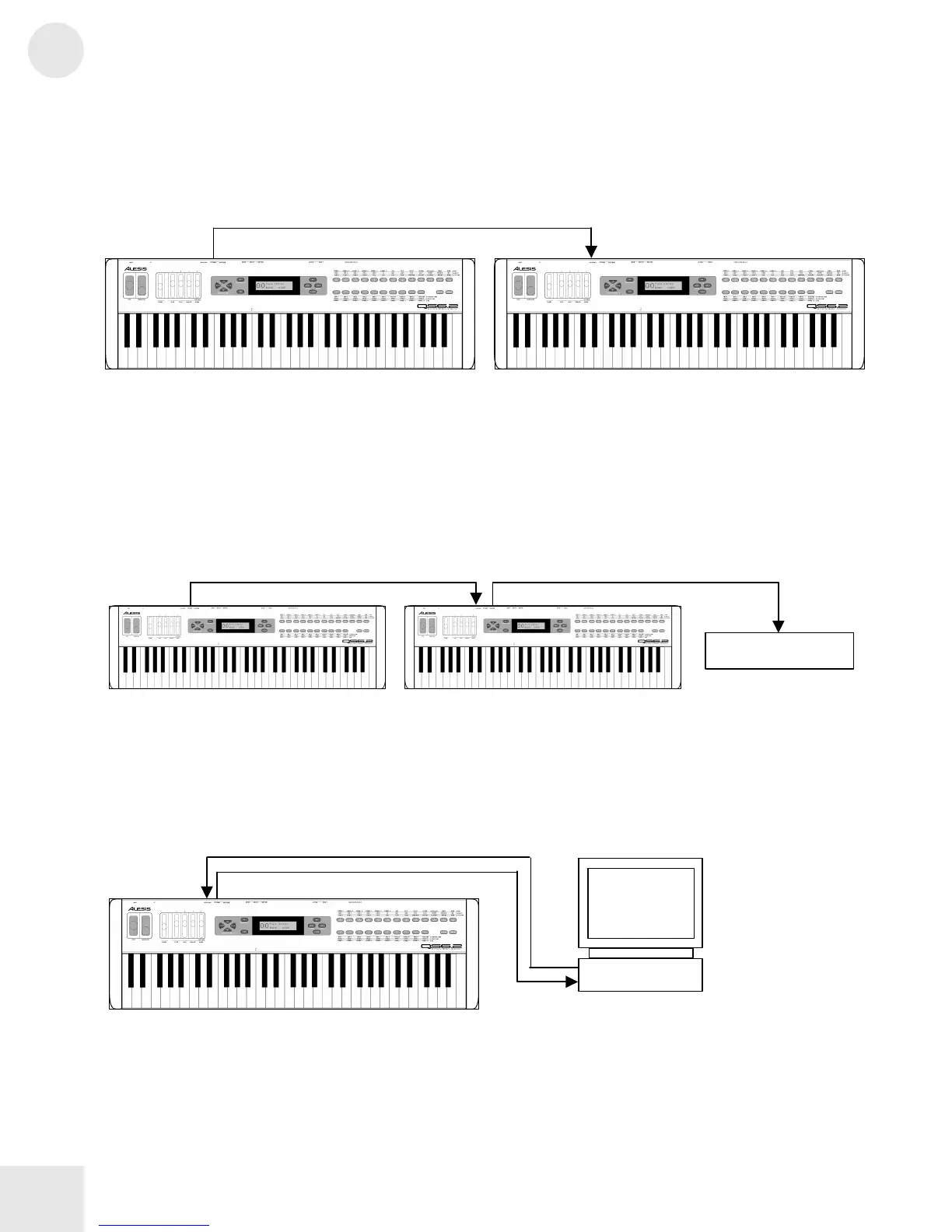
• Slave. With this setup, you can use another keyboard to play the
sounds on your QS. Connect a MIDI cable from the controller’s
MIDI OUT jack to the QS’s [MIDI IN] jack.
• Slave with pass-through. This setup allows MIDI signals to pass
through the QS so they may reach multiple units. This allows one
MIDI device to control several. Attach a cable from the MIDI OUT
of the first device to the [MIDI IN] jack of the QS; and then attach
another cable from the QS’s [MIDI THRU] jack to the MIDI IN of
the third device.
• Sequencing. This setup allows you to use your QS with a MIDI
sequencer or a computer with a MIDI interface. Attach one MIDI
cable from the MIDI OUT of the sequencer or computer to the
[MIDI IN] jack of the QS. Attach another cable from the QS’s [MIDI
OUT] jack to the MIDI IN of the sequencer or computer.
OUT
IN
Sound Module
OUT
THRU IN
IN
Computer
IN
OUT
IN
OUT
Master
Slave



 To Next Page