13
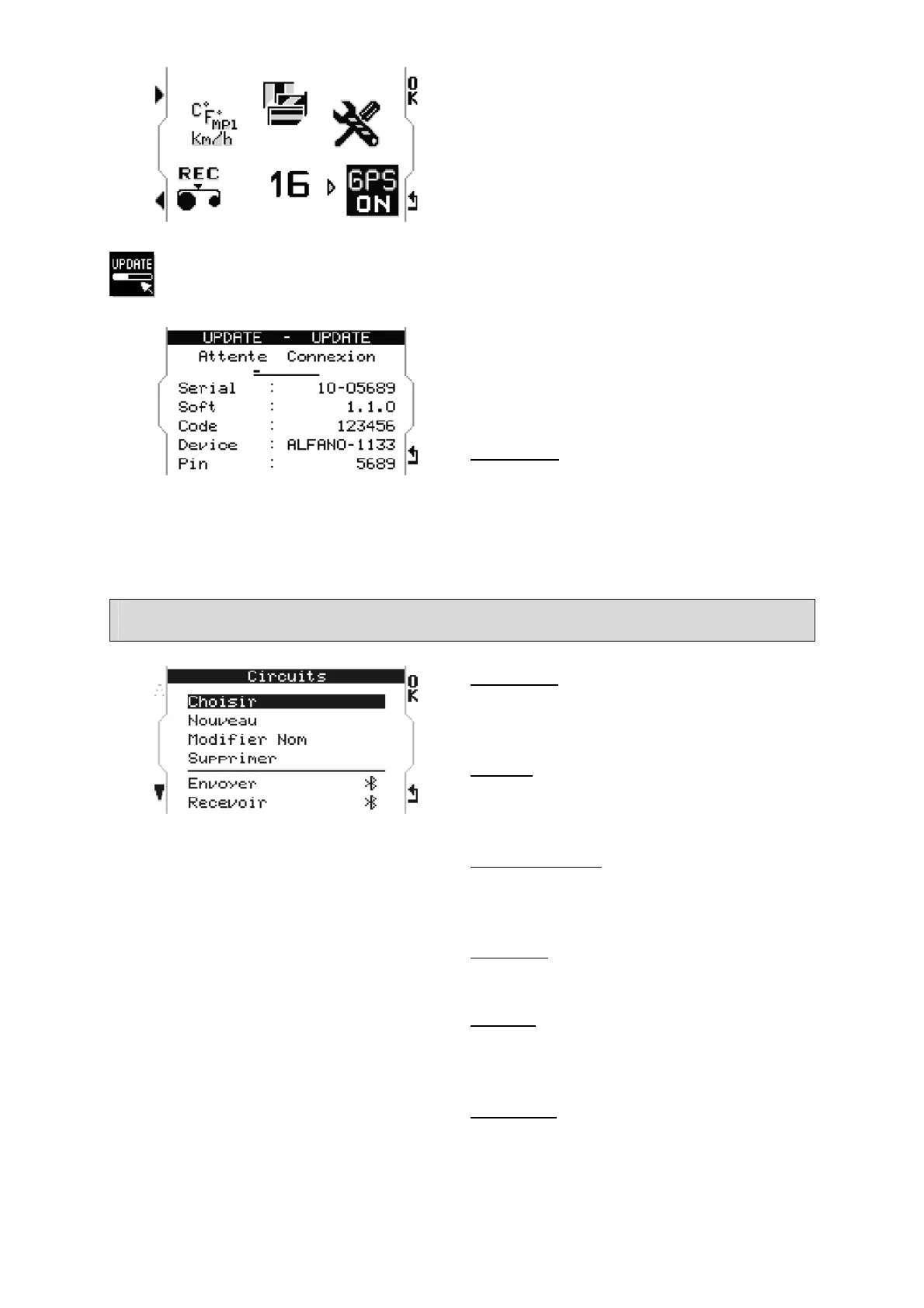
Press « OK »on icon« GPS ON », the device
starts with GPS module activated.
Note : The GPS module requires around 40
% of the system total energy to function.
Update
Activates and displays the Bluetooth
parameters to make a FIRMWARE update
using a Windows computer provided with
Bluetooth peripheral.
ATTENTION: some computers have some
difficulty with Bluetooth connection, in this
case, it's better to use the USB-Bluetooth
adapter supplied with the system.
(Details on chapter « Update »).
Track Management
« Choose »
Allows you to select an existing track from
the menu.
« New »
Allows creation of a new track (detailed
below).
« Modify Name »
Allows you to modify the name of an
existing track.
« Delete »
Allows deletion of an existing track.
« Send »
Allows you to send an existing track via
Bluetooth to another M4/M4GPS.
« Receive »
Allows you to receive, via Bluetooth, a track
from another M4/M4GPS.


 To Next Page