22
Having selected the track, the system shows
the first lap of the session, with the upper-
left button (arrow towards right) allowing
to commute to the following lap, and
conversely with the lower-left button. The
number of bars-graphs represents the
number of laps and the height of the bar-
graph gives a value of the time which is
represented, the longer the time, the higher
the bar-graph.
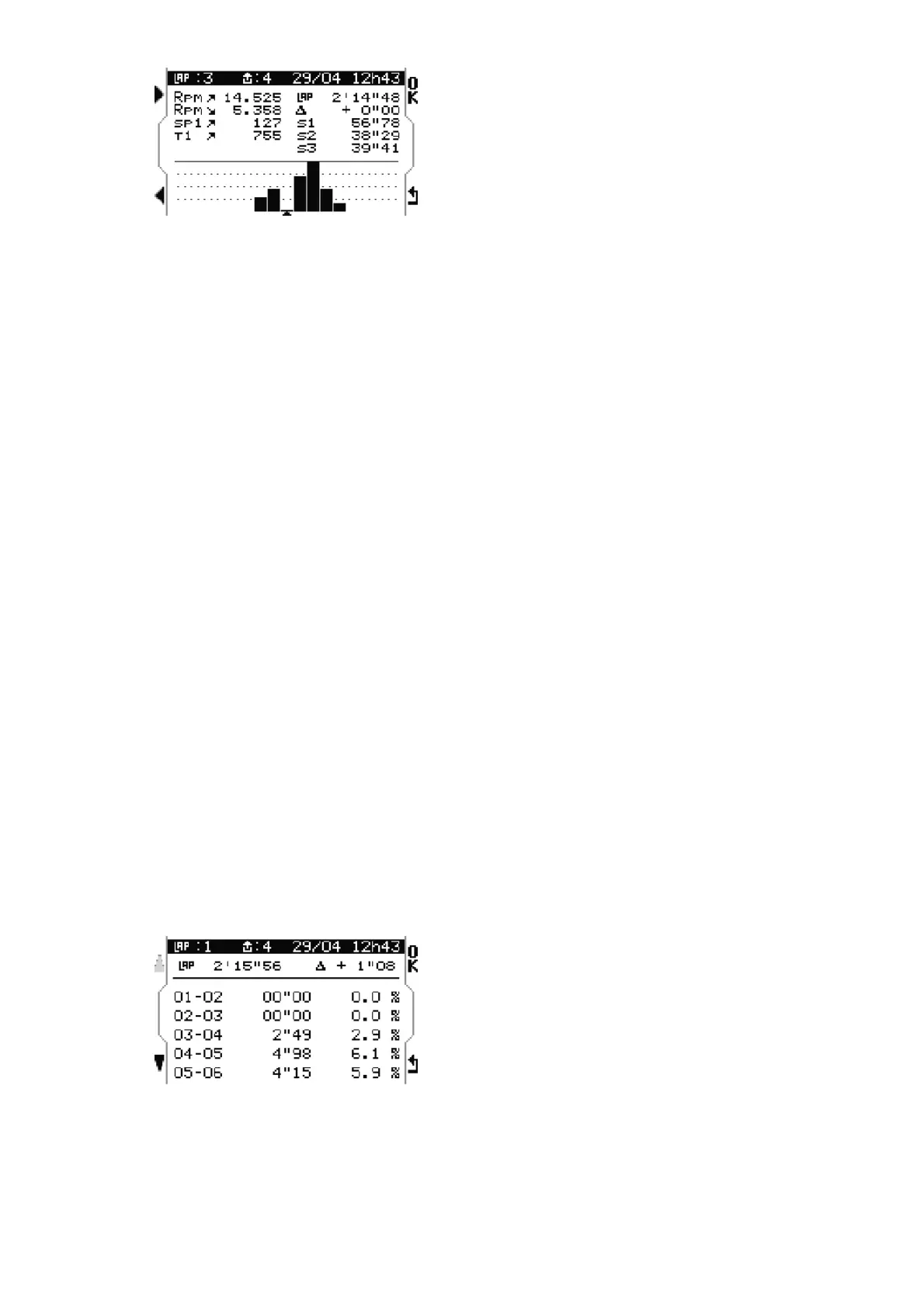
Every lap will be accompanied with its main
data. Example : Lap 3 of the 4th session of
29/04 - 12h43.
RPM Maximum/Minimum
(14.525 et 5.358 tr/min)
Speed Maximum
(127 Km/h) (only for M4GPS)
Temperature T1 Maximum
(755 °C)
Display of partial times(sectors)
(S1 = 56.78)
(S2 = 38.29)
(S3 = 39.41)
Total of 7 laps (7 bars-graphs)
Best lap : the 3rd (2’14’48)
Lap gap/Best lap : +0’’00
To go on with the analysis, press « OK » on
the lap desired.
RPM section
This menu shows the duration and the
percentage of RPM by sections of 1.000
rpm for the browsed lap.
Example : 01-02 corresponds to the section
1.000-2.000 tr/min.
To go on with the analysis, press « OK ».


 To Next Page