CHAPTER 3 RFID TAG READER
ALR-H450 USER GUIDE
DOC. CONTROL #8102146-000 REV A
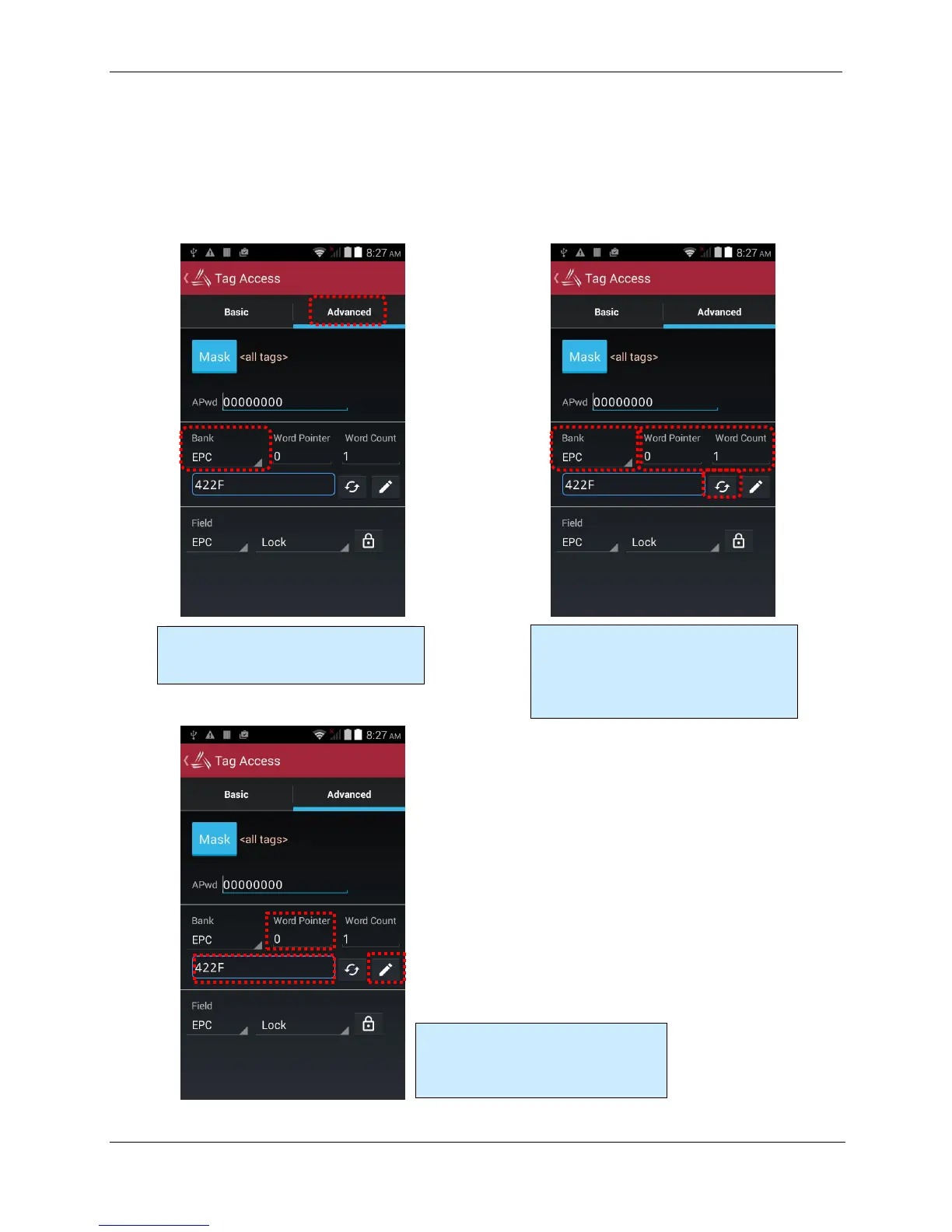
Advanced Access Tab
The Advanced Access tab has three general control areas: Read, Write, and Lock. All three
operations require you to specify the bank of tag memory to access (Reserved, EPC, TID, and
User). When reading and writing, you must specify the offset into that bank of memory where you
would like to access. The reading operation also requires you to specify the length of the data to
read. Both the offset and length parameters are measured in words (1 word = 2 bytes = 16 bits).
Three operations s in Advanced Access:
Read, Write, and Lock. Each requires you
to specify a memory bank.
To read from a memory bank, select the
Bank, start Word Pointer, and Word
Count, then click the read/refresh button.
Note that the tag’s EPC starts at word #2 of
the EPC bank.
To write data to a memory bank, select
the start Word Pointer to write to, and
enter the hex-formatted data, then click
the pencil/write button.



 To Next Page