RFID TAG READER CHAPTER 3
ALR-H450 USER GUIDE
DOC. CONTROL #8102146-000 REV A
RFID Settings
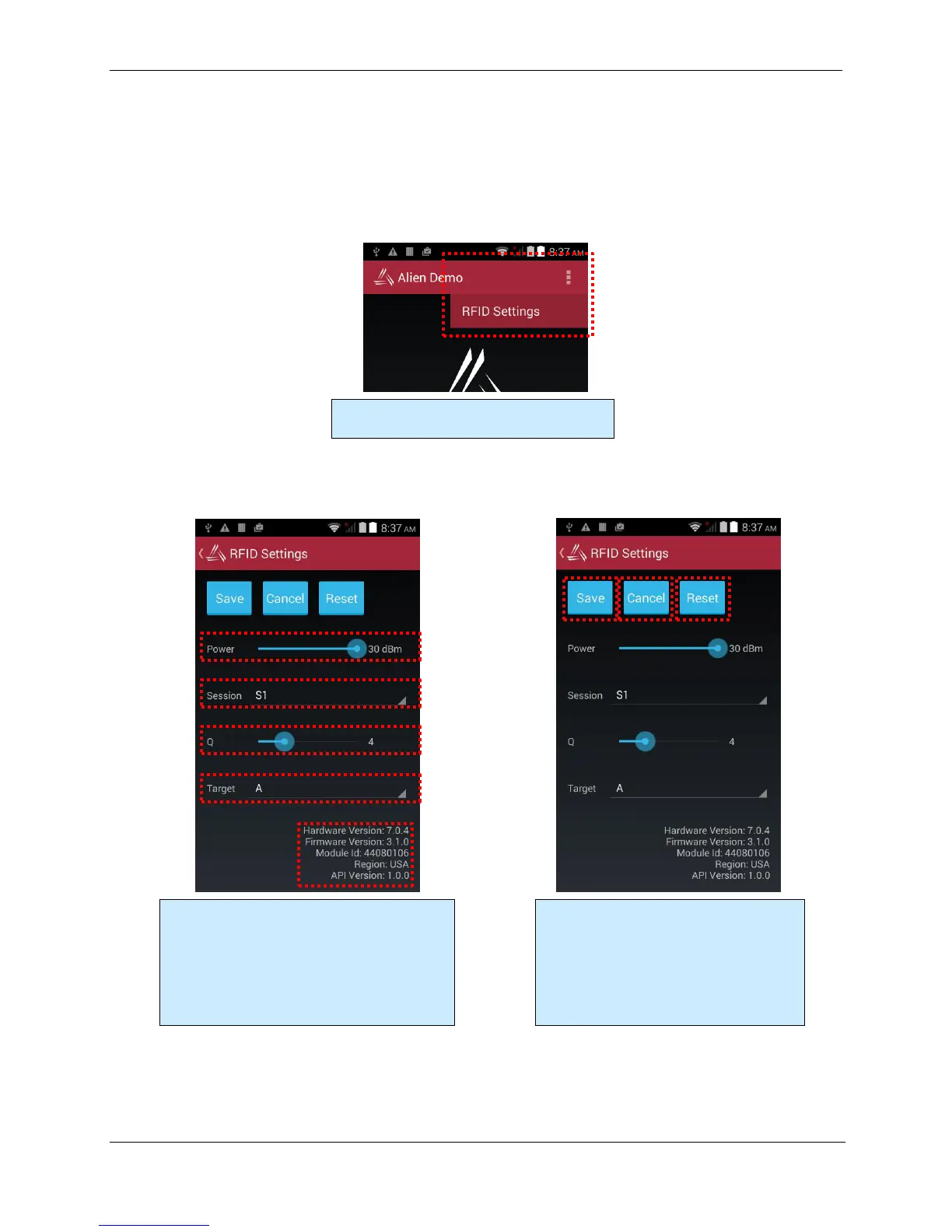
The RFID Settings screen allows you to see and change certain parameters of the RFID reader,
such as transmit power, and some Gen2-specific parameters on the RFID tab. You get to the RFID
Settings screen from the menu button at the top of the main screen. The RFID Settings screen also
has useful device, hardware module, and software version information.
Configure the RFID reader’s transmit power,
inventory session (1-4), starting Q value
(according to how many tags are expected), and
inventory Target (usually “A”).
Hardware, Firmware, and API versions are
shown at the bottom.
Save stores the current settings.
Cancel ignores and changes you may have
made.
Reset restores the settings to their default
values.
Access the RFID Settings screen from the top
Alien Demo screen.



 To Next Page