Setting up the monitor | 33
Setting up the monitor
Attaching the stand
NOTE: The stand assembly is not pre-installed when the monitor is
shipped from the factory.
NOTE: The following instructions are applicable only for the stand that
was shipped with your monitor. If you are attaching a stand that you
purchased from any other source, follow the setup instructions that are
included with the stand.
CAUTION: The following steps are important
to protect your screen.
Follow the instructions to complete the installation.
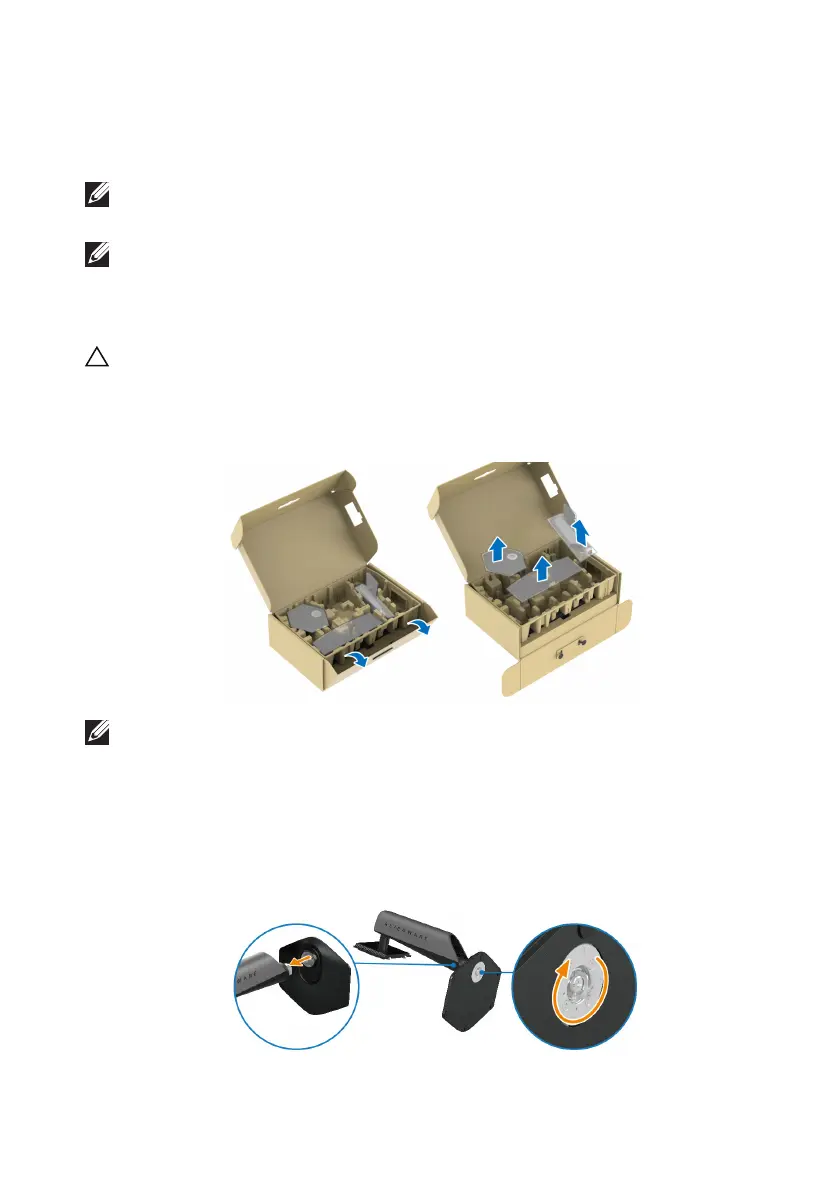
1. Re
move the stand riser, stand base, and I/O cover from the packaging
cushion.
NOTE: The images are for the purpose of illustration only. The
appearance of the package cushion may vary.
2. Al
ign and place the stand riser on the stand base.
3. Op
en the screw handle at the bottom of the stand base and turn it
clockwise to secure the stand assembly.
4. C
lose the screw handle.















 To Next Page