Using your gaming keyboard
│
11
Using your gaming keyboard
Function
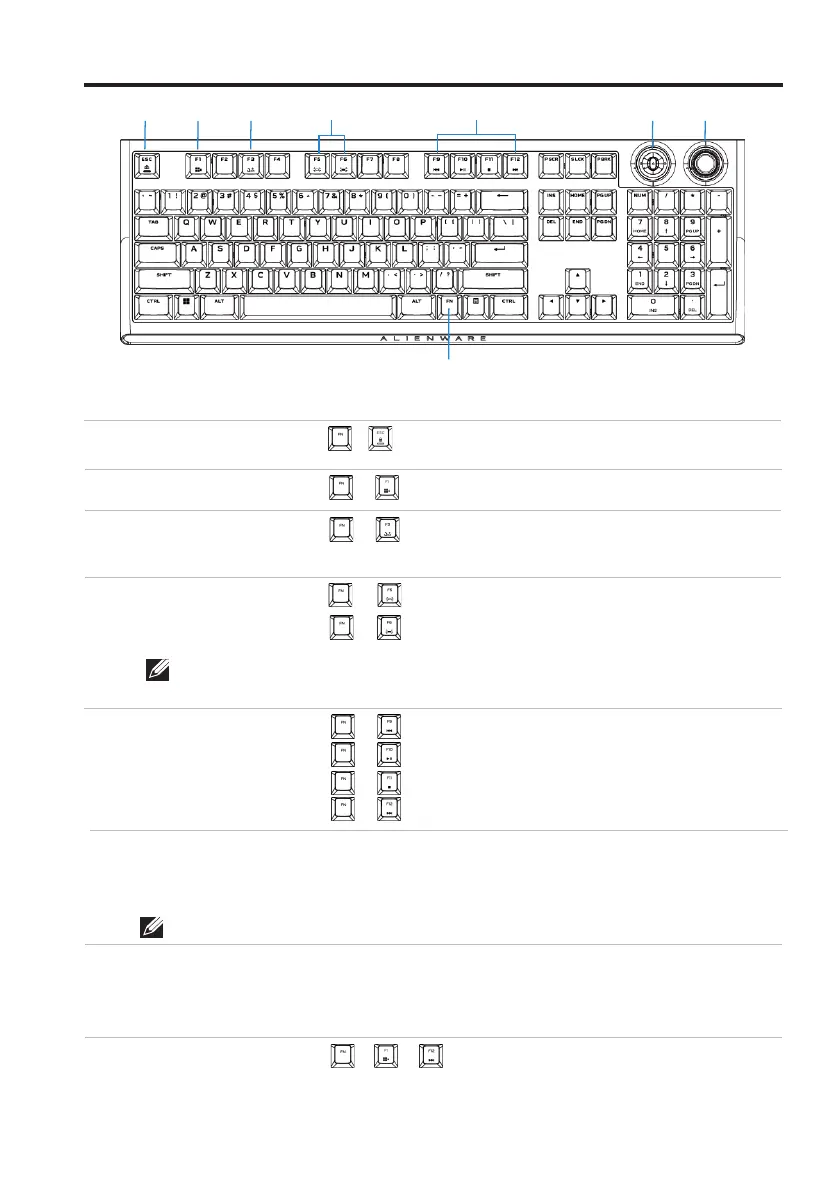
1 FN Lock
2 Win Lock
3 Profile
switch
(press once to cycle)
• Press
• Press
• Press
• Press
• Press
• Press
• Press
• Press
• Push left
• Push right
• Press down
• Clockwise
• Counter clockwise
• Press down
+
(FN+F1)
(FN+F3)
(FN+F5)
(FN+F6)
(FN+F9)
(FN+F10)
(FN+F11)
(FN+F12)
+
+
+
+
+
+
+ to toggle
4 Brightness
control
5 Media
5 playback
6 Rocker
7 Dial knob
Disables the Windows key function
Switches between profiles (profile+
lighting) stored in keyboard
Decreases brightness;
Increases brightness from current/
default intensity
Fast backward
Play/Pause
Stop
Fast forward
Previous track (default)
Next track (default)
Play/Pause (default)
Increase volume
Decrease volume
Mute/Unmute
Toggles different FN functions from
F1 to F12
Locks the F1 to F12 media-control
functions
+
8 FN toggle
2 3
4 5
6 7
1
8
• Press
+ ~
NOTE: AW920K has a total of 10 brightness levels. The default keyboard-
backlight brightness level is 5.
NOTE: You can remap the function through AWCC.
Function keys
Keyboard behavior
Callout
• Press



 To Next Page