EasyManua.ls Logo

Alinco DJ-W100 - User Manual

Alinco DJ-W100
2 pages
Print Icon
To Next Page IconTo Next Page
Loading...
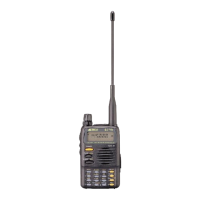
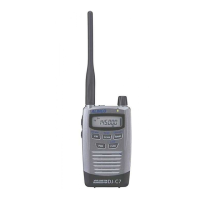
DJ-W100
VHF FM HANDHELD TRANSCEIVER
This new VHF Full-feature handheld transceiver
packs a lot of performance into a MIL-spec* rugged
polycarbonate body. Designed to resist splash and
dust*, the DJ-W100 features professional grade
specs such as 1W audio output, 2.5ppm frequency
stability, capable of operating 136-174MHz range at
5W in 200 programmable-channels or VFO*;
Keep in touch for retails,construction, factory,
warehouse, in a theme-park,shopping mall,
exhibition hall, hotel, park/mountain rangers and
surveillance…where you need solid communications
for business, the DJ-W100 is a reliable, cost effective
alternative to a mobile/cell phone!
*MIL-STD-810G shock/vibration compliant
*IP54 Dust & Splash-proof compatible
*VFO(frequnecy) mode may not be available
due to regulation. Please consult with
your dealer before purchase.
M
I
L
-
S
T
D
-
8
1
0
C
o
m
p
l
i
a
n
t
V
i
b
r
a
t
i
o
n
/
S
h
o
c
k
MIL-STD-810
IP54


Questions and Answers

  • J
    Jennifer RodriguezAug 13, 2025
    What to do if Alinco DJ-W100 has no power?
    • M
      matthewedwardsAug 14, 2025
      If your Alinco Transceiver has no power, the battery may be exhausting; recharge or replace it. Alternatively, the battery may not be installed correctly; remove it and install it again. If the power switch is broken or the battery life is end, contact local dealers for repair or replacement.
  • B
    Brittney FowlerAug 17, 2025
    Why Alinco Transceiver communication distance becomes short, and low sensitivity?
    • R
      robertstriciaAug 17, 2025
      If the communication distance is short and the sensitivity is low, check if the antenna is in good condition and the antenna base is not loose. The antenna may be broken, so consult your local dealer for services.
  • J
    John WattsAug 20, 2025
    What to do if Alinco DJ-W100 receiving indicator with green light but no sound?
    • C
      Connie HallAug 20, 2025
      If your Alinco Transceiver shows a receiving indicator with a green light but produces no sound, the volume may be too low; increase the audio level. Alternatively, the volume switch, loudspeaker, or earphone jack might be broken. In this case, please contact your local dealer for repair.
  • P
    Patricia FrancisAug 25, 2025
    What to do if Alinco DJ-W100 cannot talk or hear other members in your group?
    • J
      James RobinsonAug 25, 2025
      If you cannot communicate with other members in your group, you may be using a different frequency or channel; please change it. Also, check if the CTCSS / DCS /DTMF settings are different and reset them if needed. Consider that you might be out of communication range.
  • C
    Corey JenkinsAug 28, 2025
    What to do if Alinco DJ-W100 receiving signal is intermittent?
    • C
      chenkatelynAug 29, 2025
      If the receiving signal on your Alinco Transceiver is intermittent, you may be out of communication range or obstructed by walls or buildings; change your position to transmit. If the issue persists, internal components may be in trouble, and you should contact local dealers for repair.
  • M
    Michael WagnerSep 1, 2025
    What to do if Alinco Transceiver battery power dies shortly after charging?
    • R
      Robin ColemanSep 1, 2025
      Replace the battery pack with a new one.
  • F
    fordalexisSep 5, 2025
    What to do if Alinco DJ-W100 Transceiver loudspeaker sounds lower or with dry noise after certain time of usage?
    • V
      vlucasSep 5, 2025
      Check whether the loudspeaker is broken, if iron powder or dust is in the loudspeaker. Please contact with local dealers to repair.
  • O
    obriendanielleSep 9, 2025
    What to do if Alinco DJ-W100 has no sound when using earphone?
    • C
      Crystal PetersSep 9, 2025
      Please contact with local dealers for inspection, because the earphone or the jack may be broken.

Alinco DJ-W100 Specifications

General IconGeneral
ModulationFM
Channels128
CTCSS/DCSYes
IP RatingIP54
TypeHandheld

Related product manuals