EasyManua.ls Logo

Alinco DR-435T - Page 10

Alinco DR-435T
50 pages
Print Icon
To Next Page IconTo Next Page
To Previous Page IconTo Previous Page
Loading...
3.
Initial
Installation
External
power
supply
control
&
power
lamp
functions
=>
ACC
terminal
Cigar-Plug
connection
Ext.
Power
jack
DC
cable
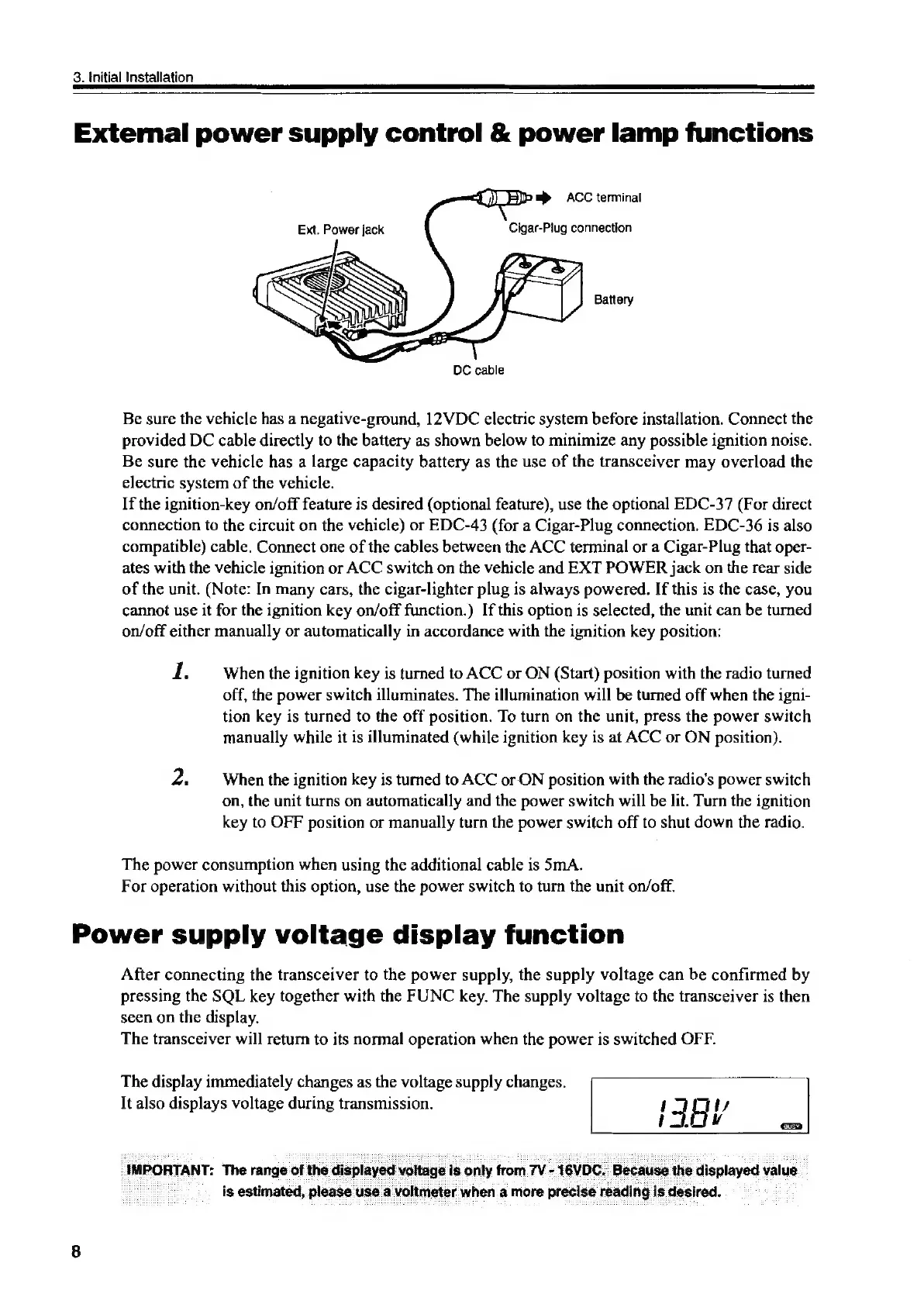
Be
sure
the
vehicle
has
a
negative-ground,
12VDC
electric
system
before
installation.
Connect
the
provided
DC
cable
directly
to
the
battery
as
shown
below
to
minimize
any
possible
ignition
noise.
Be
sure
the
vehicle
has
a
large
capacity
battery
as
the
use
of
the
transceiver
may
overload
the
electric
system
of
the
vehicle.
If
the
ignition-key
on/off
feature
is
desired
(optional
feature),
use
the
optional
EDC-37
(For
direct
connection
to
the
circuit
on
the
vehicle)
or
EDC-43
(for
a
Cigar-Plug
connection.
EDC-36
is
also
compatible)
cable.
Connect
one
of
the
cables
between
the
ACC
terminal
or
a
Cigar-Plug
that
oper-
ates
with
the
vehicle
ignition
or
ACC
switch
on
the
vehicle
and
EXT
POWER
jack
on
the
rear
side
of
the
unit.
(Note:
In
many
cars,
the
cigar-lighter
plug
is
always
powered.
If
this
is
the
case,
you
cannot
use
it
for
the
ignition
key
on/off
function.)
If
this
option
is
selected,
the
unit
can
be
turned
on/off
either
manually
or
automatically
in
accordance
with
the
ignition
key
position:
1.
When
the
ignition
key
is
turned
to
ACC
or
ON
(Start)
position
with
the
radio
turned
off,
the
power
switch
illuminates.
The
illumination
will
be
turned
off
when
the
igni-
tion
key
is
turned
to
the
off
position.
To
turn
on
the
unit,
press
the
power
switch
manually
while
it
is
illuminated
(while
ignition
key
is
at
ACC
or
ON
position).
2.
When
the
ignition
key
is
turned
to
ACC
or
ON
position
with
the
radio's
power
switch
on,
the
unit
turns
on
automatically
and
the
power
switch
will
be
lit.
Turn
the
ignition
key
to
OFF
position
or
manually
turn
the
power
switch
off
to
shut
down
the
radio.
The
power
consumption
when
using
the
additional
cable
is
SmA.
For
operation
without
this
option,
use
the
power
switch
to
turn
the
unit
on/off.
Power
supply
voltage
display
function
After
connecting
the
transceiver
to
the
power
supply,
the
supply
voltage
can
be
confirmed
by
pressing
the
SQL
key
together
with
the
FUNC
key.
The
supply
voltage
to
the
transceiver
is
then
seen
on
the
display.
The
transceiver
will
return
to
its
normal
operation
when
the
power
is
switched
OFF.
The
display
immediately
changes
as
the
voltage
supply
changes.
It
also
displays
voltage
during
transmission.
f]
ts
IFEY
IMPORTANT:
‘The
range
of
the
displayed
voltage
is
only
from
7V
-
16VDC.
Because
the
displayed
value.
is
estimated,
please
use
a
voltmeter
when
a
more
precise
reading
is
desired.