EasyManua.ls Logo

Alinco DR-435T - CTCSS;DCS Configuration

Alinco DR-435T
50 pages
Print Icon
To Next Page IconTo Next Page
To Previous Page IconTo Previous Page
Loading...
5.
Basic
Operation
CTCSS
/
DCS
setting
Many
repeaters
require
a
CTCSS
tone
or
a
DCS
code
encode
setting
as
a
“key”
to
access
the
system,
so-called
“‘selective-calling”.
Sometimes,
CTCSS
or
DCS
decode
features
are
used
on
the
output
of
a
repeater
so
they
can
be
used
as
a
squelch.
In
this
mode,
regardless
of
the
main
squelch
status,
the
audio
can
be
heard
ONLY
when
the
matching
tone/code
signal
is
received.
The
combi-
nation
of
CTCSS
squelch
and
DCS
function
is
not
available;
only
one
or
the
other
may
be
used
for
a
given
memory
channel.
I.
Press
TS/DCS
key.
The
current
setting
will
be
=
8G
aes
displayed
with
T/SQ/DCS
icons
and
relative
["
985
985
023
frequency/code.
Press
the
same
key
to
select
T/SQ/DCS
setting.
The
original
status
2.
The
numbers
(such
as
88.5)
represent
the
CTCSS
frequency
in
Hz.
When
it
is
dis-
played
with
the
T
icon
only,
the
unit
transmits
the
sub-audible
tone
while
the
PTT
is
pressed
(encode)
and
the
repeater
access
is
enabled
(assuming
the
repeater
is
using
88.5).
3.
Press
the
same
key
again
so
that
the
SQ
icon
shows
up
on
the
display.
This
is
the
CTCSS
decode
frequency.
This
enables
CTCSS
squelch
(or
Tone
Squelch,
TSQ).
4.
Press
it
again
so
that
the
3-digit
number
and
DCS
icon
is
displayed.
This
is
the
DCS
code,
and
it
enables
DCS
encoding
and
decoding.
For
2
-
4,
rotate
the
main
dial
or
press
the
UP/DOWN
keys
to
change
tone
or
code.
Press
any
key
(Except
TS/DCS,
UP/DOWN
keys)
to
enter
the
setting
and
return
to
original
status.
The
T/SQ/
DCS
icon
will
remain
on
the
display
to
show
the
current
status.
To
exit,
simply
use
the
TS/DCS
key
and
press
it
until
the
relative
status
icon
T/TQ/DCS
disappears.
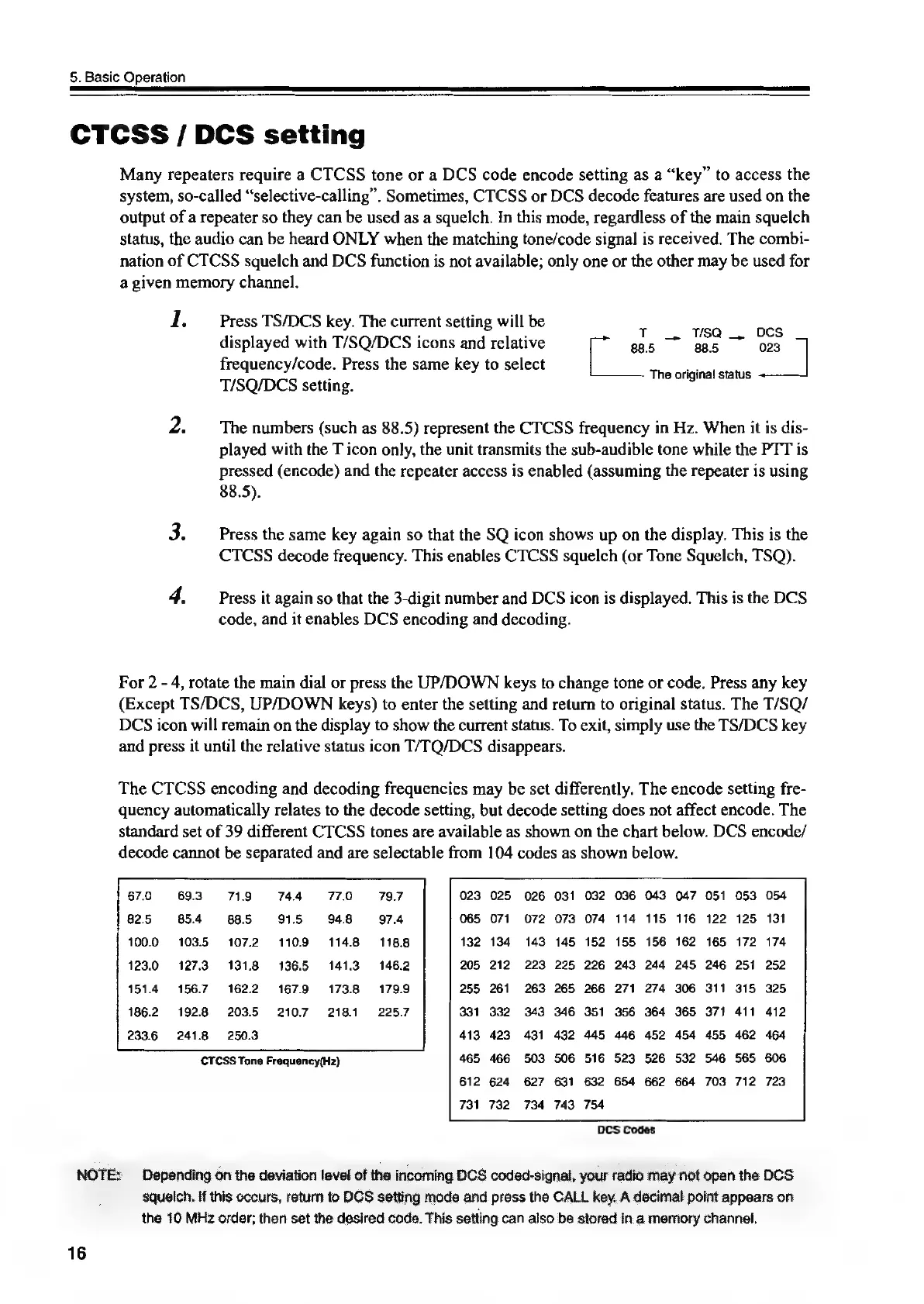
The
CTCSS
encoding
and
decoding
frequencies
may
be
set
differently.
The
encode
setting
fre-
quency
automatically
relates
to
the
decode
setting,
but
decode
setting
does
not
affect
encode.
The
standard
set
of
39
different
CTCSS
tones
are
available
as
shown
on
the
chart
below.
DCS
encode/
decode
cannot
be
separated
and
are
selectable
from
104
codes
as
shown
below.
CTCSS
Tone
Frequency(Hz)
DCS
Codes
“NOTE:
Depending
on
the
deviation
level
of
the
incoming
DCS
coded-signal,
your
radio
may
not
open
the
OCS
16
squelch.
if
this
occurs,
return
to
DCS
setting
mode
and
press
the
CALL
key.
A
decimal
point
appears
on
the.
10
MHz
order;
then
set
the
desired
code.
This
setting
can
also
be
stored.in
a
memory
channel.

Other manuals for Alinco DR-435T

Related product manuals