EasyManua.ls Logo

Alinco DR-435T - Channel Step Selection; Repeater (Duplex) Operation

Alinco DR-435T
50 pages
Print Icon
To Next Page IconTo Next Page
To Previous Page IconTo Previous Page
Loading...
5.
Basic
Operation
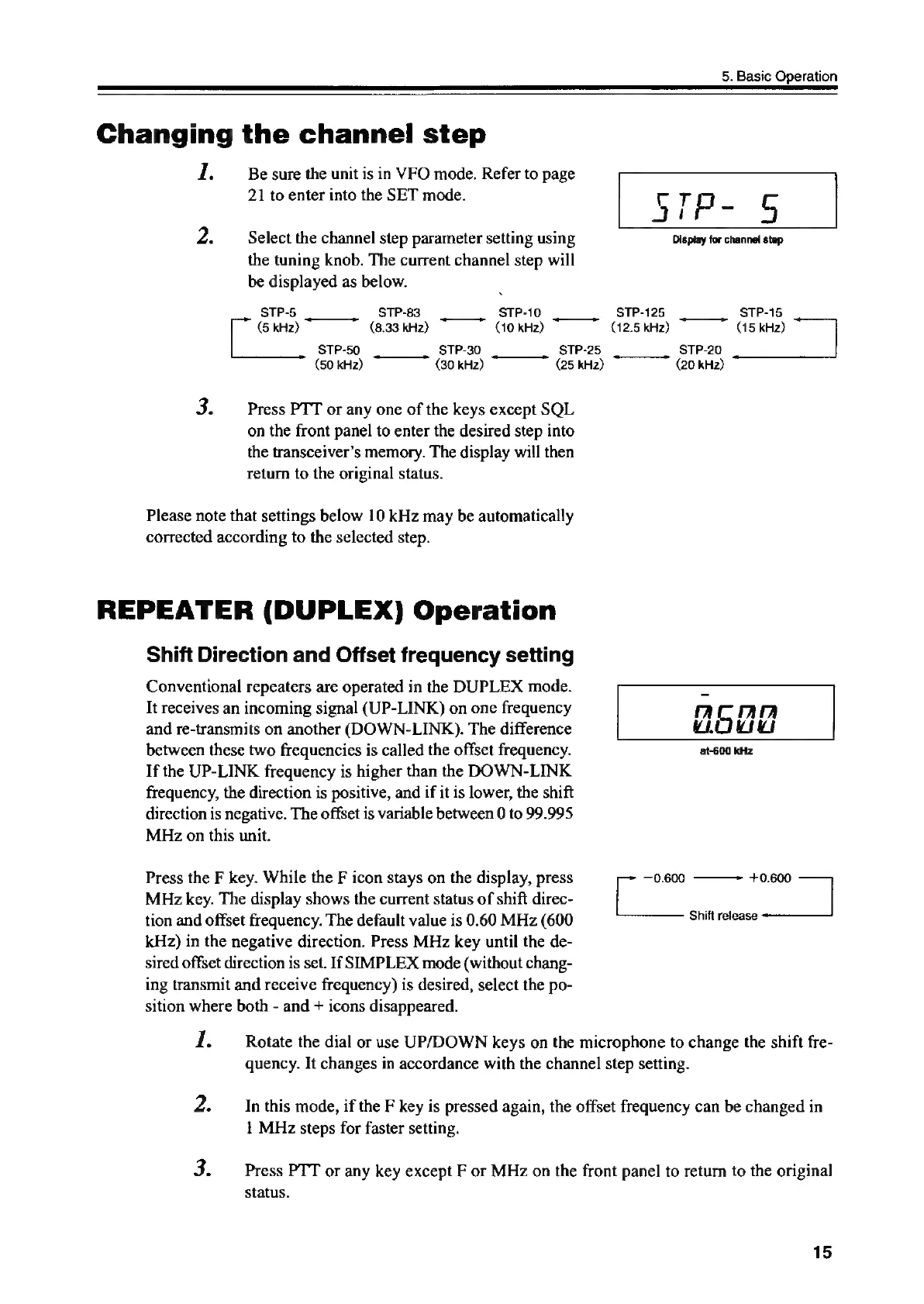
Changing
the
channel
step
1.
Be
sure
the
unit
is
in
VFO
mode.
Refer
to
page
21
to
enter
into
the
SET
mode.
CT
Select
the
channel
step
parameter
setting
using
Display
for
channel
step
the
tuning
knob.
The
current
channel
step
will
be
displayed
as
below.
STP-5
STP-83
STP-10
STP-125
STP-15
(5
kHz)
(8.33
kHz)
(10
kHz)
(12.6
kH2)
(15
kHz)
STP-50
STP-30
STP-25
STP-20
(50
kHz)
(30
kHz)
(25
kHz)
(20
kHz)
Press
PTT
or
any
one
of
the
keys
except
SQL
on
the
front
panel
to
enter
the
desired
step
into
the
transceiver’s
memory.
The
display
will
then
return
to
the
original
status.
Please
note
that
settings
below
10
kHz
may
be
automatically
corrected
according
to
the
selected
step.
REPEATER
(DUPLEX)
Operation
Shift
Direction
and
Offset
frequency
setting
Conventional
repeaters
are
operated
in
the
DUPLEX
mode.
=
It
receives
an
incoming
signal
(UP-LINK)
on
one
frequency
‘”
5
rALA
and
re-transmits
on
another
(DOWN-LINK).
The
difference
mou
between
these
two
frequencies
is
called
the
offset
frequency.
at-600
kHz
If
the
UP-LINK
frequency
is
higher
than
the
DOWN-LINK
frequency,
the
direction
is
positive,
and
if
it
is
lower,
the
shift
direction
is
negative.
The
offset
is
variable
between
0
to
99.995
MHz
on
this
unit.
Press
the
F
key.
While
the
F
icon
stays
on
the
display,
press
a
—0.600
———~
+0.600
af
MHz
key.
The
display
shows
the
current
status
of
shift
direc-
tion
and
offset
frequency.
The
default
value
is
0.60
MHz
(600
Shift
release
kHz)
in
the
negative
direction.
Press
MHz
key
until
the
de-
sired
offset
direction
is
set.
If
SIMPLEX
mode
(without
chang-
ing
transmit
and
receive
frequency)
is
desired,
select
the
po-
sition
where
both
-
and
+
icons
disappeared.
1.
Z.
Rotate
the
dial
or
use
UP/DOWN
keys
on
the
microphone
to
change
the
shift
fre-
quency.
It
changes
in
accordance
with
the
channel
step
setting.
In
this
mode,
if
the
F
key
is
pressed
again,
the
offset
frequency
can
be
changed
in
1
MHz
steps
for
faster
setting.
Press
PTT
or
any
key
except
F
or
MHz
on
the
front
panel
to
return
to
the
original
status.
15

Other manuals for Alinco DR-435T

Related product manuals