EasyManua.ls Logo

Alinco DR-435T - Cable Cloning Feature; Theft Alarm: Operation 2 Setup

Alinco DR-435T
50 pages
Print Icon
To Next Page IconTo Next Page
To Previous Page IconTo Previous Page
Loading...
7.
Advanced
Operations
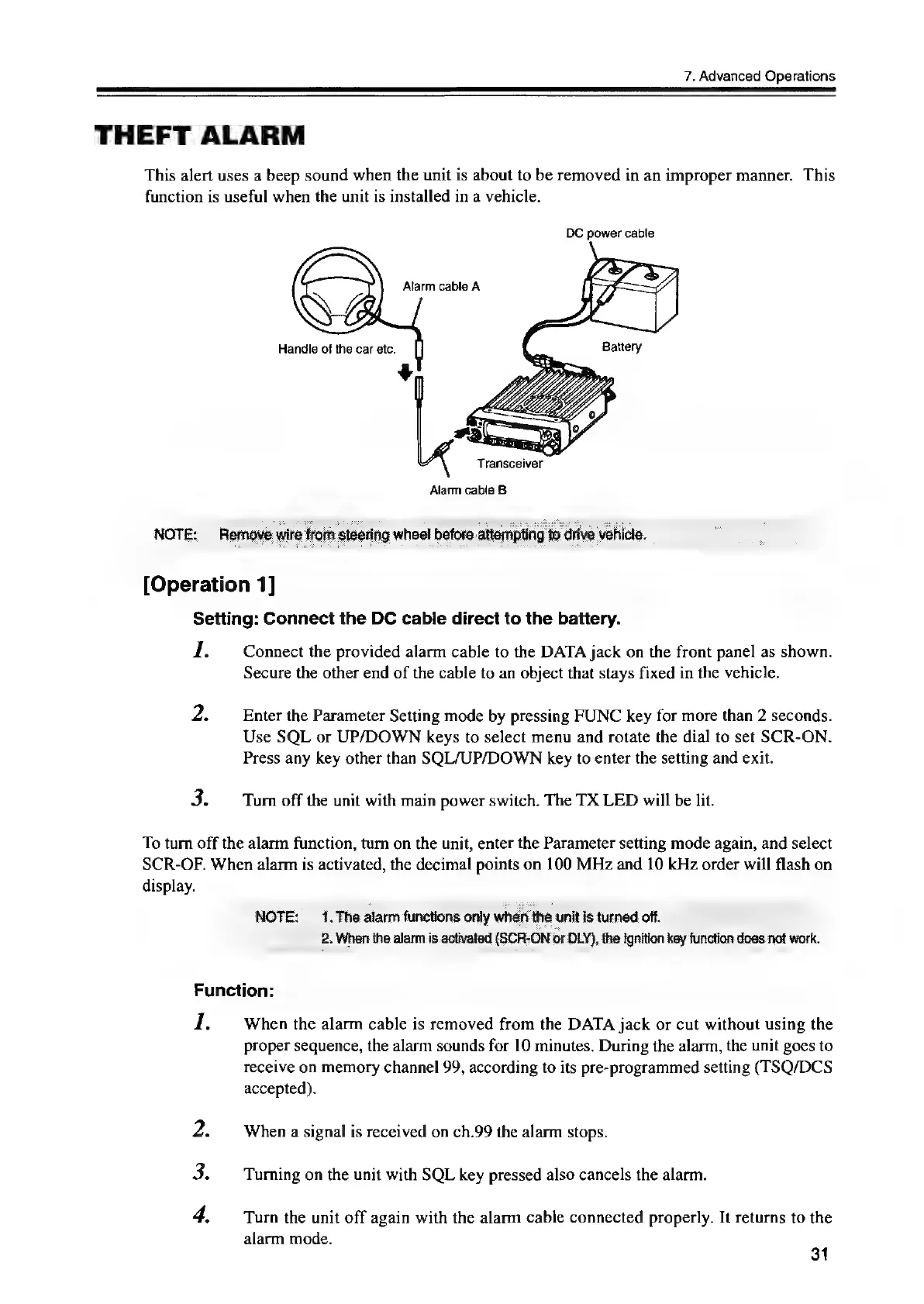
THEFT
ALARM
This
alert
uses
a
beep
sound
when
the
unit
is
about
to
be
removed
in
an
improper
manner.
This
function
is
useful
when
the
unit
is
installed
in
a
vehicle.
DC
power
cable
Alarm
cable
A
Handle
of
the
car
etc.
Transceiver
Alarm
cabie
B
NOTE:
Remove
wire
from
steering
wheel
before
attomp
[Operation
1]
Setting:
Connect
the
DC
cable
direct
to
the
battery.
I.
Connect
the
provided
alarm
cable
to
the
DATA
jack
on
the
front
panel
as
shown.
Secure
the
other
end
of
the
cable
to
an
object
that
stays
fixed
in
the
vehicle.
2.
Enter
the
Parameter
Setting
mode
by
pressing
FUNC
key
for
more
than
2
seconds.
Use
SQL
or
UP/DOWN
keys
to
select
menu
and
rotate
the
dial
to
set
SCR-ON.
Press
any
key
other
than
SQL/UP/DOWN
key
to
enter
the
setting
and
exit.
3.
Turn
off
the
unit
with
main
power
switch.
The
TX
LED
will
be
lit.
To
turn
off
the
alarm
function,
turn
on
the
unit,
enter
the
Parameter
setting
mode
again,
and
select
SCR-OF.
When
alarm
is
activated,
the
decimal
points
on
100
MHz
and
10
kHz
order
will
flash
on
display.
NOTE:
1.
The
alarm
functions
only
when
the
unitisturned
of.
_
2.
When
the
alarm
is
activated
(SCR-ON
or
DLY),
the
Ignition
key
function
does
not
work.
Function:
1.
When
the
alarm
cable
is
removed
from
the
DATA
jack
or
cut
without
using
the
proper
sequence,
the
alarm
sounds
for
10
minutes.
During
the
alarm,
the
unit
goes
to
receive
on
memory
channel
99,
according
to
its
pre-programmed
setting
(TSQ/DCS
accepted).
2.
When
a
signal
is
received
on
ch.99
the
alarm
stops.
3.
Turning
on
the
unit
with
SQL
key
pressed
also
cancels
the
alarm.
4.
Turn
the
unit
off
again
with
the
alarm
cable
connected
properly.
It
returns
to
the
alarm
mode.
31

Other manuals for Alinco DR-435T

Related product manuals