EasyManua.ls Logo

Alinco DR-435T - Packet Operation with External TNC

Alinco DR-435T
50 pages
Print Icon
To Next Page IconTo Next Page
To Previous Page IconTo Previous Page
Loading...
7.
Advanced
Operations
CABLE
CLONE
This
feature
will
copy
the
programmed
data
and
parameters
in
the
master
unit
to
slave
units.
It
copies
the
parameters
and
memory
program
settings.
Connection
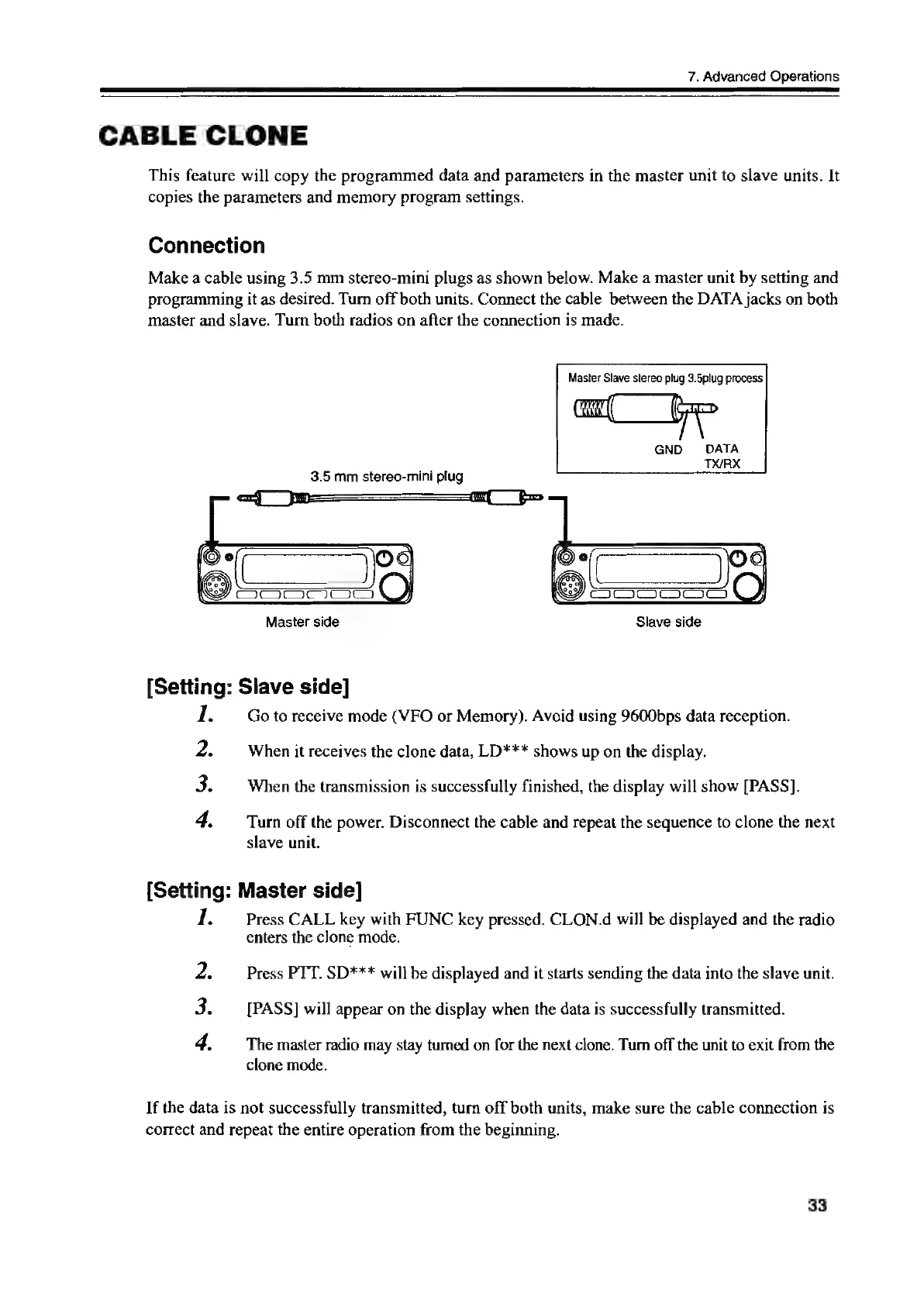
Make
a
cable
using
3.5
mm
stereo-mini
plugs
as
shown
below.
Make
a
master
unit
by
setting
and
programming
it
as
desired.
Turn
off
both
units.
Connect
the
cable
between
the
DATA
jacks
on
both
master
and
slave.
Turn
both
radios
on
after
the
connection
is
made.
Master
Slave
stereo
plug
3.5plug
process
3.5
mm
stereo-mini
plug
0
eo
5
Master
side
Slave
side
[Setting:
Slave
side]
1.
Go
to
receive
mode
(VFO
or
Memory).
Avoid
using
9600bps
data
reception.
2.
When
it
receives
the
clone
data,
LD***
shows
up
on
the
display.
3.
When
the
transmission
is
successfully
finished,
the
display
will
show
[PASS].
4.
Turn
off
the
power.
Disconnect
the
cable
and
repeat
the
sequence
to
clone
the
next
slave
unit.
[Setting:
Master
side]
ve
Press
CALL
key
with
FUNC
key
pressed.
CLON.d
will
be
displayed
and
the
radio
enters
the
clone
mode.
2.
Press
PTT.
SD***
will
be
displayed
and
it
starts
sending
the
data
into
the
slave
unit.
3.
[PASS]
will
appear
on
the
display
when
the
data
is
successfully
transmitted.
4.
The
master
radio
may
stay
turned
on
for the
next
clone.
Turn
off
the
unit
to
exit
from
the
clone
mode.
If
the
data
is
not
successfully
transmitted,
turn
off
both
units,
make
sure
the
cable
connection
is
correct
and
repeat
the
entire
operation
from
the
beginning.
33

Other manuals for Alinco DR-435T

Related product manuals