EasyManua.ls Logo

Alinco DR-435T - Packet Mode: 1200 bps Connections; Packet Mode: 9600 bps Connections

Alinco DR-435T
50 pages
Print Icon
To Next Page IconTo Next Page
To Previous Page IconTo Previous Page
Loading...
8.
PACKET
OPERATION
Packet
mode
is
high-speed
data
communication
using
a
personal
computer.
The
use
of
a
Digital
repeater
network
(Digi-peaters),
including
satellites,
offers
communications
with
distant
stations.
In
order
to
operate
in
the
packet
mode,
it
is
essential
that
the
station
is
equipped
with
a
personal
computer
with
appropriate
packet
software,
9
pin
RS-232C
cable,
optional
EJ-41U
TNC
unit
or
external
TNC
(terminal
node
controller).
For
the
operation
of
the
EJ-41U
unit
or
external
TNC,
please
refer
to
its
respective
instruction
manual.
[To
operate
packet
using
EJ-41U]
Configure
the
radio
to
a
known
packet
operation
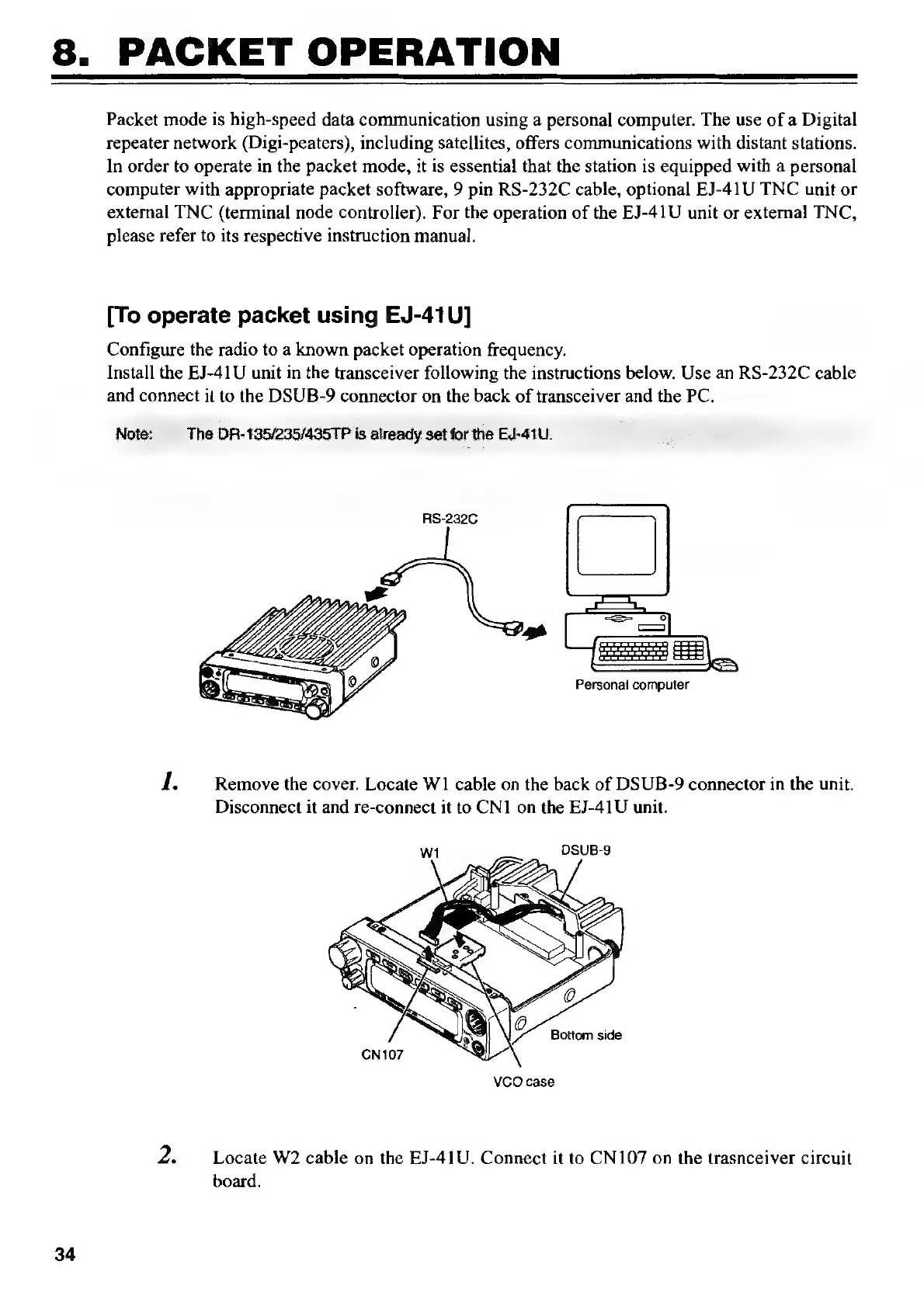
frequency.
Install
the
EJ-41U
unit
in
the
transceiver
following
the
instructions
below.
Use
an
RS-232C
cable
and
connect
it
to
the
DSUB-9
connector
on
the
back
of
transceiver
and
the
PC.
Note:
The
DR-195/235/495TP
is
already
set
for
the
EJ-41U.
RS-232G
Personal
computer
1.
Remove
the
cover.
Locate
W1
cable
on
the
back
of
DSUB-9
connector
in
the
unit.
Disconnect
it
and
re-connect
it
to
CN1
on
the
EJ-41U
unit.
VCO
case
2.
Locate
W2
cable
on
the
EJ-41U.
Connect
it
to
CN107
on
the
trasnceiver
circuit
board.
34

Other manuals for Alinco DR-435T

Related product manuals