EasyManua.ls Logo

Alinco DR-435T - APRS System Setup & Operation

Alinco DR-435T
50 pages
Print Icon
To Next Page IconTo Next Page
To Previous Page IconTo Previous Page
Loading...
8.
PACKET
OPERATION
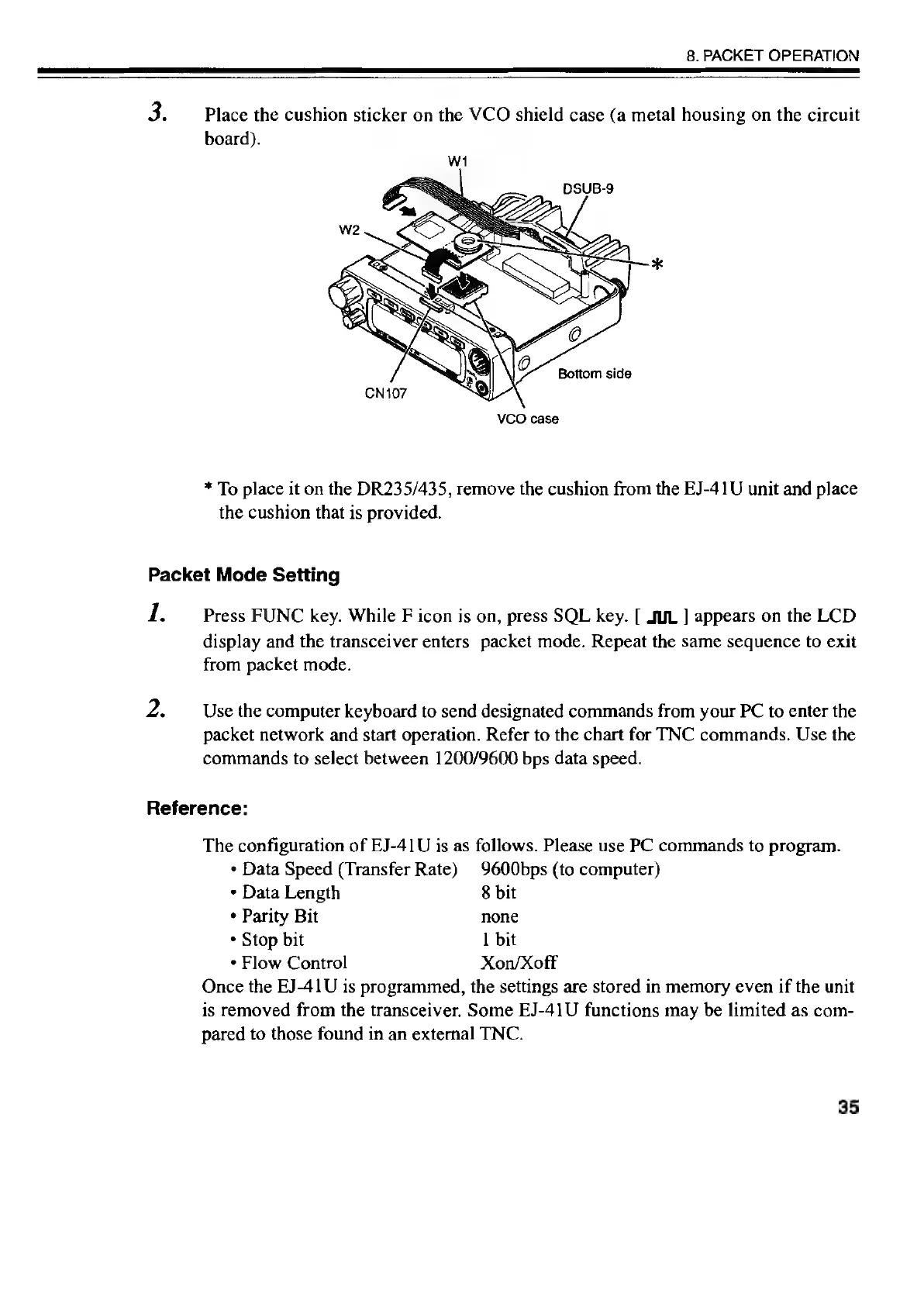
Place
the
cushion
sticker
on
the
VCO
shield
case
(a
metal
housing
on
the
circuit
board).
VCO
case
*
To
place
it
on
the
DR235/435,
remove
the
cushion
from
the
EJ-41U
unit
and
place
the
cushion
that
is
provided.
Packet
Mode
Setting
1.
Press
FUNC
key.
While
F
icon
is
on,
press
SQL
key.
[
JUL
]
appears
on
the
LCD
display
and
the
transceiver
enters
packet
mode.
Repeat
the
same
sequence
to
exit
from
packet
mode.
Use
the
computer
keyboard
to
send
designated
commands
from
your
PC
to
enter
the
packet
network
and
start
operation.
Refer
to
the
chart
for
TNC
commands.
Use
the
commands
to
select
between
1200/9600
bps
data
speed.
Reference:
The
configuration
of
EJ-41U
is
as
follows.
Please
use
PC
commands
to
program.
*
Data
Speed
(Transfer
Rate)
9600bps
(to
computer)
*
Data
Length
8
bit
¢
Parity
Bit
none
+
Stop
bit
1
bit
*
Flow
Control
Xon/Xoff
Once
the
EJ-41U
is
programmed,
the
settings
are
stored
in
memory
even
if
the
unit
is
removed
from
the
transceiver.
Some
EJ-41U
functions
may
be
limited
as
com-
pared
to
those
found
in
an
external
TNC.
35

Other manuals for Alinco DR-435T

Related product manuals