EasyManua.ls Logo

Alinco DR-435T - Direct Frequency Entry; Frequency Entry by Tuning Step

Alinco DR-435T
50 pages
Print Icon
To Next Page IconTo Next Page
To Previous Page IconTo Previous Page
Loading...
8.
PACKET
OPERATION
38
[SET
UP]
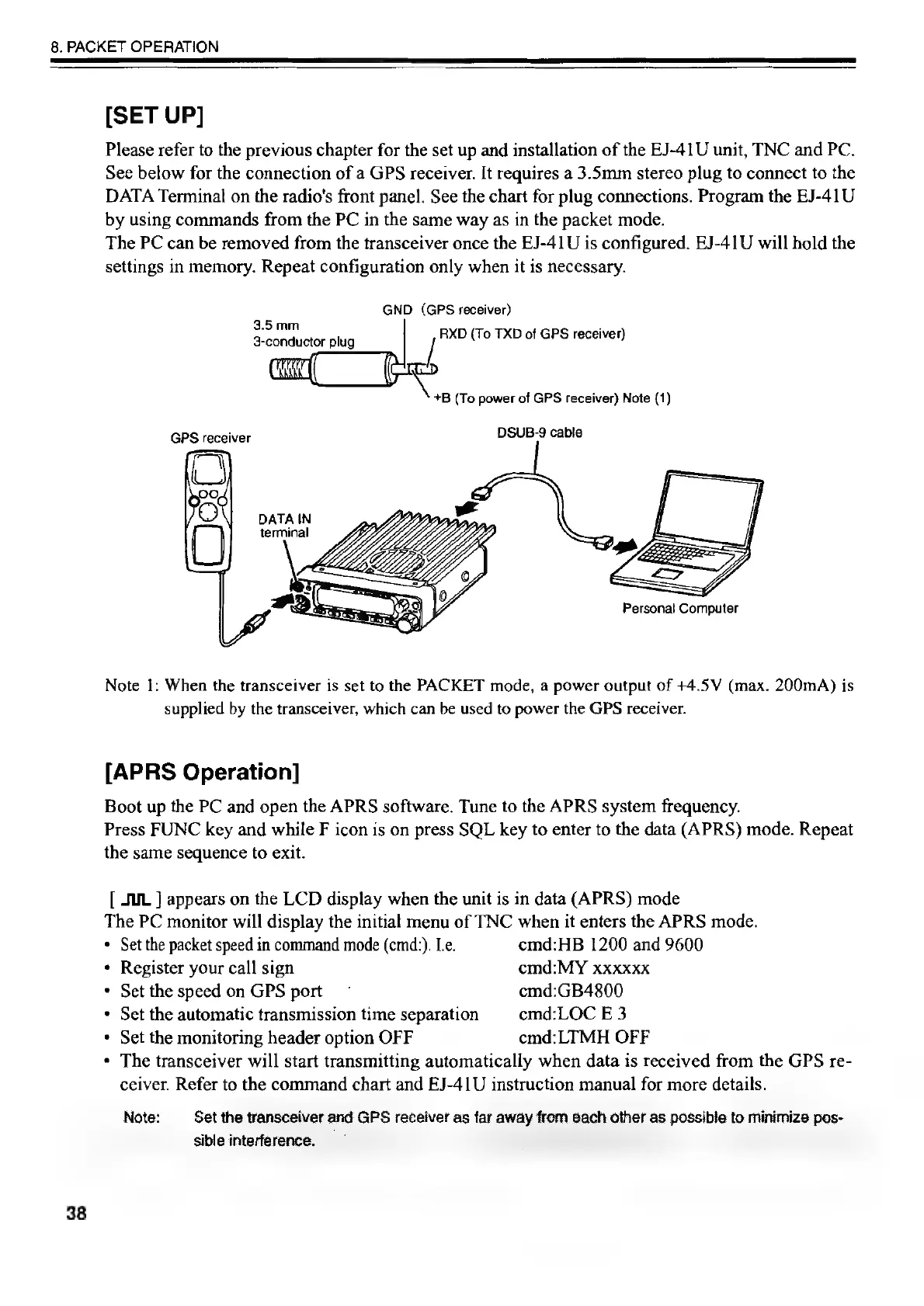
Please
refer
to
the
previous
chapter
for
the
set
up
and
installation
of
the
EJ-41U
unit,
TNC
and
PC.
See
below
for
the
connection
of
a
GPS
receiver.
It
requires
a
3.5mm
stereo
plug
to
connect
to
the
DATA
Terminal
on
the
radio's
front
panel.
See
the
chart
for
plug
connections.
Program
the
EJ-41U
by
using
commands
from
the
PC
in
the
same
way
as
in
the
packet
mode.
The
PC
can
be
removed
from
the
transceiver
once
the
EJ-41U
is
configured.
EJ-41U
will
hold
the
settings
in
memory.
Repeat
configuration
only
when
it
is
necessary.
GND
(GPS
receiver)
RXD
(To
TXD
of
GPS
receiver)
3.5mm
3-conductor
plug
+B
(To
power
of
GPS
receiver)
Note
(1)
GPS
receiver
DSUB-9
cable
DATA
IN
terminal
[=
J
MR\
,
S
Personal
Computer
Note
I:
When
the
transceiver
is
set
to
the
PACKET
mode,
a
power
output
of
+4.5V
(max.
200mA)
is
supplied
by
the
transceiver,
which
can
be
used
to
power
the
GPS
receiver.
[APRS
Operation]
Boot
up
the
PC
and
open
the
APRS
software.
Tune
to
the
APRS
system
frequency.
Press
FUNC
key
and
while
F
icon
is
on
press
SQL
key
to
enter
to
the
data
(APRS)
mode.
Repeat
the
same
sequence
to
exit.
[
JUL
]
appears
on
the
LCD
display
when
the
unit
is
in
data
(APRS)
mode
The
PC
monitor
will
display
the
initial
menu
of
TNC
when
it
enters
the
APRS
mode.
*
Set
the
packet
speed
in
command
mode
(cmd:).
Le.
cemd:HB
1200
and
9600
*
Register
your
call
sign
emd:MY
xxxxxx
*
Set
the
speed
on
GPS
port
~
cmd:GB4800
*
Set
the
automatic
transmission
time
separation
cmd:LOC
E
3
*
Set
the
monitoring
header
option
OFF
cmd:LTMH
OFF
*
The
transceiver
will
start
transmitting
automatically
when
data
is
received
from
the
GPS
re-
ceiver.
Refer
to
the
command
chart
and
EJ-41U
instruction
manual
for
more
details.
Note:
Set
the
transceiver
and
GPS
receiver
‘as
far
away
from
each
other
as
possible
to
minimize
pos
sible
interference.
:
:
Se
:
:

Other manuals for Alinco DR-435T

Related product manuals