7
,QLWLDO,QVWDOODWLRQ
0LFURSKRQHFRQQHFWLRQ
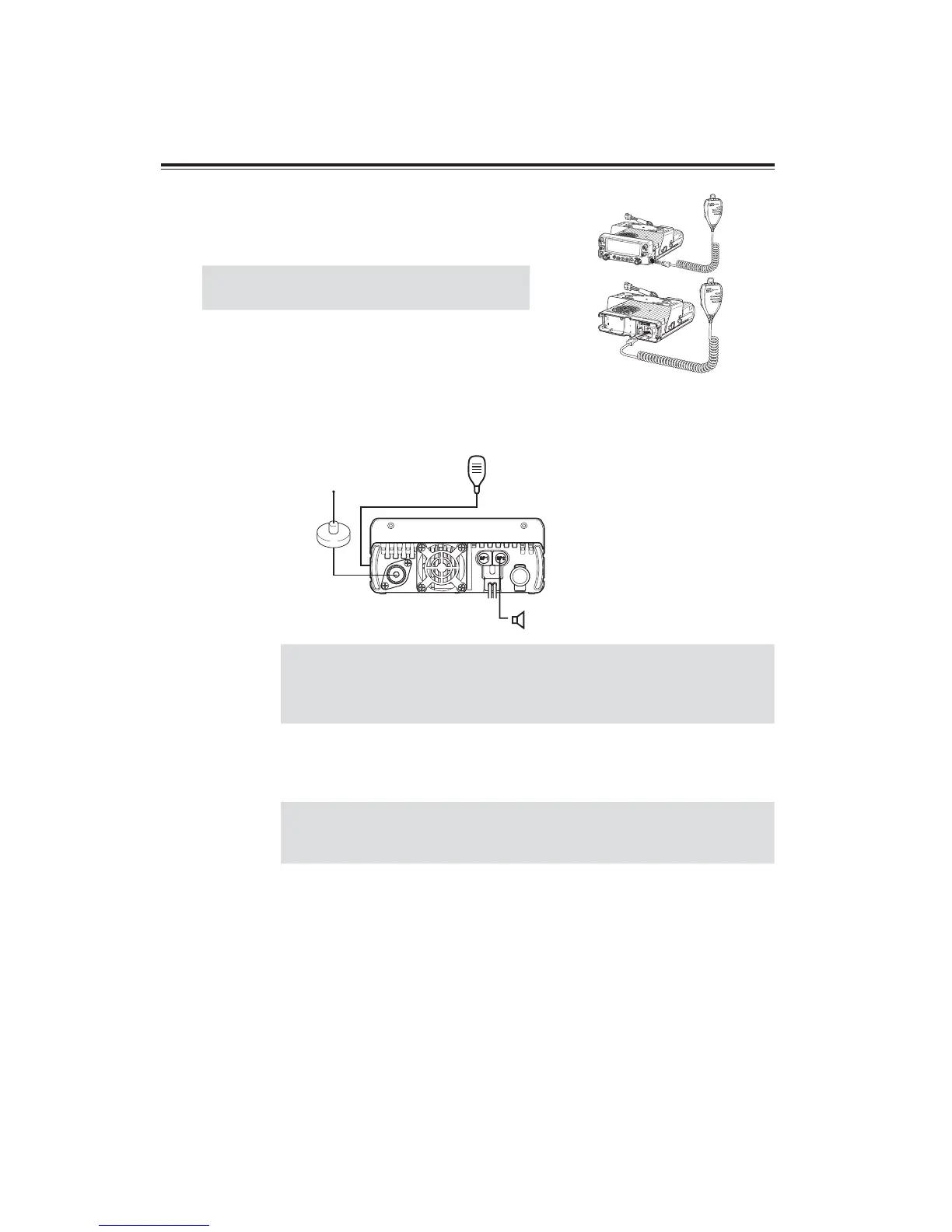
Connect the microphone plug into microphone terminal on the
right side of control panel or into other microphone terminal in
front of MAIN unit. Insert the plug until hearing a click.
IMPORTANT
When connecting, take care to the modular
plug direction.
$QWHQQD&RQQHFWLRQ
Connect antenna port to 50: antenna that covers 2m/70cm bands, using good quality 50: coaxial cable.
rear panel
External speaker
(if used)
Microphone
Antenna
IMPORTANT
Coupling the antenna to the transceiver via feed-lines having impedance
other than 50: reduces the efficiency of the antenna system and can cause
interference to nearby televisions, radio receivers and other electronic
equipment.
)RUDEDVHVWDWLRQVHWXS
IMPORTANT
• Before connecting, be sure to turn off the transceiver and DC power
supply.
• Be certain to use DC cable provided with unit.
The transceiver requires 13.8V DC negative grounded power supply.
Use a regulated power supply capable of providing continuous current of 12A or more.
Power supplies that do not meet does specifications may cause malfunction and/or damage
to the radio and will void the warranty. Alinco offers excellent communication-grade power
supplies as optional accessories. Please contact your local authorized Alinco dealer.
V
O
L


 To Next Page