6
OVERVIEW OPERATION
Terminology in this book.
CPS: PC software
TG:Talk Group
DMR: Digital Mobile Radio
Some Notes.
In the radio contains many work modes and it allows user can set. Therefore, depend on
the “work mode” you set, it may limit user to access to functions in radio setting menu.
Commercial mode:
VFO channel does not exist.
User cannot access to all setting functions in the radio setting menu.
Some setting functions are hidden in the radio setting but it may work by the CPS
setting when you assign a function to programmable key.
Amateur mode:
VFO channel exist.
User can access to all setting functions in the radio setting menu.
To set the frequency bands (work mode), need to use “set band” software, please
contact to your dealer to set it.
To see the frequency bands go to CPSModelModel information.
1.Status Indications
The top LED will help you to identify the current radio status.
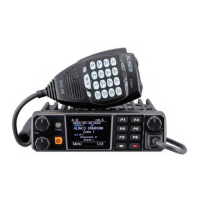
2.Programmed Key
There are programmable keys and you can assign the desired functions to it by setting
on radio or by setting on CPS. On front panel [P1], [P2], [P3],[P4],[P5],[P6]. And on
speaker microphone PA, PB, PC, PD.
Method 1: In radio Menu - Settings - Radio Set - P1~P6, PA-PD.
Method 2: In CPS - Public - Optional Setting - Key function
Check the current battery capacity voltage
Switch the power between super high, high, middle and low power.
Switch between Talk Around and Repeater mode
Turn on/off the frequency reverse function.
Choose the digital encryption group for digital channel
In Analog mode, send the DTMF/5TONE/2TONE encode. This function


 To Next Page