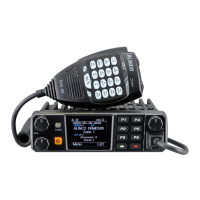
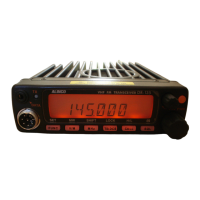
This document outlines the operation and features of the ALINCO DR-MD500, a digital mobile radio designed for both commercial and amateur use. The radio supports Digital Mobile Radio (DMR) standards and offers a range of functionalities for communication, monitoring, and channel management.
Function Description
The DR-MD500 operates in various work modes, which can limit or expand access to its functions. In "Commercial mode," VFO channels are not available, and some settings are hidden but can be configured via PC software (CPS) through programmable keys. In "Amateur mode," VFO channels are accessible, and users have full access to all setting functions in the radio menu. The specific frequency bands (work mode) are set using "set band" software, which requires contacting a dealer.
The radio provides clear status indications through a top LED: constant red for transmitting, constant green for analog receiving, constant cyan for digital receiving, and flashing green for scanning.
Programmable keys on both the front panel (P1-P6) and the speaker microphone (PA-PD) allow users to assign desired functions. These functions can be configured either directly through the radio's menu (Settings - Radio Set - P1~P6, PA-PD) or via CPS (Public - Optional Setting - Key function). Available programmable key functions include:
- OFF: No function.
- Volt: Checks the current battery capacity voltage.
- Tx Power: Switches transmit power between super high, high, middle, and low.
- TalkAround: Toggles between Talk Around and Repeater mode.
- Reverse: Turns on/off frequency reverse.
- Digi Encrypt: Selects the digital encryption group for digital channels.
- Call (Analog): Sends DTMF/5TONE/2TONE encode for analog quick calls. Requires prior setup of analog quick call.
- Call (Digital): Selects a contact from the digital contact list, temporarily switching the channel to that contact. It reverts to the original contact after the group/personal call hold time.
- VFO/MR: Switches between VFO mode and memory channel mode.
- Scan: Toggles scan on/off.
- FM Radio: Toggles FM radio on/off.
- Alarm: Long press activates the alarm; short press exits. Various emergency alarm modes can be set via CPS.
- Record Switch: Enables/disables the recording function.
- Record: Starts/stops recording. The radio can record both TX and RX voice during a call. When recording stops, the radio can remind or send the record.
- SMS: In digital mode, enters SMS messages.
- Dial: Initiates manual dialing.
- Monitor: Monitors weak signals or signals with unmatched IDs.
- Main CH Switch: Selects channel A or B as the main channel.
- Hot Key 1~6: Selects hot keys 1-6, with setup details in CPS.
- Work Alone: Toggles the work alone function.
- Nuisance Delete: During scanning, skips unwanted channels.
- Digi Monitor: In DMR mode, toggles digital monitor on/off.
- Sub CH On/Off: Toggles the sub channel on/off.
- Priority Zone: Switches to a priority zone.
- Program Scan: Starts scanning in VFO channel, requiring start and end frequencies to be programmed in CPS.
- Enhanced Sound: In digital channels, switches microphone tone between normal and enhanced modes.
- Last Call Reply: In digital channels, accesses the last call and allows PTT to call back.
- Switch ChType: Switches channel type (Analog, Digital, Ana+Dgi, Dgi+Ana).
- Roaming: In standby, searches and locks onto the repeater with the strongest signal. The radio returns to the last frequency after channel or frequency changes. Repeater frequency lists must be pre-programmed in CPS.
- Max VOL Set: In standby, allows setting the maximum RX volume.
- Slot Set: Chooses a slot for the current channel, valid only in repeater mode.
- Zone Select: In standby, allows inputting a zone number to switch to that zone.
- A CH Mute/B CH Mute: Mutes the main or sub channel.
- Roaming Set: Quickly enters the Roaming menu.
- Zone Up/Zone Dn: Switches zones upward or downward.
- Exit/Menu: Exits or enters the menu (for A-D short press).
Combination key functions, such as [MENU] + number key, can also be programmed via CPS.
Usage Features
Power On/Off:
- To power on, press the [Power] key. The LCD displays "Booting, please wait," then a start-up message, and a beep after 7 seconds.
- To power off, press and hold the [Power] key for 5 seconds.
Volume Adjustment:
- Two knobs are provided for main and sub channel volume. The upper knob controls the upper channel, and the bottom knob controls the lower channel.
- Rotate clockwise to increase volume, counterclockwise to decrease. The LCD displays volume status during adjustment.
Main Band/Sub Band Switch:
- Press the [M/S] key on the speaker microphone or a programmed [Main Channel Switch] key to switch the main channel when two channels are displayed. The main channel is indicated by bold characters.
VFO/Channel Switch:
- Press the programmed [VFO/MR] key to toggle between VFO and memory channel display.
VFO Frequency Setup:
- In VFO mode, with the channel as the main "bold text" channel, frequency can be set by direct keyboard input or by turning the channel selector to adjust steps.
Channel Selection:
- In Channel mode (accessed via [VFO/MR] key), channels can be selected by turning the channel dial or by inputting the channel number via the keyboard (e.g., 0099 for channel 99).
- Channels can be Analog or Digital. Digital channels have configurable talk permit parameters:
- Always Allow: Transmit anytime.
- Channel Free: Transmit only if the channel is free.
- Different Color Code: Transmit if the channel is free but color code mismatches.
- Same Color Code: Transmit if the channel is free and color code matches.
New Channel Creation:
- Go to Menu - Settings - Chan Set - New Chan.
- Input channel number and name.
- Select a zone and confirm to save.
- Access Channel Settings to configure parameters for the new channel.
Delete Channel:
- Go to Menu - Settings - Chan Set - Delete Chan to delete the current channel.
Receiving and Responding to Calls:
- In digital mode, the radio receives calls on channels with matching frequency/color code/slot.
- Upon receiving a call, the cyan LED lights up, the RSSI icon appears, and the LCD displays DMR ID/name/city/state/country/call type and incoming icon based on the contact list.
- After "Call end" is displayed, press [PTT] to respond within the digital hold time.
Making Digital Calls:
- Preset TG/DMR ID: Choose a programmed channel and press PTT.
- Temporary TG/DMR ID (from list): Choose a programmed channel, press [EXIT] to enter TG List, and use UP/DOWN keys or channel switch to select an ID.
- Temporary TG/DMR ID (from keypad): Choose a programmed channel, go to Menu - Talk Group - Manual Dial, input the ID, press [#] to switch between group/private ID, then press [PTT].
Monitor Function:
- Press the programmed [Monitor] key to activate. Allows monitoring weak signals or signals with unmatched IDs. Press again to exit.
- In analog mode, it emits background noise if no signal and displays the Rx icon when active.
Emergency Alarm:
- Press the programmed [Emergency Alarm] key to turn on/off. Configurable via CPS.
Advanced Features for Private Call:
- From Contact List: Menu - Talk Group, select a private call ID, then Option.
- From Manual Dial: Menu - Talk Group - Manual Dial, input Private ID, then Option.
- Call Alert: Sends a call alert; target radio beeps and returns success/fail message.
- Remote Monitor: Sends a signal to turn on the target radio's microphone and transmit its surroundings. Requires CPS activation (Optional Setting - Digital Func - Remote Monitor).
- Check Radio: Sends a radio check; target radio returns availability status.
- Kill: Sends a kill signal to disable the target radio (no display, no operation). Requires CPS activation (Optional Setting - Digital Func - Digital Remote Stun&Kill).
- Wake: Sends a wake signal to reactivate a killed radio. Requires CPS activation (Optional Setting - Digital Func - Digital Remote Stun&Kill).
Talk Group (TG):
- TG List: Displays programmed talk groups from CPS.
- New Contact: Creates new TGs.
- Manual Dial: Inputs group or private IDs for quick TG access.
- Talker Alias: Configures Alias Tx Set / Alias Rx Display.
SMS:
- New Msg: Creates and sends new messages.
- InBox: Views, forwards, or deletes received messages.
- OutBox: Views, resends, forwards, or deletes sent messages.
- Quick Text: Pre-saved messages for sending, editing, or deleting.
- Draft: Draft messages for sending, editing, or deleting.
Call Log:
- Last Call: Shows last caller ID and time; allows saving as a new contact.
- Sent: Shows sent messages.
- Answered: Shows answered calls; allows deleting or saving IDs.
- Missed: Shows missed calls; allows deleting or saving IDs.
Zone Management:
- A zone is a group of channels (up to 160 analog/digital). The radio supports 250 zones.
- Switching Zones: Use Zone Up/Down keys on the microphone or go to Menu - Zone and select from the list.
- Add/Delete Zone: Manually add or delete zones via the zone menu.
Scan:
- CPS (Public - Scan list) allows saving 250 scan lists.
- Scan On/Off: Manually turns scan on/off.
- Scan List: Creates new or edits existing scan lists.
- Scan Modes:
- SCM TO: Stops for 5s on a signal, then resumes.
- SCM CO: Stops until signal disappears (resumes 2s later).
- SCM SE: Terminates scan on a signal (VFO scan only).
Roaming:
- Searches programmed roaming channel lists for the strongest repeater signal (digital channels only).
- One Time Roam: Manual roaming; returns to off state after completion.
- Roaming Zone: Selects an active roaming zone, adds/removes channels, edits names, and sets parameters (RX/TX frequency, CC, TS, CH name).
- Auto Roaming Settings: Sets fixed time interval for automatic roaming when a repeater is not found.
- Start Roaming: Initiates timed roaming or repeater check roaming (when repeater is out of range).
- Repeater Check: Checks repeater status. If out of range, attempts reconnection at set intervals.
- OutRange Note: Reminds user when repeater is out of range (beep or sound, display times).
- Effect Wait: Sets stay time on a repeater during roaming.
Radio Menu Settings:
- Beep On/Off: Keypad beep sound.
- Speaker Mode: Voice output from mic speaker, radio speaker, or both.
- Mic Spk Set: Configures mic speaker output for A or B channel.
- Back Light: Adjustable LCD backlight intensity (5 steps).
- Ch. Name/Frequency: Displays channel name in channel mode or frequency in VFO mode.
- Key Lock:
- Manual Lock: Hold Red [EXIT] key on radio or [*] key on mic.
- Auto Lock: Radio auto-locks after a period of standby.
- Forced Lock Key: Prevents user from unlocking keypad.
- Auto Power Off: Sets automatic power off after 10, 30 minutes, 1, or 2 hours of inactivity.
- TX Timer: Limits transmission time (30S-240S) or turns off limit.
- Max Vol Level: Sets maximum RX volume (1-8 levels).
- Enhanced Sound (Digital): Sets audio pitch (Normal, Enhance, Indoor, Outdoor).
- Fan Open: Configures fan activation (PTT, Temperature, Both).
- Language: Default English.
- Menu Exit Time: Sets how long the menu stays open (5S-60S).
- Start Display: Configures power-on display (ALINCO picture, characters, customer's pic uploaded via CPS).
- CHG Background: Sets standby background (default or customer's pic uploaded via CPS).
- Mic Level: Adjusts microphone gain (1-5 levels).
- Display Color Setting: Selects display colors.
- Main Ch: Sets upper or lower displayed channel as main.
- Sub Ch On/Off: Toggles sub channel display.
- SMS Notify: Prompt options for new messages.
- Call Ring: Prompt options for new calls.
- Freq Step: Sets frequency steps (2.5K, 5K, 6.25K, 10K, 12.5K, 20K, 25K, 30K, 50K).
- Ana SQ Level: Adjusts squelch level for analog signals (5 levels).
- TBST Sel: Activates dormant repeaters with TBST tones (1000Hz, 1450Hz, 1750Hz, 2100Hz).
- DTMF Speed: Sets DTMF encode speed (50-500ms).
- FM Radio Moni: Allows/disallows reception/transmission while FM radio is on.
- Start Up Pwd: Sets a password for radio startup (configured in CPS).
- AuRepeater A or B (VFO A or B): Auto Repeater function for VFO mode, automatically adjusts TX frequency based on offset.
- Key P1-P6, PA-PD: Programmable keys for various functions.
- Repeater (Cross-band): Enables cross-band repeater function (TX on one channel, RX on another). Supports Analog-Analog, Analog-Digital, Digital-Analog, Digital-Digital cross-bands.
- SMS Format: Sets SMS text format compatibility (Motorola DMR, Hytera DMR, DMR Standard).
- CTC Ste: CTCSS eliminate tail tone way.
- No-signal Ste: No signal eliminate tail tone way.
- Time Zone: Sets local time zone.
- Date Time: Manually sets date and time.
Channel Setting (Digital Channel):
- New Channel: Creates and saves new digital channels with number, name, and zone.
- Delete Channel: Deletes the current digital channel.
- Channel Type: Sets channel as A-Analog, D-Digital, A+D TX A (mixed analog RX/analog TX), D+A TX D (mixed digital RX/digital TX).
- TX Power: Sets transmit power levels.
- Offset: Adjusts offset frequency for transmission.
- Band Width: Narrow band (12.5KHz) for digital channels.
- RX/TX Frequency: Inputs RX/TX frequencies.
- Talk Around: Allows repeater channels to be used as simplex (TX frequency = RX frequency).
- Name: Resets channel name (channel mode only).
- TX Allow: Configures transmit permission (Always, Channel Free, Different CC, Same CC).
- TX Prohibit: Allows/disallows transmission on current channel.
- Radio ID: Displays/edits DMR ID for digital channels or radio self-ID for analog channels.
- Color Code: Sets color code for digital communication.
- Time Slot: Sets Slot 1 or Slot 2.
- Digi Encrypt: Selects digital encryption group (32 options, configurable in CPS).
- Encrypt Type: Normal or Enhance.
- RX Group List: Edits RX Group List (selects current, adds/removes TGs).
- Work Alone: Activates work alone function; radio beeps and displays "Work Alone Predict" if predetermined time is reached. User must confirm to continue or alarm will be sent.
- SMS Forbid: Forbids receiving messages (sending still allowed).
- Data ACK Forbid: Forbids data feedback (e.g., message received reply).
- DMR Mode:
- Simplex: Direct communication with another radio on repeater frequencies.
- Repeater: Communication through repeaters.
- Double Slot: For same TX/RX frequency, enables communication by slot in simplex mode.
Channel Setting (Analog Channel Only):
- New Channel: Creates and saves new analog channels.
- Delete Channel: Deletes the current analog channel.
- Channel Type: Sets channel as A-Analog, D-Digital, A+D TX A, D+A TX D.
- TCDT/RCDT/RTCDT: Sets CTCSS/DCS codes for TX and RX (51 CTCSS groups, 1024 DCS groups).
- Optional Signal: Sets DTMF/5TONE/2TONE encode/decode.
- TX Power: Sets transmit power levels.
- Offset: Adjusts transmission offset frequency.
- Squelch mode: Sets RX condition (SQ for matched carrier, CDT for matched CTCSS/DCS, TONE for matched signaling, C&T for both).
- Band Width: Wide or narrow band.
- Reverse: Reverses RX/TX frequency and CTCSS/DCS encode/decode.
- Compander: Reduces background noise and enhances audio clarity.
- Scrambler: Analog voice inversion scrambler for confidential communication (11 standard, 1 self-defined group).
- RX/TX Frequency: Inputs RX/TX frequencies.
- Talk Around: Allows repeater channels to be used as simplex.
- Name: Resets channel name (channel mode only).
- Busy Lock: Configures transmission permission (Off, Different CDT, Channel Free).
- TX Prohibit: Allows/disallows transmission.
- OWN ID: Displays radio ID number (set in CPS).
- DTMF Enc: Sets default DTMF ID for current channel.
- 2Tone Enc/Dec: Sets default 2Tone ID for current channel.
- 5Tone Enc: Sets default 5Tone ID for current channel.
- Work Alone: Activates work alone function.
Maintenance Features
Device Information:
- Displays Radio ID, Radio name, model name, frequency range, firmware/hardware version, radio data version, latest production date, picture version, language version, and sct version.
Record Function:
- Allows recording sounds around the radio, like a tape recorder. Requires programming via programmable keys (CPS - Optional setting - Key Function - Record).
- Record Switch: Toggles recording of TX and RX communication.
- Records are saved as separate files with DMR ID and time details. Standard voice recording is 4 hours in digital channels only.
- Record List:
- Record Play: Plays one record at a time; can switch records with channel switch.
- Loop Playback: Plays all records in a loop.
- Record Send: Transmits a record to a TG or private ID.
- Record Delete: Deletes all recording files.
- Recording Manually: Program a key as "Record" in CPS. Press the key to start recording, speak into the mic, then play or send the record to a contact or manually dialed DMR ID.
Digital Monitor:
- Allows hearing incoming calls under specific conditions.
- DigiMoni Switch: Turns Digital Monitor off, monitors current time slot (Single Slot), or monitors both time slots (Double Slot).
- DigiMoni Cc: Monitors any color code (Any Cc) or same color code (Same Cc).
- DigiMoni Id: Monitors any talk group (Any Id) or same talk group (Same Id).
- Slot Hold: Turns slot hold on/off. Recommended for double slot monitoring to prevent immediate switching if a signal disappears in one slot.
- Respond and Save Call: During Digital Monitor, if an unmatched ID call is received, press [*] key, then [PTT] to respond. Press the confirm key to choose a zone and save the new channel.
Resetting the Radio:
- Power off the radio.
- Press and hold [P2] Key + Channel selector + Power key simultaneously to power on.
- The display will show "Are you sure you want to initialize radio?".
- Press Confirm Key to proceed. The radio displays "Initialize Radio" and resumes factory default settings.
- After restart, set the time zone and date.
- Important: Save the code-plug to PC before updating or resetting. If "prohibit reset" is set, the user cannot reset the radio.

 Need help?
 General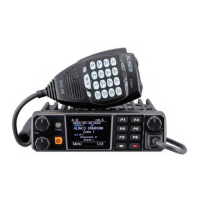

 To Next Page