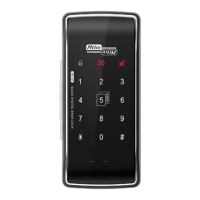
This document describes the Milre MI-260S Digital Door Lock System, providing details on its functions, technical specifications, usage, and maintenance.
Product Features
The Milre MI-260S offers a comprehensive set of features designed for security, convenience, and ease of use:
- Automatic Identification System (Left/Right-Handed): The lock can be installed on both left and right-handed doors without needing separate disassembling work, ensuring convenient installation.
- Separable Safe Knob Structure: This feature enhances security by providing a separable knob structure that prevents external trespassing using wire strings.
- Real-time Door Lock Status Notification: Users can visually check the open/close status of the door in real-time.
- Two-Way Solution: The door lock supports both secret codes and card keys for unlocking.
- Random Security Coding Function: To prevent secret codes from being revealed, users can press any number randomly before entering their actual secret code. This allows opening the door without exposing the code to others.
- One-Touch Mute Function: This allows users to open the door quietly without operating sound, temporarily, to avoid disturbing neighbors.
- Battery Alarm for Replacement Time: The system provides an alarm (sound and lamp) when the battery replacement time is due.
- Trespass Alarm Function: If the door is forced open with a hammer or other tools, an alarm will sound.
- Mischief & Hacking Prevention: After 5 abnormal attempts with a wrong number or unregistered card key, the door lock function is suspended for a while, accompanied by an alarm sound.
- 8-Step Operation Volume Control System: The volume of the door lock's operations can be adjusted across 8 different levels.
- Double Locking Function: When activated, this function prevents the door from being opened from the outside, even with a registered card key or secret code.
- Auto Lock: The door automatically locks when it is closed.
- Auto Re-locking Function: If the door is unlocked but not opened within a certain period, it will automatically re-lock for enhanced security.
- Open/Close Button Disable Function: This system prevents illegal trespassing.
- Disable Function for Missing Secret Code or Card Keys: When new secret codes or card keys are registered, old information is automatically deleted.
Important Technical Specifications
- Front Assembly Dimensions: 75mm (W) x 165mm (H) x 20mm (D)
- Back Assembly Dimensions: 73mm (W) x 165mm (H) x 41mm (D)
- Working Temperature: -15°C to 55°C
- Sensor Operating Temperature (High Temperature): 60°C ± 10°C
- Power: 6V (1.5V "AA" Size LR6 Alkaline 4 EA) batteries.
- Card Key: 2 EA (FOB) included.
- Magnet: 20mm (W) x 11.6mm (H), hole Φ13.
- Steel Pad: Φ15~20mm.
- Product Fixed Plate: 73.7mm (W) x 113.2mm (H) x 3.9mm (D).
- Strike (Optional Parts): 35.2mm (W) x 161.2mm (H) x 17.4mm (D) or 35.2mm (W) x 161.2mm (H) x 37.2mm (D).
- Installation Condition: Suitable for glass doors with a thickness of 12mm.
Usage Features
Opening the Door
- Using Secret Code: Touch the front pad to display numeric buttons, enter the secret code (4 to 12 digits), and then press
*.
- Using Card Key: Touch the registered card key to the card contact area.
- Mute Function (No Sound): Touch the numeric pad for a second (it will flicker twice), then enter the secret code and press
*, or touch the registered card key to the card area.
- From Indoor (Manually): Turn the thumb-turn clockwise to unlock.
- From Indoor (Automatically with [Open/Close] button): Press the [Open/Close] button.
Locking the Door
- From Outdoor (Auto-Locking Mode): The door automatically locks when closed (magnet must be installed).
- From Outdoor (Manual Locking Mode): Touch the front pad, then press
0 to lock the door.
- From Indoor (Auto-Locking Mode): The door automatically locks with a beep sound when closed (magnet must be installed).
- From Indoor (Manual Locking Mode): After closing the door, press the [Open/Close] button to lock it.
Setting Auto/Manual Locking System
- Touch the front pad.
- Press
#.
- Input the secret code (e.g., 123456) or touch the card key.
- Press
#.
- Enter
5 for Auto-locking mode or 6 for Manual-locking mode.
Setting/Canceling Auto Stop Function for [Open/Close] Button
This feature prevents the deadbolt from extending and damaging the glass door when the door is open.
- Touch the front pad.
- Press
#.
- Input the secret code or touch the card key.
- Press
#.
- Enter
4 to activate the stop function or 7 to cancel it.
Setting Outing Mode
Outing mode maintains its setting even if the thumb-turn is reattached. It can only be released with a password or registered tag from outside.
- From Outside: Touch the front pad for 2 seconds, then press
#.
- From Inside (Manual Locking Mode): Remove the thumb-turn (separable) with the door open, then press
0.
- From Inside (Auto Locking Mode): Remove the thumb-turn (separable) with the door open. When you close the door, the deadbolts will automatically extend.
Stopping Outing Mode
- Touch the front pad.
- Input the secret code or touch the card key.
- Press
*.
Setting/Stopping Warning Sound for Thumb-Turn (Separable)
- Touch the front pad.
- Press
#.
- Input the secret code or touch the card key.
- Press
#.
- Enter
1 to set the warning sound or 0 to cancel it.
- If the alarm sounds for 2 minutes, use the secret code or card key to turn it off. The audible alarm will sound whenever the thumb-turn (separable) drops until the alarm is disabled.
Auto Re-locking
The door automatically re-locks after 7 seconds if it is not opened after being unlocked. Pressing 0 or [Open/Close] during automatic re-locking will lock it immediately.
Double Locking Function
This mode suspends the door's function, preventing it from being opened from the outside.
- To Use: After the door is closed, press the [Open/Close] / [Double lock] button for 5 seconds. A "Beep ~ ↑" sound indicates activation.
- To Cancel: Press the [Open/Close] / [Double lock] button. A "Beep ~ ↓" sound indicates deactivation.
- Double lock mode can be unlocked by the thumb-turn.
- The intrusion alarm function remains active in double lock mode.
- If the volume is muted, only the lamp will flicker without sound.
Controlling Volume Level
Sound volume can be controlled by 8 levels.
- Touch the front pad.
- Press
#.
- Input the secret code or touch the card key.
- Press
#.
- Enter
2 to decrease volume or 3 to increase volume.
Against Mischief or Hacking
If a wrong secret code or unregistered card key is applied over 5 times, the alarm system activates with a warning sound, and all door lock functions are suspended for one minute.
- To Release: Press the [Open/Close] button or [REG] button.
Against Trespassing by Force and Warning Alarm Function
Once the door is locked, the alarm system activates in 7 seconds. If there is any attempt of trespassing by force, a strong alarm sound will be emitted for 2 minutes.
- To Release: Touch the card key or input the secret code, then press
*. The system will return to normal status.
Maintenance Features
- Battery Replacement: If the battery lamp flickers red with sound, replace all 4 "AA" size (1.5V, LR6 alkaline) batteries.
- Battery life is approximately one year based on 10 uses per day, but can vary.
- Check batteries periodically (at least every 6 months) for leakage. If leakage is found, wipe with a dry cloth and replace.
- External Power in Emergency: If batteries are entirely exhausted, contact a 9V (6LF22) battery to the emergency power terminal to activate the lock. Open the door with a secret code or card, then replace the batteries.
- Cleaning: Use a soft cloth to clean the touch pad. Do not use flammable materials like alcohol, benzene, or thinners, as they can damage the surface or cause fire.
- Warranty: The product comes with a one-year warranty from the date of installation. Keep the warranty for after-sales service. Failure to fill out the purchase date or present the warranty may result in charges for service. The product may not be considered genuine if no serial number is described.
Safety Precautions
- Do not disassemble or alter the lock: This can damage the product and void the warranty. Contact customer service for issues.
- Harmful Gases/Smoke: If the product generates harmful gases or smoke, immediately remove the batteries.
- Keep away from water/liquids: Wipe off moisture with a soft cloth if exposed to salty water or liquids. If moisture or foreign materials penetrate, remove batteries and contact service.
- Check batteries regularly: Every 6 months, check for leakage and cleanliness of terminals. Replace new batteries if leakage is found. Wash immediately with soap and water if exposed to leakage.
- Avoid contact with metals: Do not allow battery electrodes to contact metals like key holders, as this can cause overheating, explosion, or severe damage.
- Do not close the door with the deadbolt in the locked position: This can damage the product or cause malfunction.
- Do not force the front cover: This can damage the product or cause malfunction.
- Do not mix old and new batteries or different types: This can shorten battery life, cause leaks, or explosions.

 Need help?
 General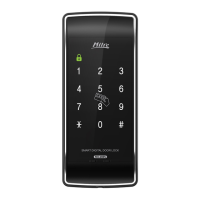

 To Next Page