507404-02 Page 11 of 80Issue 1448
Removing the Bottom Panel
Remove the two screws that secure the bottom cap to the
furnace. Pivot the bottom cap down to release the bottom
panel. Once the bottom panel has been removed, reinstall
the bottom cap. See Figure 15.
Horizontal Applications
WARNING
Do not install the furnace on its front or its back. See
Figure 12.
This furnace can be installed in horizontal applications with
either right or left hand air discharge.
Refer to Figure 17 for clearances in horizontal applications.
Figure 15
Removing the Bottom Panel
Figure 14
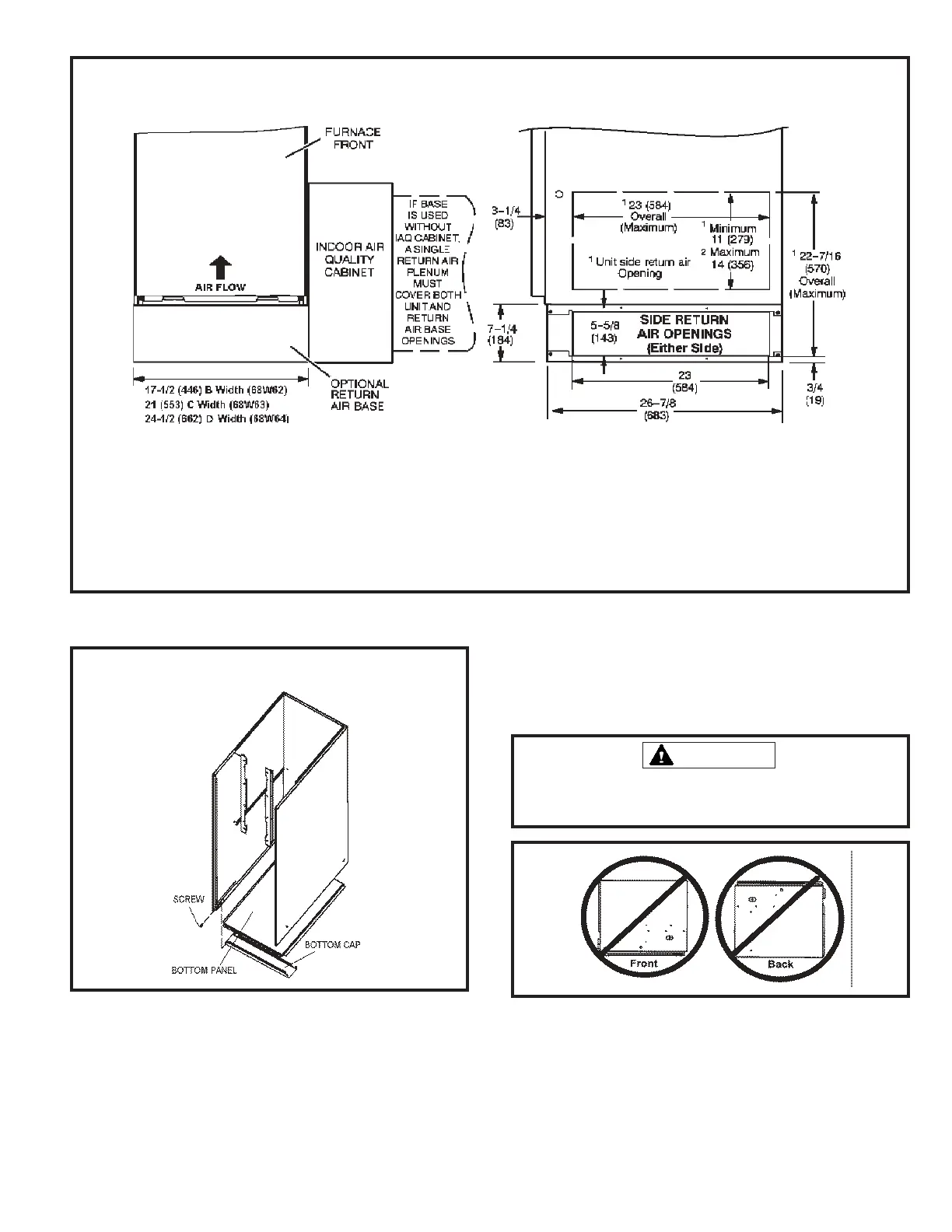
Optional Return Air Base
(Upow Applications Only)
NOTE: Optional side return air lter kits are not for use with return air base.
1 Both the unit return air opening and the base return air opening must be covered by a single plenum or IAQ cabinet.
Minimum unit side return air opening dimensions for units requiring 1800 cfm or more of air (W x H): 23 x 11 in. (584 x 279 mm).
The opening can be cut as needed to accommodate plenum or IAQ cabinet while maintaining dimensions shown.
Side return air openings must be cut in the eld. There are cutting guides stenciled on the cabinet for the side return air opening.
The size of the opening must not extend beyond the markings on the furnace cabinet.
2 To minimize pressure drop, the largest opening height possible (up to 14 inches) is preferred.
FRONT VIEW
SIDE VIEW
Figure 16


 To Next Page