2. OVERVIEW
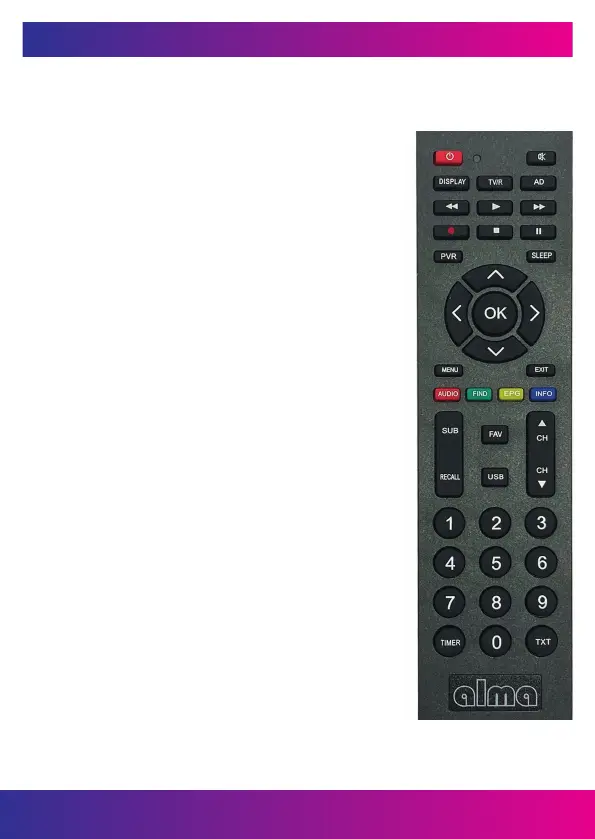
2.3 REMOTE CONTROL
You can control this receiver with this
remote control.
1. Power supply: Switch the receiver between operating
and standby mode.
2. MUTE: Mutes the sound.
3. DISPLAY: Change the brightness of the front panel display.
4. TV/R: Change the TV / Radio station list.
5. AD: Turn on / off audio description for the blind.
6.
◄◄ Fast reverse.
7.
► Play.
8.
►► Fast forward.
9.
● Record of the show.
10.
■ Stops recording and playback.
11.
I I Pause / Switches to the time shift function.
12. PVR: Direct access to the playlist.
13. SLEEP: Used to turn off the receiver automatically
after the selected time.
14.
◄/►: You change the volume in watch mode,
in the menu, move left and right.
15. ▲/▼: You change the station, move up / down
on the menu.
16. OK: Activate the highlighted submenu in menu mode
and display the station list in browse mode.
17. MENU: Activate the main menu of the receiver.
18. EXIT: Exits the current menu step by step.
19. AUDIO: Displays a list of available sounds.
20. FIND: Used to search for a station from the station list.
21. EPG: Electronic program guide.
22. INFO: Displays program information.
23. SUB: Zobrazí seznam dostupných jazyků titulků.
24. RECALL: Switches to the previous watched station.
25. FAV: Displays a list of favorite stations,
which you set earlier.
26. USB: Displays the USB drive menu.
27. CH▲/CH▼: Change station up and down.
28. NUMERIC BUTTONS (0 ~ 9): Enter TV number /
radio station, or menu option number.
29. TIMER: Event timer settings.
30. TXT: Displays teletext if available.
www.inter-sat.cz
40


 To Next Page