Chapter 4: Menu Setup and Navigation 31
Cont-Time/RunAvg Logging
In Cont-Time/RunAvg mode, the user starts taking readings by pressing SAVE or . The
instrument will continue taking samples until the time as set in “Test Length” has elapsed or ESC,
SAVE or is pressed.
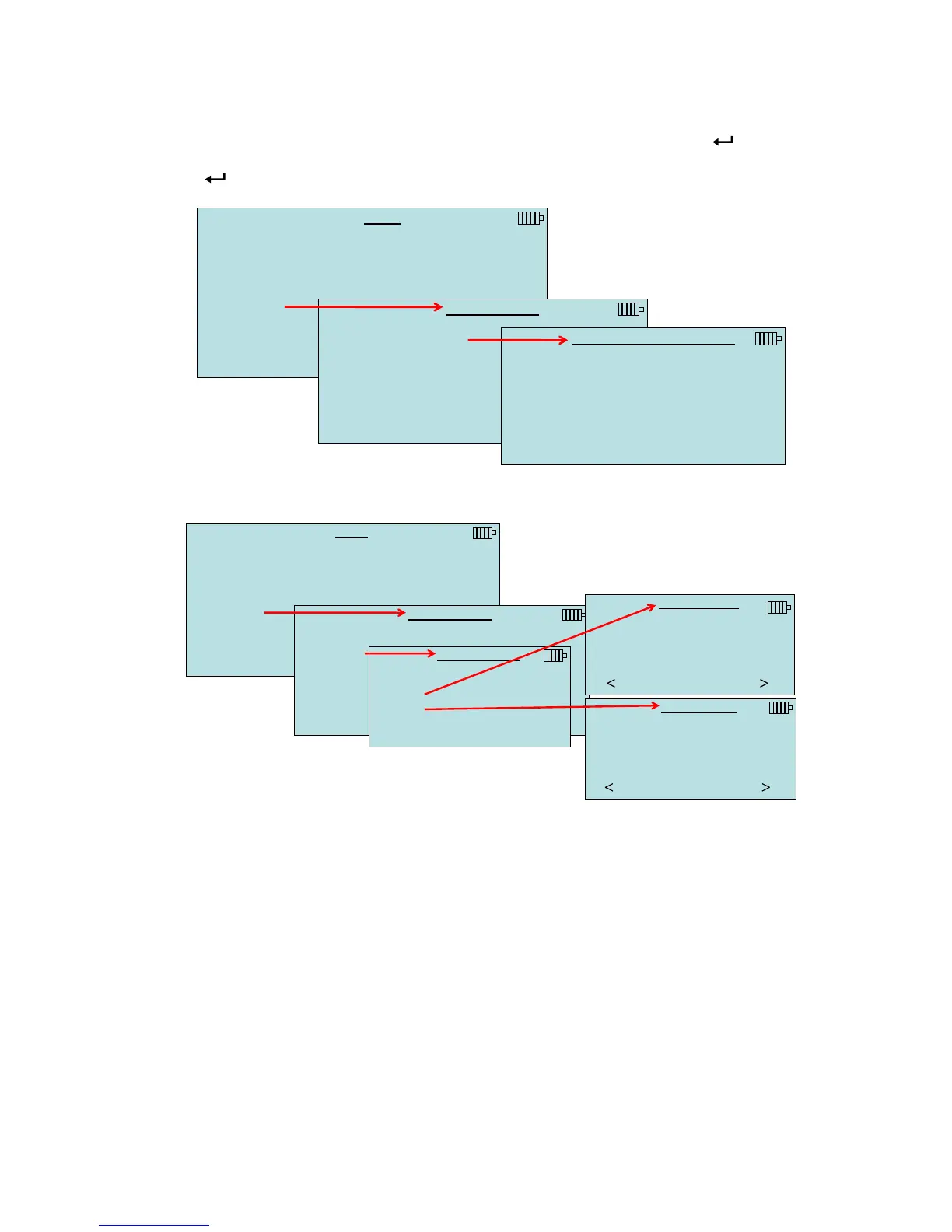
MENU
Pressure Tool
Display Setup
Flow Setup
Actual/Std Setup
Settings
Data Logging
Bluetooth Functions
Applications
Cf Selection
Calibration
DATA LOGGING
Measurements
Log Mode/Display Mode Manual/RunAvg
Log Settings
Choose Test Test 001
Name Test
View Data
Delete Data
% Memory
LOG MODE/DISPLAY MODE
Manual/Single
Manual/RunAvg
Auto-Save/RunAvg
Cont-Key/RunAvg
Cont-Time/RunAvg
When set to Cont.-time, the log interval and test length can be adjusted.
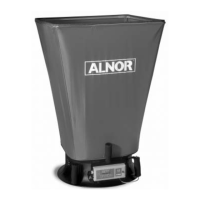
MENU
Pressure Tool
Display Setup
Flow Setup
Actual/Std Setup
Settings
Data Logging
Bluetooth Functions
Applications
Cf Selection
Calibration
DATA LOGGING
Measurements
Log Mode/Display Mode Cont-Time/RunAvg
Log Settings
Choose Test Test 001
Name Test
View Data
Delete Data
% Memory
LOG SETTINGS
Log Interval 00:01
Test Length 00:00:01
LOG INTERVAL
00:01
Min:Sec
PREVIOUS NEXT
TEST LENGTH
00 : 00 : 05
Day:Hour:Min
PREVIOUS NEXT
www.GlobalTestSupply.com
Find Quality Products Online at: sales@GlobalTestSupply.com


 To Next Page