Chapter 5 Parameter Introductions
http://www.acdrive-china.com
181
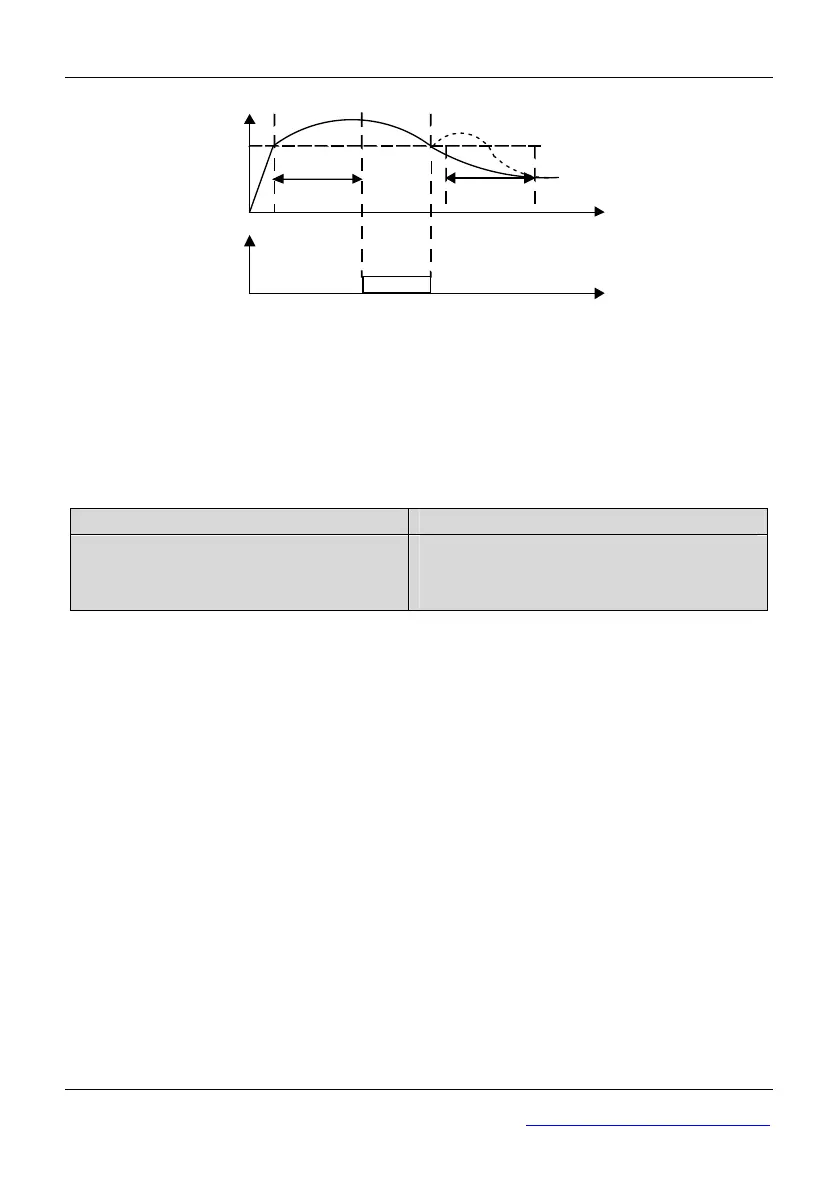
Action
Detect time
Detect time
Detect threshold
Output current
Enabled
Time
Time
Fig. 5-13-2 Overload pre-alarm function
Tips:
1. Pre-overload detection threshold should be lower than the overload protection
threshold.
2. During the overload detection time, if the current of ac drive is less than Pd.02, the
ac drive will clear the record of pre-overload detection time.
Pd.04 Current amplitude limit
Range: 0~2【1】
Pd.05 Current amplitude limiting level
Range:
Type G: 80~180%【150%】
Type P:60~140%【120%】
0: Invalid
1: Valid during Acceleration and deceleration, invalid in constant speed Operation
2: Valid
Note:
◆When the ac drive is running at Acc/Dec or constant speed, there may be a sharp
increase in the current, because of the unmatched of acc time and motor inertia, or the
mutation of load torque. In order to control the output current, when Pd.04 is set to 1 or
2, the ac drive’s output frequency may be adjusted automatically.
◆In Acc or Dec process, if the output current reaches “Current amplitude limiting level”
(Pd.05), the ac drive’s output frequency will stop changing until the current returned to
normal, and then continue accelerating/decelerating. Finally, the current will be
controlled not more than Pd.05.
◆In constant speed operating process, if Pd.04 is set to 2, when the output current
reaches “Current amplitude limiting level” (Pd.05), the ac drive will reduce output
frequency. When the current lower, the ac drive will return to the original work state.
If Pd.04 is set to 1, the output frequency will not be changed.
◆When the ac drive is in the status of current amplitude limit, the time last more than 1
minute or press “STOP/RESET ”key directly and hold over 2s, the ac drive will coast
to stop.



 To Next Page