8 Hardware Installation and Maintenance
Notes:
•
PCs made after 1997 that run Windows 98 or higher, and Mac-
intosh computers such as the iMac, are likely to have USB ports
built in. USB ports can also be added to older computers.
•
The computer does not have to be turned off to connect USB
devices.
•
The same USB cable is used to connect both PCs and Macin-
tosh computers.
•
Standard A-B USB cables found in computer stores may be
used.
•
PCs must be running Windows 98 or newer to use the USB
port, as Windows 95 and older do not support USB.
•
Windows NT does not support USB
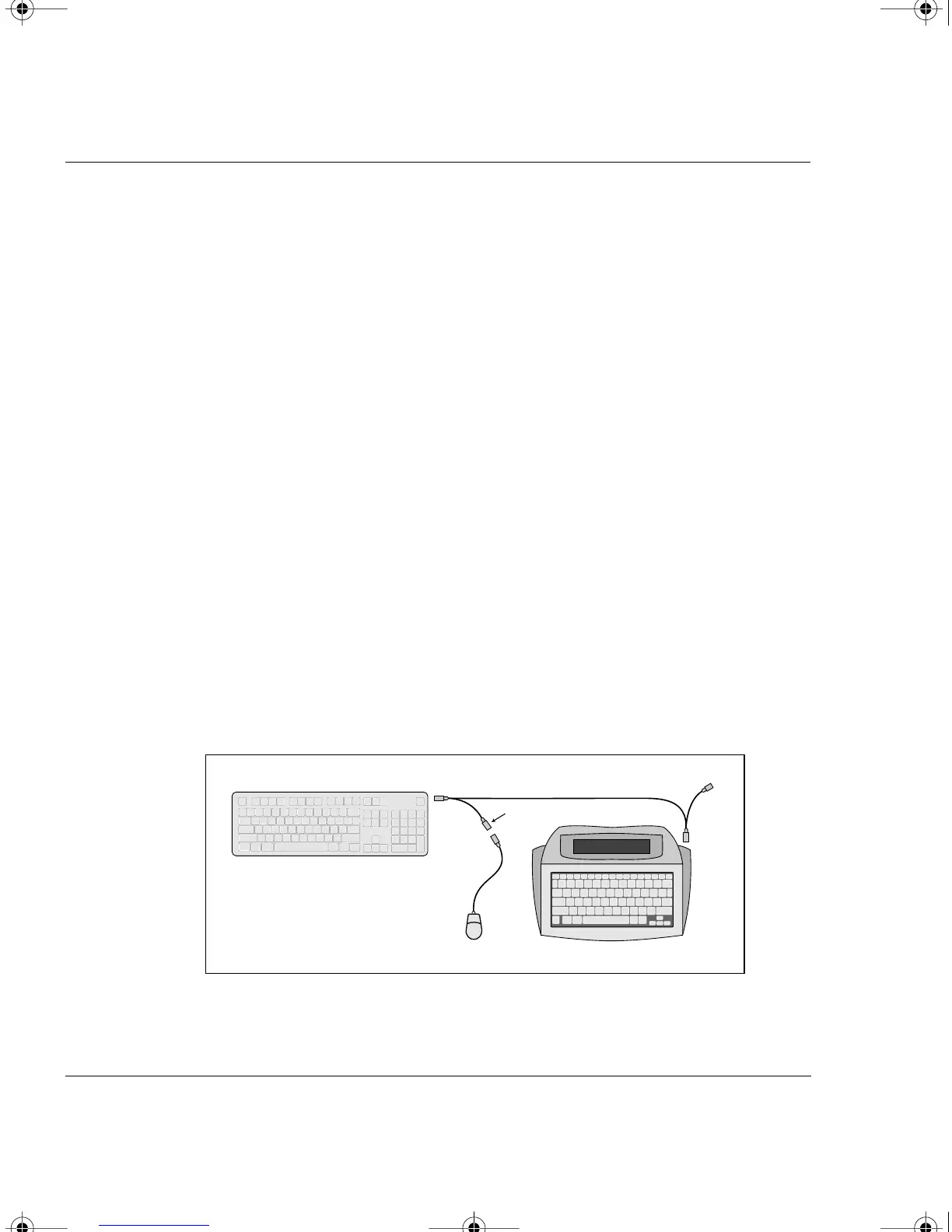
Connecting the Mac Y Cable
To transfer data to a Macintosh with an ADB (Apple Desktop Bus)
port, use the Mac Y cable. (For Macintoshes with USB ports [iMac and
newer], see the section “Connecting Your AlphaSmart 3000 to a
Computer,” in this chapter.) We suggest installing the cable between
your keyboard and mouse.
AlphaSmart
Mac Keyboard
Green
Red
Mouse
Grey
Mac Y Cable
Blue
Installation of the Mac Y cable
AS3000UG.book Page 8 Tuesday, June 25, 2002 12:19 PM



 To Next Page