26
Filter Cycles
Altercycleisaperiodinwhichthecirculationpumpisrunforauserprogrammed
lengthoftime.Thisallowsforadedicatedperiodofwatersanitizingandcleanup.
Heavierspapoolusagemayrequirelongerltercycletimes.Atthestartofeach
ltercycle,themainjetpumpmayrunbrieytopurgetheplumbing.
Filter cycle operation consists of two separate programmable parameters:
-Durationofltrationperday[FILT](hoursperday,e.g.4hourstotalperday)
-Filtercycleblocks[F.CYC](timebetweenstartofeachltercycle,e.g.4hours)
Thedefaultsettingsare:4hoursofltrationperdayover4individual1-hourlter
blocks(e.g.every4hours,anhourlongltercyclewillengage.)
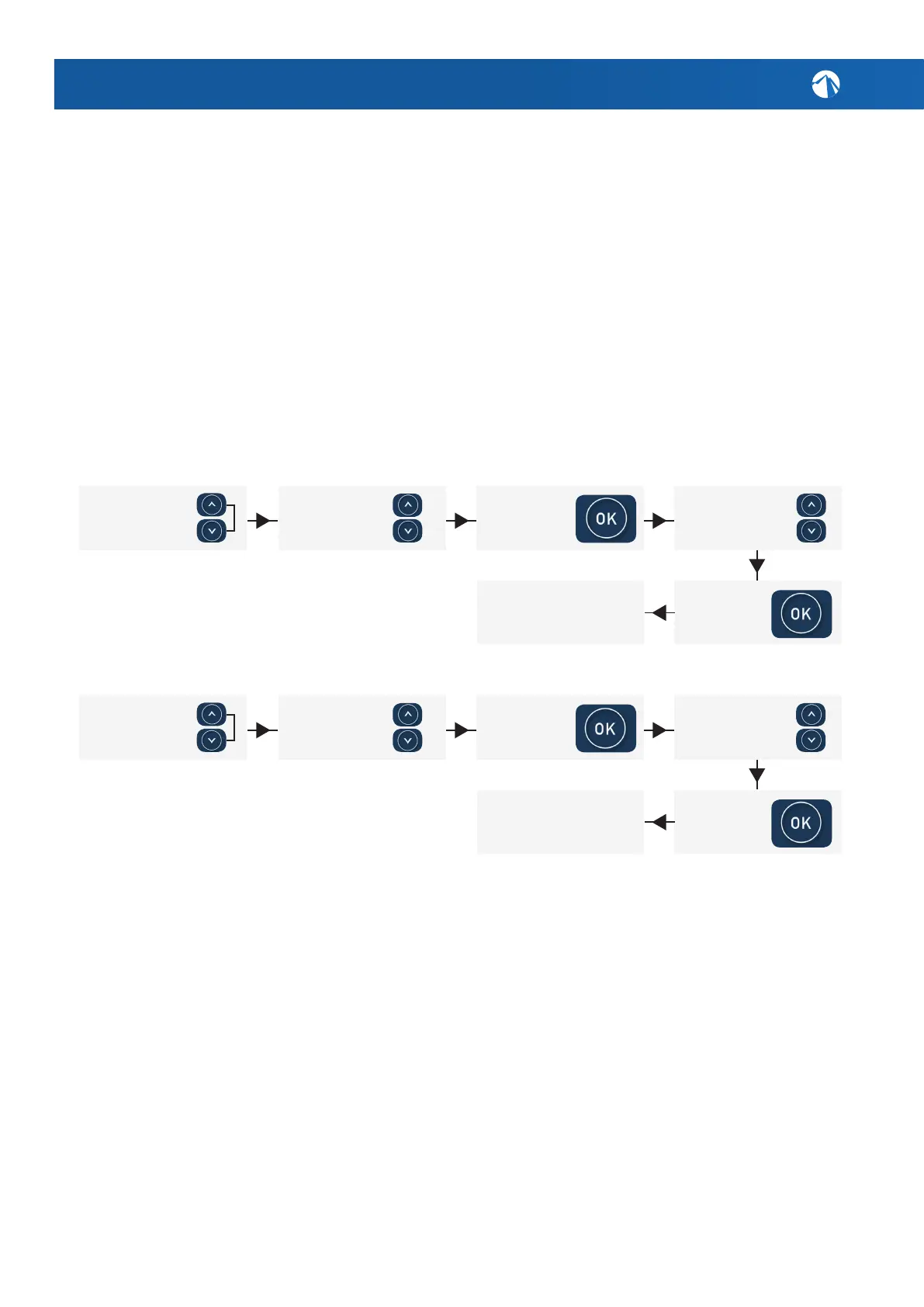
Setting Filter Cycle Hours of Filtration [FILT]
Setting Filter Cycle Blocks [F.CYC]:
Sleep Timers [SNZE]
Sleeptimersareaveryhandyfeaturewhichenablestheusertostopallspapool
activityduringcertaintimesofdayornight.Whilethecontrollerisinsleepmode
NOautomaticheatingorltrationmaintenancewilloccur,howeverthespapool
canstillbeoperatedbymanualusewithouttheneedtoadjustsleeptimesettings.
Therearetwoindividualsleeptimersthatcanbeset,eachofwhichcanoperateon
oneormorespeciedweekdays.Thisenablestheusertoprogramdifferentsleep
timesfordifferentdays(i.e.weekdaysvsweekends),aswellascustomizingthe
settingsonaparticularday/timewheretheusermaywantthespapoolsilenced.
DefaultSleepTimerSettings:SleepTimer1(Sat–Fri;Sleepperiod22:00–07:00).
6. SPA POOL USAGE GUIDE & TIPS
Press and hold the
‘UP/DOWN’ buttons
together. The word
[MODE] will display.
Press and hold the
‘UP/DOWN’ buttons
together. The word
[MODE] will display.
Enter FILT by
pressing the ‘OK’
button.
Enter F.CYC by
pressing the ‘OK’
button.
Scroll to FILT by
using the ‘UP/
DOWN’ buttons.
Scroll to F.CYC
by using the ‘UP/
DOWN’ buttons.
Select duration
between 1-24hrs
with ‘UP/DOWN’
buttons.
Conrm duration
selection with the
‘OK’ button.
Conrm duration
selection with the
‘OK’ button.
Let screen timeout
(10 secs) back to the
default display.
Let screen timeout
(10 secs) back to the
default display.
Select duration
between 1-24hrs
with ‘UP/DOWN’
buttons,



 To Next Page