49-EN
01GB06iXA-W404E.fm
ALPINE iXA-W404E 68-14470Z14-A (EN)
Page Skip Function/Percent Skip
Function/Alphabet Skip Function
The unit is provided with a page skip/percent skip/alphabet skip
function for effective searching. When you use this function in the
search mode, you can quickly search an artist or a song, etc.
Before using search mode, choose your Favourite Function first. For
details, please refer to “Skip Style Setting” (page 15).
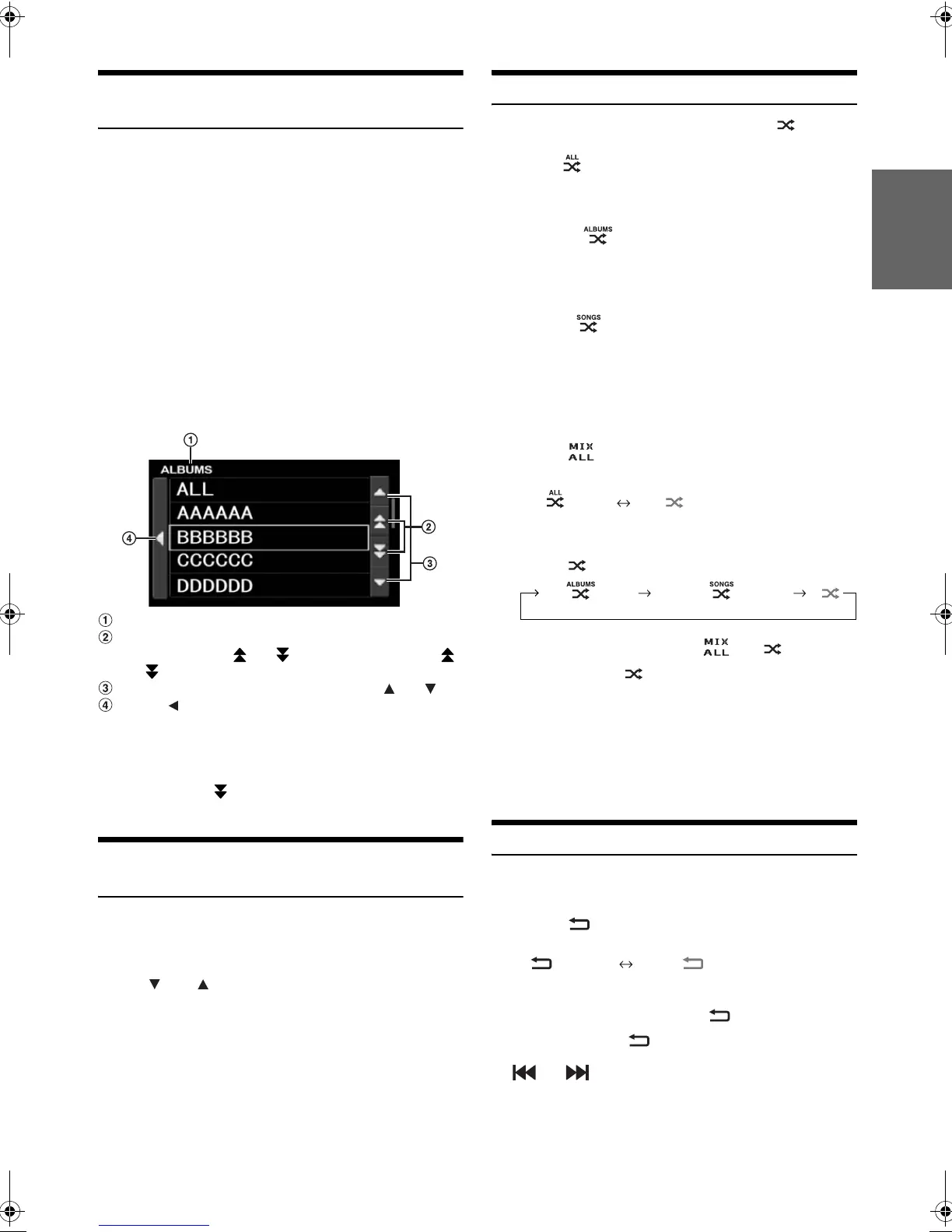
Displays the current search mode.
Skip the list one page, one alphabet
*
2
or 10 percent at a
time by touching [] or []. Touching and holding []
or [], the display continuously changes.
Skip the list one line at a time by touching [] or [].
Touch [] to return to the previous menu.
*
1
Only applicable to English alphabetic characters.
*
2
Titles are listed alphabetically, and can be skipped every 200 titles
with the same beginning alphabetical character. If there are fewer than
200 titles, titles beginning with the next alphabetical character are
selected. e.g. touch
[]
,
switch to the section beginning with alphabet
B from A.
Selecting Playlist/Artist/Album/Genre/
Composer/Episode/Category
Playlist/Artist/Album/Genre/Composer/Episode/Category*
3
can be
easily changed. For example, if you listen to a song from a selected
album, the album can be changed.
Touch [] or [] to select the desired Playlist/Artist/
Album/Genre/Composer/Episode/Category
*
3
.
*
3
Category can be changed only when play back the video files of
iPhone/iPod.
• The operation can also be performed by pressing in the outer ring
and rotating the Double Action encoder.
• If search selection mode is not activated, a Song search is not
possible.
• During shuffle (M.I.X.) playback, this operation is not possible.
• If Playlist/Artist/Album/Genre/Composer/Episode are not searched,
this operation is not possible.
Random Play Shuffle (M.I.X.)
The Shuffle function of the iPhone/iPod is displayed as on the
iXA-W404E.
Shuffle ALL :
All songs in the iPhone/iPod are played back in random
sequence. Any one song does not play back again until all
songs have been played back.
Shuffle Albums :
The songs on each album are played back in proper order. Upon
completing of all the songs on the album, the next album is
selected randomly. This continues until all albums have been
played.
Shuffle Songs :
Song shuffle randomly plays back songs within a selected
category (playlist, album, etc.). The songs within the category
are played just once until all songs have been played.
1
Touch [P1/2].
The function guide is displayed.
2
Touch []
*
.
The songs will be played back in random sequence.
(Shuffle ALL) (off)
Touch [].
3
To cancel M.I.X. play, touch [] or [].
• When set M.I.X. to off, turns to grey.
• For details of the search mode, refer to “Searching for a desired
Song” (page 48).
• If a song is selected in the album search mode before selecting
Shuffle (M.I.X.), the songs will not play back randomly even when
Shuffle album is selected.
* This operation cannot be performed for the video files of iPhone/
iPod.
Repeat Play
Only Repeat One is available for the iPhone/iPod.
Repeat One: A single song is repeatedly played back.
1
Touch [].
The file will be played repeatedly.
2
To cancel repeat play, touch [].
• When set Repeat to off, turns to grey.
• During repeat playback, no other songs are selectable by touching
[] or [].
Page skip function:
(factory setting)
The list is skipped page by page.
Alphabet skip function*
1
:
The alphabet skip function is skipped
to the next alphabet such as from A to
B, B to C. You can skip in reverse order
such as B to A.
Percent skip function:
For example, 100 songs are stored in the
iPhone/iPod.
These 100 songs are
divided into 10 groups (0%, 10%, …
90%).
Display example for ALBUMS search screen
(Shuffle Albums) (Shuffle Songs)
(off)
(Repeat One) (off)
01GB00iXA-W404E.book Page 49 Tuesday, March 3, 2009 5:01 PM



 To Next Page