55-EN
01GB07iXA-W404E.fm
ALPINE iXA-W404E 68-14470Z14-A (EN)
Installation
Caution concerning the installation location
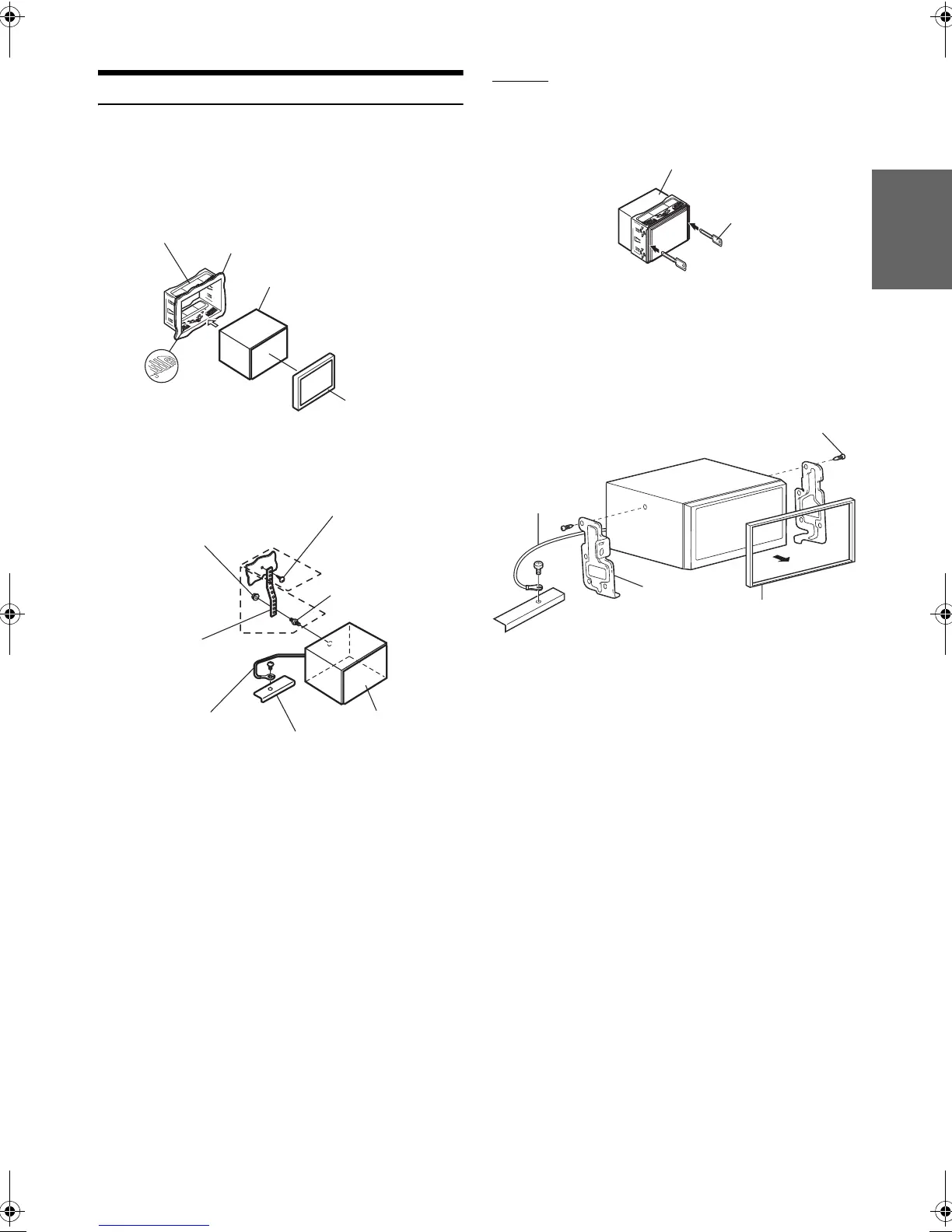
1
Remove the mounting sleeve from the main unit (see
“Removal” on page 55).
Slide the unit into the mounting sleeve and secure it.
*
1
If the installed mounting sleeve is loose in the dashboard, the
pressure plates may be bent slightly to remedy the problem.
*
2
The supplied face plate may be mounted.
Removal
1. Insert the bracket keys into the unit, along the guides
on either side. The unit can now be removed from the
mounting sleeve.
2. Pull the unit out, keeping it unlocked as you do so.
<JAPANESE CAR>
Take the face plate off, and secure the ground lead of the unit to
a clean metal spot using a screw (*) already attached to the
car’s chassis.
Attach the Original Mounting Bracket to each side of the
iXA-W404E, using the screws supplied with iXA-W404E.
2
Reinforce the head unit with the metal mounting
strap (not supplied). Secure the ground lead of the
unit to a clean metal spot using a screw (*
1
) already
attached to the vehicle’s chassis.
• For the screw marked “*
2
”, use an appropriate screw for the chosen
mounting location.
Connect each input lead coming from an amplifier or
equalizer to the corresponding output lead coming
from the left rear of the iXA-W404E. Connect all
other leads of the iXA-W404E according to details
described in the CONNECTlONS section.
3
Slide the iXA-W404E into the dashboard until it
clicks. This ensures that the unit is properly locked
and will not accidentally come out from the
dashboard.
Mounting Sleeve (Included)
Dashboard
This unit
Face Plate*
2
(Included)
Pressure Plates*
1
Hex Nut (M5)
Screw
Bolt Stud
This unit
Chassis
Ground Lead
Metal
Mounting
Strap
*
2
*
1
This unit
Bracket keys
(Included)
Ground Lead
Chassis
Screws (M5 × 8) (Included)
Face Plate (Included)
Mounting
Bracket
*
01GB00iXA-W404E.book Page 55 Tuesday, March 3, 2009 5:01 PM



 To Next Page