CONTROL UNITS UTR230868 / UTR400868 2727
SETTINGS
6.5 CYCLE COUNTER DATA
Y
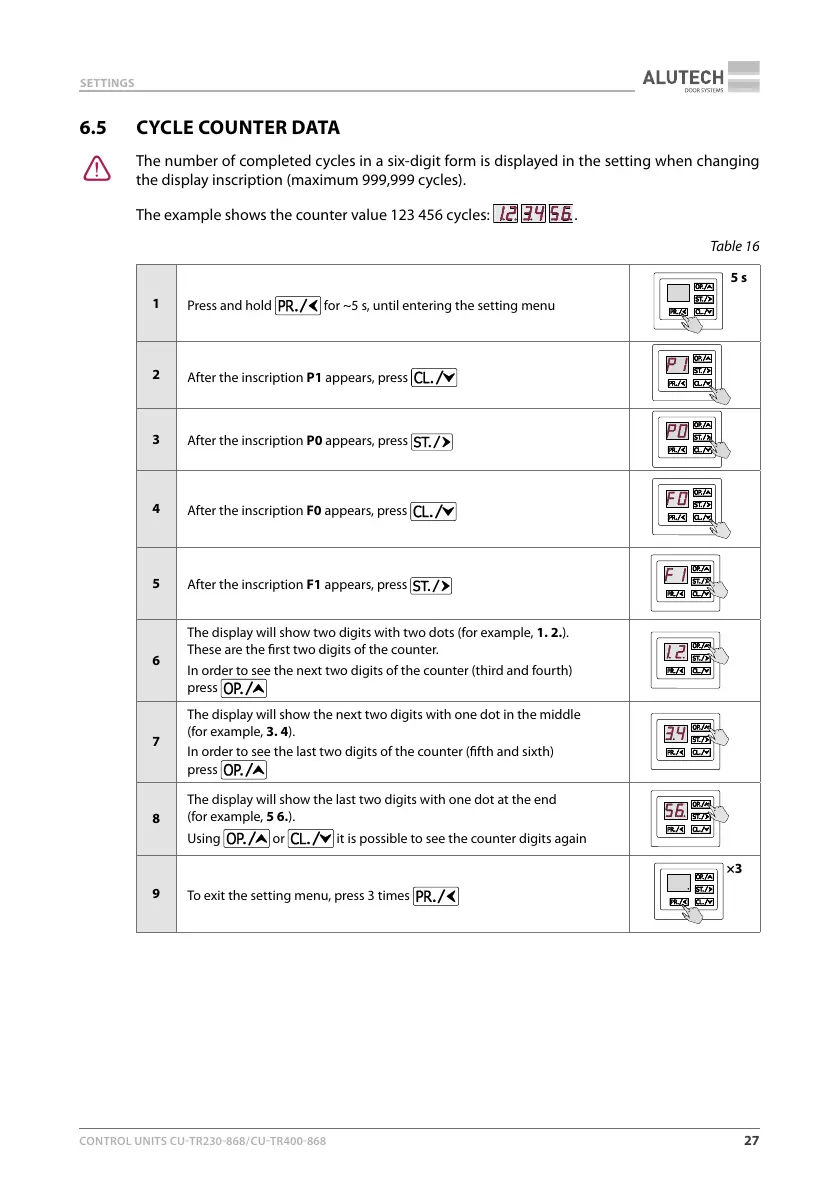
The number of completed cycles in a six-digit form is displayed in the setting when changing
the display inscription (maximum 999,999 cycles).
The example shows the counter value 123 456 cycles:
.
Table16
1
Press and hold
for ~5 s, until entering the setting menu
5 s
2
After the inscription P1 appears, press
3
After the inscription P0 appears, press
4
After the inscription F0 appears, press
5
After the inscription F1 appears, press
6
The display will show two digits with two dots (for example, 1.2.).
Theseare the rst two digits of the counter.
In order to see the next two digits of the counter (third and fourth)
press
7
The display will show the next two digits with one dot in the middle
(forexample, 3.4).
In order to see the last two digits of the counter (fth and sixth)
press
8
The display will show the last two digits with one dot at the end
(forexample, 5 6.).
Using
or it is possible to see the counter digits again
9
To exit the setting menu, press 3 times
×3



 To Next Page