CONTROL UNITS UTR230 / UTR400114114
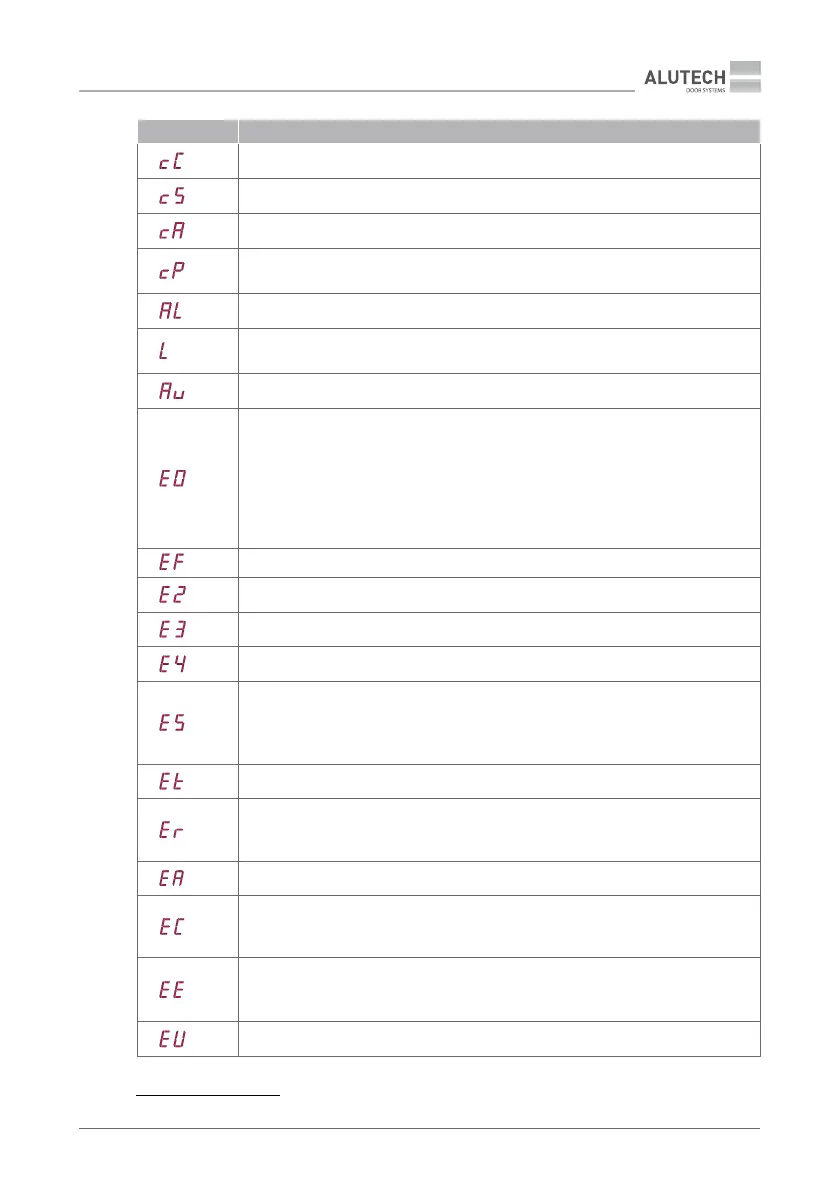
INSCRIPTION
INSCRIPTION DESCRIPTION
Closing command is activated
Stop of movement according to the STOP control command
Control command is activated from input A (connector 20)
Control command is activated from input P (connector 20) or PARTIALLY OPEN
command of the radio remote control is activated
Input A is activated (connector 20)
Operation of control devices is blocked. The pins of connector 17 (LOCK) are closed
(Table 2)
Counting pause time until automatic closing
End position error.
For a drive with switches the following may be:
• end position switches are open / input OP.L and input CL.L are activated
(connector16)
• in the setting P1–F0, the value 01 is not set (Table 13)
For a drive with encoder the following may be: end positions are not set (section
‘6.1.Setting end positions of doors’, item3)
*
Built-in security obstacle detection
Safety device / photocells are activated (input PH1, connector 20)
Safety edge is activated (input SE, connector 20)
PHOTOTEST verication error (Table 13, P7–F3)
Safety device in the STOP circuit is activated:
• input S, connector 20
• connector 18 or contacts IN_S and O_S of connector 11
(section ‘5.2. Connection of switches / drive encoder’)
Stop of movement at the end of operating hours (settings P5–F3, P5–F4)
No movement error (for a drive with encoder).
Make sure that the drive is locked. Check the connection of the drive motor. In the event
of malfunction that cannot be resolved, contact the service department
Settings read error. Make a reset to factory settings (Chapter 6.4)
Encoder data read error (for a drive with encoder), wrong encoder signal, malfunctions.
Check the connection of the encoder. In the event of malfunction that cannot be
resolved, contact the service department
There is no signal from the drive encoder: incorrect or broken encoder connection,
malfunction.
In setting P1–F0, the value 02 (Table 13) for the drive with encoder is not set.
Mains voltage is low or there is a unit malfunction (T1A fuse, Table 20)
* Only for control unit (settings P5–F1, P5–F2).


 To Next Page