CONTROL UNITS UTR230 / UTR4009494
SETTINGS
6. SETTINGS
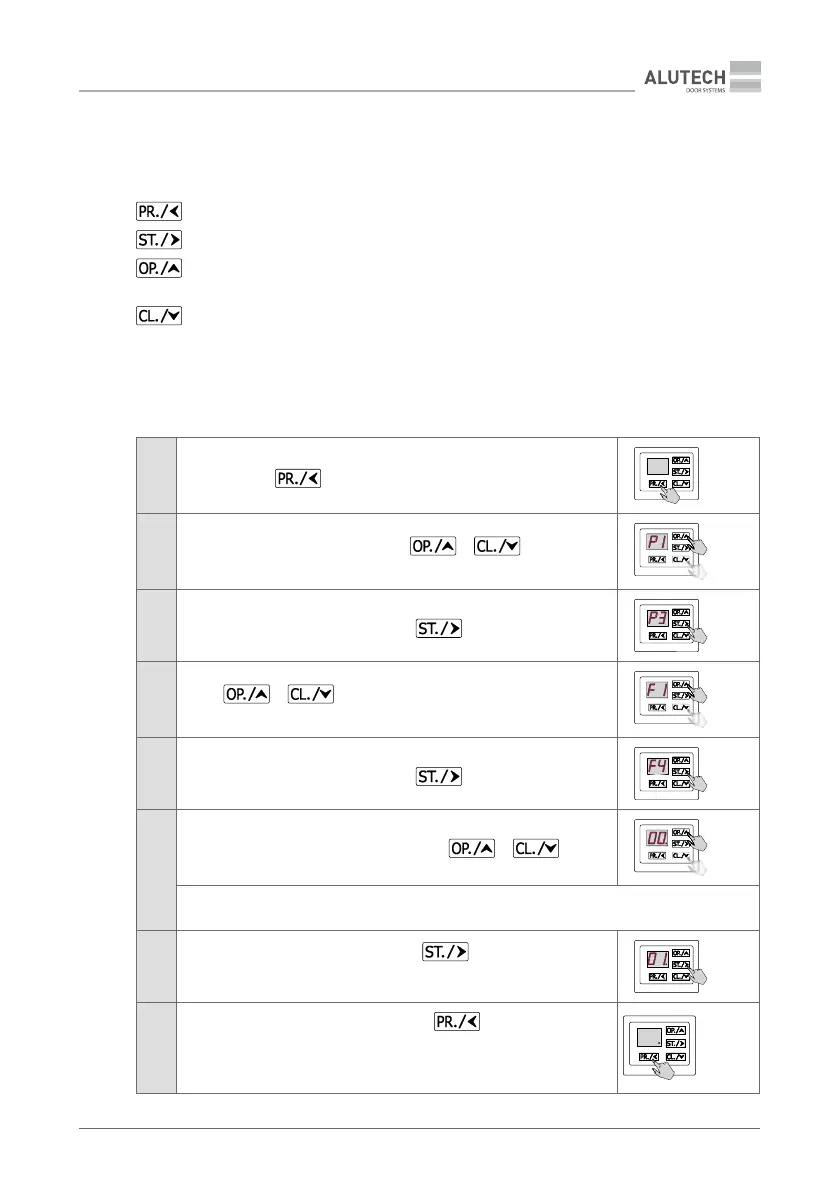
The setting is performed using the buttons, the setting inscription is displayed on the control
panel display 14 (Figure 8 / Figure 9).
—
button to enter the settings menu and exit the menu
—
button to enter the setting and conrm the selected value
—
button for stepping into the menu with increasing; also used to control
opening during setting
—
button for stepping into the menu with decreasing; also used to control closing
during setting
Y
Table 3 presents a general description of entering the settings menu, selecting and conrming,
exiting the settings menu
Table 3
1
Press and hold
within ~5 s, before entering the settings menu
≥ 5s
2
After the inscription P1 appears using
or select the
desired menu P0…P8
3
When the desired menu appears, press
4
Using
or select the desired setting
from the menu F0…F9
5
When the desired menu appears, press
6
The display shows the set value of the operation parameter setting
(Table13). The value will be with a dot. Using
or select
the desired setting value for the operation parameter
ATTENTION! For menu P1, see ‘6.1. Setting the end position of doors’.
For the menu P2, see ‘6.2. Radio control setting’
7
When the desired setting appears, press
.
The inscription will become with a dot, which will mean a change in the
setting value
8
Press the button to exit the settings menu
(2–3 times) until a dot
appears on the display.
Y
Automatically exit the settings menu is actuated after 10 minutes
in the standby mode
× 2–3


 To Next Page