CONTROL UNITS UTR230 / UTR400 9595
SETTINGS
6.1 SETTING THE END POSITION OF DOORS
Y
ATTENTION! The end position setting is dierent for drive models with mechanical switches
and encoder.
Y
ATTENTION! During the settings, control the door movement using the buttons of the unit
or is performed in manual mode (pressing and holding the button).
When the control unit is supplied, the manual operation mode is set (P3–F1–on, Table .13).
Entering the settings menu is described in Table 3.
1. In menu P1 setting F0, set (verification) value:
• 01 — drive with mechanical switches (factory setting)
• 02 — drive with encoder
2. In menu P1 setting F1, confirm the direction of the door opening:
Y
ATTENTION! The doors should be in an intermediate position.
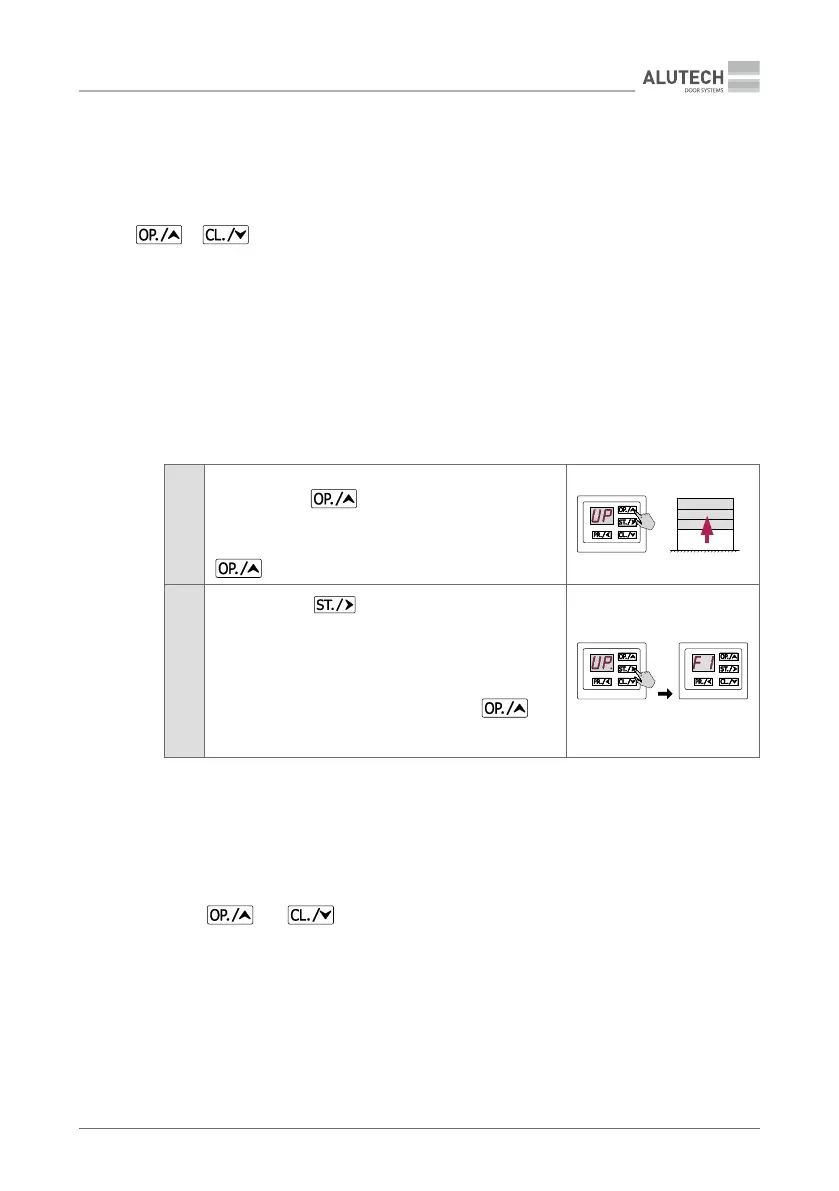
1
When inscription UP appears on the display, press and
hold the button
for a few seconds (no less than 2 s)
to see the direction of doors movement.
Doors must open!
If the doors close, press and hold once again the button
for a few seconds. Make sure that the doors open!
2
Press the button
to conrm the direction of doors
opening. After pressing the button, the inscription UP.
(with a dot) will appear on the display, then the inscription
F1 will appear on the display.
ATTENTION! If the conrmation is not fullled (inscription
UP appeared without a dot), it means that during
conrmation of opening direction the button
was
hold less than 2 s. Please, repeat the conrmation of opening
direction!
3. Set the end positions for door closing and opening.
• Menu P1 setting F2, for electric drive with mechanical switches:
Y
Adjust the drive cams in accordance with the drive manual. When entering the set-
ting, the inscription ‘- -’ in the middle of the display indicates that the doors are in
an intermediate position.
Using and move the doors to the desired end position and set the corre-
sponding drive cams. Follow the correct inscription on the unit display:
− during the door movement in the opening direction, the inscription OP will be displayed.
When the drive switch for the closing end position of opening is actuated, the
inscription LO will be displayed.
− during the door movement in the closing direction, the inscription CL will be displayed.
When the drive switch for the closing end position is actuated, the inscription LC will
be displayed.


 To Next Page