CONTROL UNITS UTR230 / UTR4009696
SETTINGS
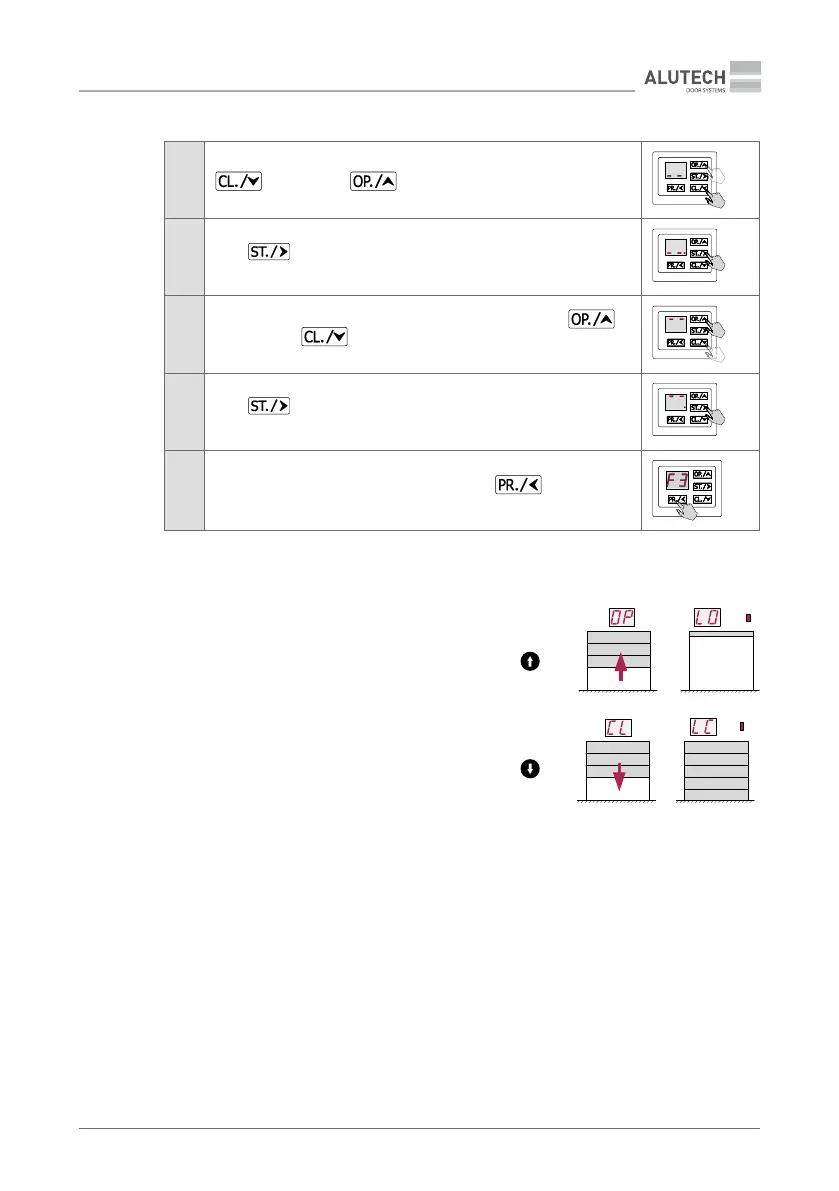
• Menu P1 setting F3, for drives with encoder:
1
When the inscription ‘- -’ appears on the bottom of display, using
or if necessary set the doors in the position of full
closing
2
Press
to conrm the installed position. The inscription ‘- -’ will
appear with a dot
3
When the inscription ‘- -’ appears on the top of display, using
orif necessary
set the doors in the position of full opening
4
Press
to conrm the installed position. The inscription ‘- -’will
appear with a dot
5
After appearance, the inscription F3 press twice
and exit from
setting menu
× 2
Y
To limit the continuous operation of the drive, adjust the operating time. Settings
P5–F3 and P5–F4 (Table13).
4. Verify the end position settings.
Use the unit buttons 2 and 4 (Figure 7) to perform
several complete cycles of opening and closing.
Make sure that the inscription of the direction of
movement and the inscription of the end posi-
tions of doors are correct on the display. Make
sure the doors stop at the desired end positions.
The corresponding end position LED is continu-
ously lighting.
Y
If the position adjustment is required, re-
peat item 3 or go to item 5 for drives with
an encoder.
5. Exact adjustment of the end position of doors (only for drives with encoder):
− In menu P1 setting F4 a value for adjusting the opening position is selected (Table 13).
− In menu P1 setting F5 a value for adjusting the closing position is selected.
6.2 RADIO CONTROL SETTING
Y
Before programming the remote controls for the rst time, clear the memory of the control unit
from the previously recorded radio remote controls. If the remote control is lost, in order to pre-
vent unauthorized access, it is necessary to delete the number of the lost remote control from
the memory. If the number of the lost remote control is unknown, then delete all the remote
control numbers and re-record all the remote controls.
LOP.
LCL.L


 To Next Page