75
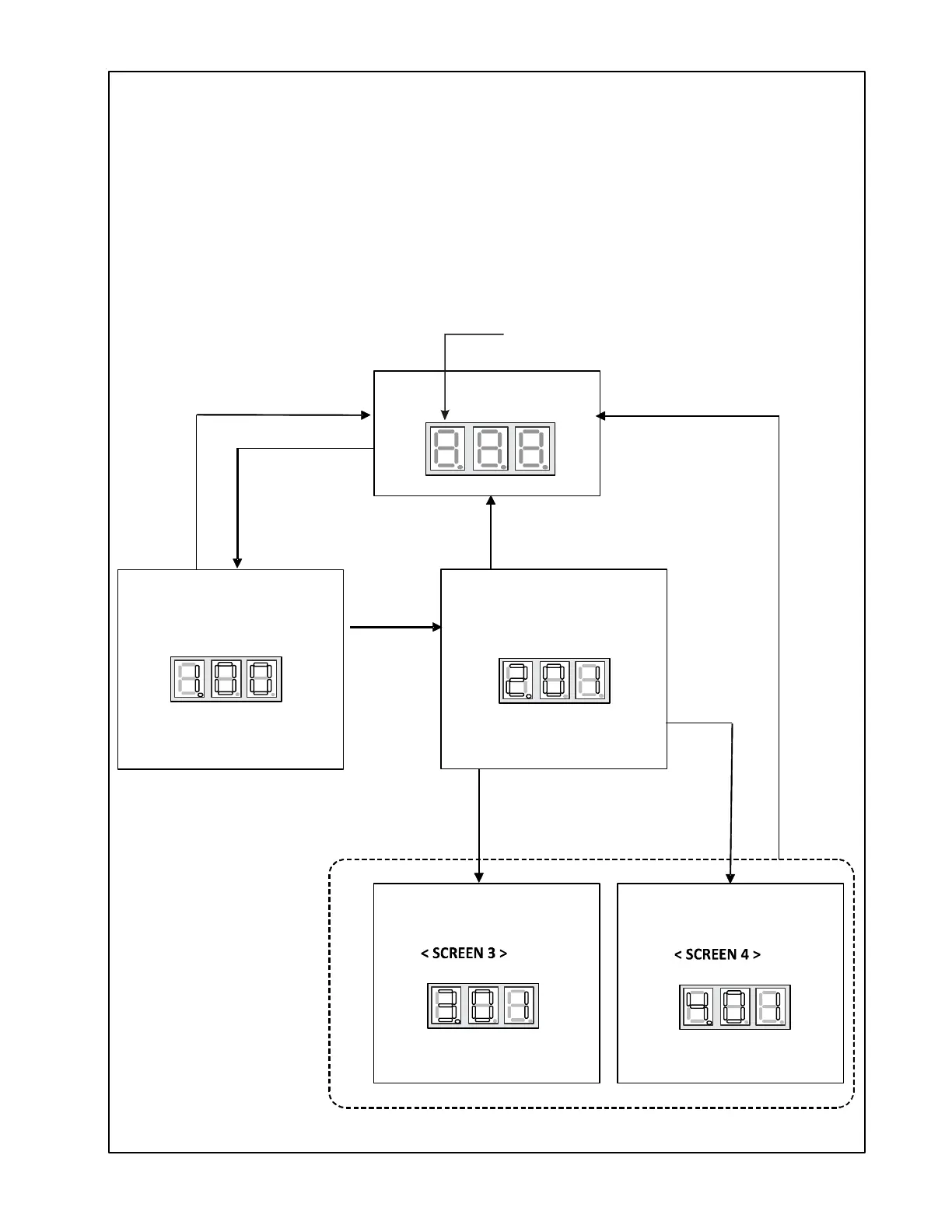
SETTING THE MODE DISPLAY
< SCREEN 0 >
< SCREEN 1 >
< SCREEN 2 >
Press RECALL Button
to change fault code history
Hold RECALL
and TEST
NAVIGATING THROUGH THE DISPLAY SCREENS
SCREEN 0
SCREEN 1
SCREEN 2
SCREEN 3
SCREEN 4
The home or default screen on the display. This shows the most recent fault.
To access, hold the RECALL button for 5 seconds at screen 0.
To access, hold the RECALL button for 5 seconds at screen 1.
To access, hold the RECALL button .
To access, hold the RECALL and TEST buttons simultaneously
To return to SCREEN 0 of the display, press the LEARN button.
for 5 seconds at screen 2
for 5 seconds at screen 2.
The first digit displays the SCREEN #.
Hold RECALL
Press LEARN
Press LEARN
Press LEARN
Hold
RECALL
Hold
RECALL


 To Next Page
 Loading...