Orientation Aid for the Start of the Season - ZA-TS
Version 08/2018 Page 6
5. Preparations on the implement - Section Control
→ Commissioning of the ZA-TS can only begin when the terminal is fully
configured.
→ The Task Controller or activated documentation from the internal job
management are managed through the terminal. You can find more
information in the operating manual for the respective terminal.
→ After you have configured the Task Controller in the setup of the terminal,
you also have to enter or, if necessary, check these settings on the implement.
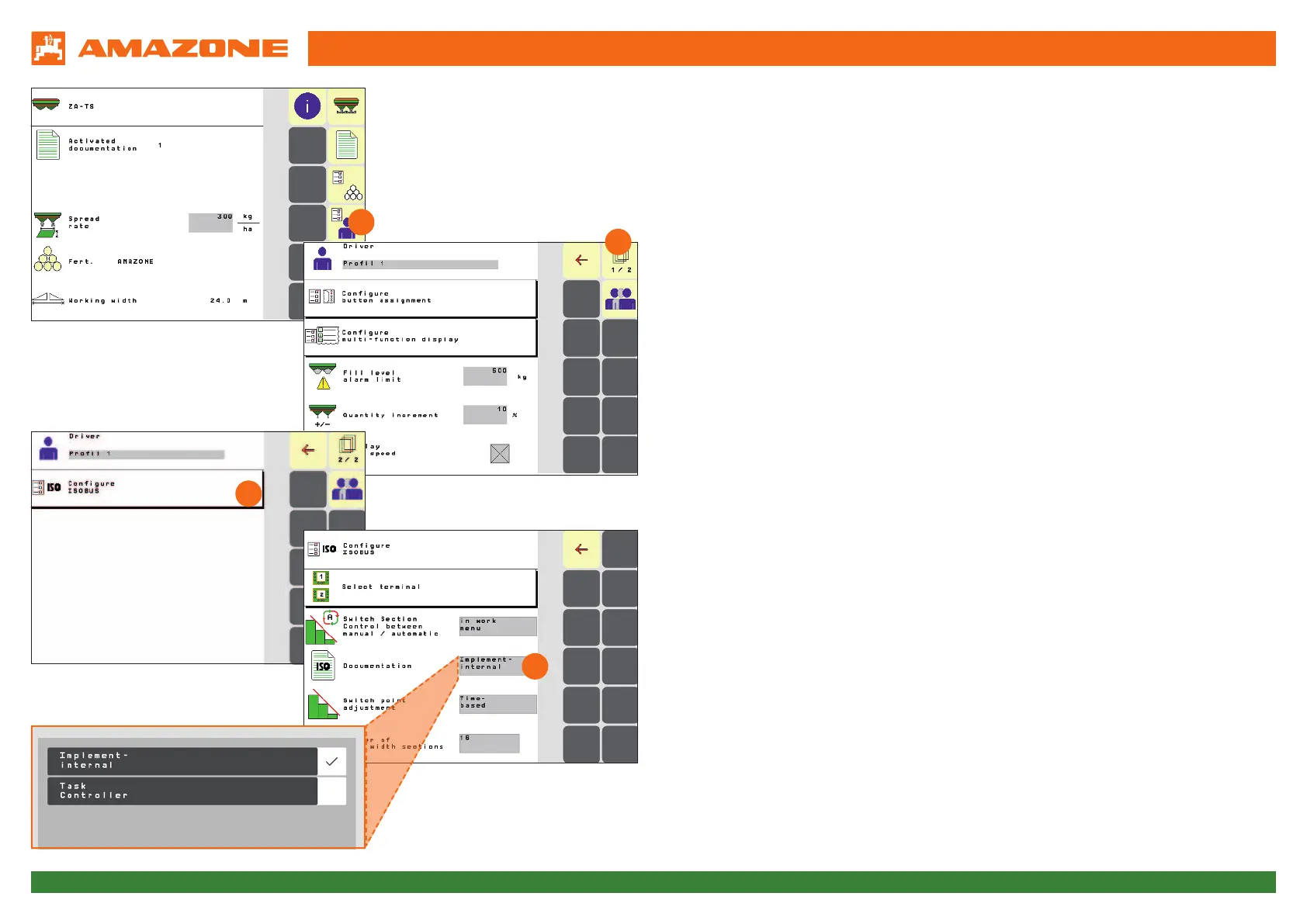
→ To go to the Setting menu, please proceed as follows:
Press on the "User menu" button on the Start screen (1). Scroll to the second*
screen (2) and select the "ISOBUS configuration" button (3).
→ Under the Documentation point, there is the choice between "Implement
internal" and "Task Controller" (4):
→ If implement-internal documentation is desired, select "Implement-internal".
→ If work is to be performed with job management in ISO-XML format, select
"Task Controller". You can find more information in the operating manual for
the terminal.
* It is possible that there is also a third screen, this depends on the configuration
(number of implement equipment options).
1
2
3
4




 To Next Page