©American Audio® - www.americanaudio.eu VMS2™ User Manual Page 27
13. AUDIO INTERFACE MODE
13.1 4 OUT MODE
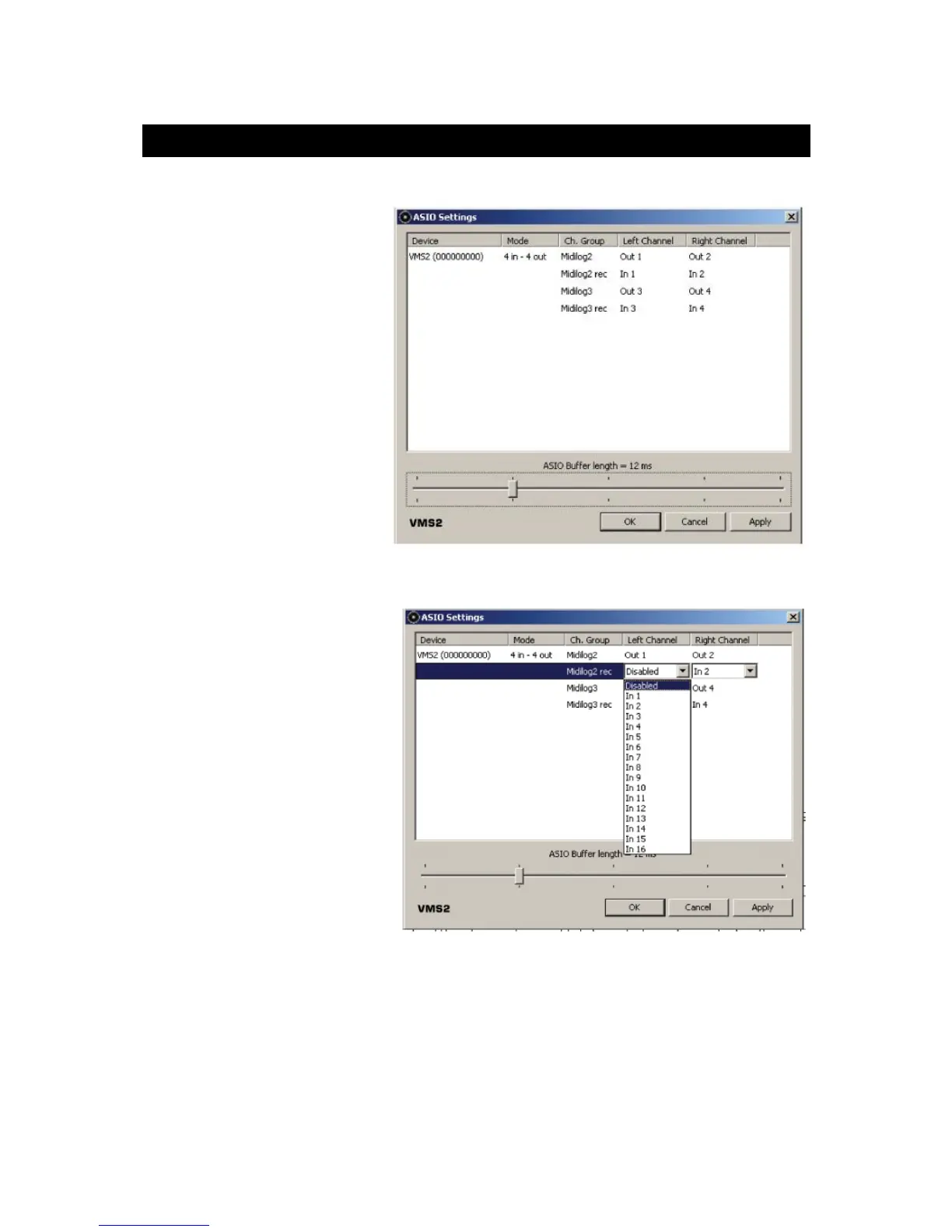
The VMS2™ can act like a 4x4
audio interface. Your USB audio
is routed through the VMS2™'s
MIDILOG Ch. #1 and #2 inputs.
If you wish to route the inputs
via USB for software play
through or Timecode control,
set your desired VMS2™
Channel to the USB setting and
the channels' Line/Phono
Selector Switch (37) to the
correct setting.
Note: For the best performance,
if no inputs are in use, set the
Inputs to Disabled by clicking on
the ASIO Driver Interface.
Your inputs and outputs can be
set to channels 1-8, but your
software may not support the
ASIO stream of the channel
numbers.
Check the software manual to
make sure it does.


 To Next Page