User`sManual
6/18
tomovecurseand[/]tochangevalueofeachfocused
itemineditmenu.
z UNIVERSAL: TheLNBtype.Press[/]toswitchbetweenLNBtypesand
press[OK]toenterlisttoselecttype.
z 22K:The22kparameter.Press[/]buttontoswitc
hbetween
Auto,OffandOn.
z Pwr:ThepowerparameteroftheLNB.Press[/]buttonto
switchbetweenAuto,Off,13v and18v.
z None: TheDiseqcportsettingforDiseqc1.0and1.1.Press[/]
buttontoswitchbetweenportsorpress[OK
]buttontoselect
portinthelist.
z Fixed:Setthemotortype.Press[/]toswitchbetweenFixed,
USALSandDiseqc1.2.
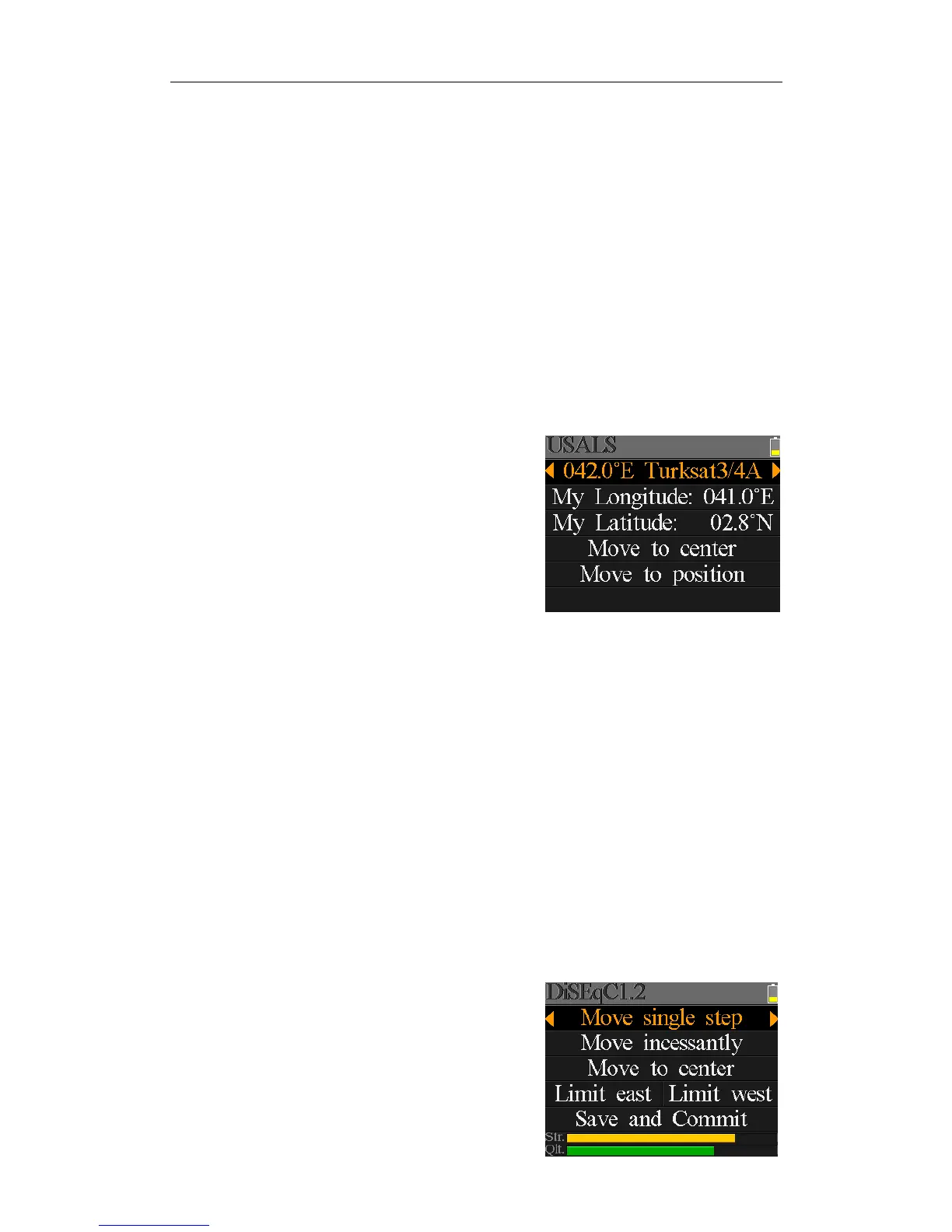
5.2.1USALSSetting:
Press[OK]toenterUSALSSETUPmenuonPosition
TypeifthetypesetstoUSALSparameters
z 042.0°ETurksat3/4A: Thecurrentsatellite.Press[/]toswitchbetweensatellites
andpress[OK]toentersatellitelisttoselectsatellite.Press[OK]
buttontoselectthefocusedsatelliteandpress[MENU]toexit
fromeditmenu.Alltheotherparametersonthemenuwillbe
refresh
edaccordingtotheselectedsatellite.
z MyLongitude: Thelongitudeoflocal.Press[OK]toentereditmode,then
press[/]tochangethevalueand[/]tomovecurse.
Press[OK]againtoexiteditmode
z MyLatitude: Thelatitudeoflocal.Press[O
K]toentereditmode,then
press[/]tochangethevalueand[/]tomovecurse.
Press[OK]againtoexiteditmode
z Movetocenter: Press[OK]tomovethedishtocentralposition.
z Movetoposition: Press[OK]toconfirmtomovetosettin
gposition
5.2.2Diseqc1.2Setting:
Press[OK]toenterDiseqc1.2settingmenuon
PositionTypeifthetypesetstoDiseqc1.2


 To Next Page