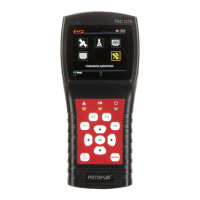
User`sManual
3/18
F2:Enable/disabledeepwhenpressingkeys
F3:EntertoTPcontrolmenuinSatelliteMeasuremenu
F4:EntertoAutoDiSEqCfunctioninSatelliteMeasuremenu
7.NavigationKeys:
/:Movefocusorchangevalue.
/:Movefocusorchangevalue
8.MENU: Gointomainmenuorexitfromthecurrentmenu
9.OK:
Confirm
10.:Turnthemeteron/off,pressandholdfor2secondstopoweron
themeter.
11.Charging: Connectwiththechargercordforchargingtheequipment.
12.Reset:Resetthemeter
3.HOWTOMEASURE
Poweronthemeter,selectthesystemtomeasureorselectsystemsettingtosetparametersforthe
deviceintheHOMEmenu.
Inallmenus,press[/]buttontonavigate,press[/]buttontochangethevalueoffocused
item,press[OK]buttontoconfirmyourse
lect,editvalueorenteralisttoselectawanteditem,press
[MENU]buttontoenterorexitmenus.
Howtomeasuresatellitesignal:
1. Connectthesignalcableto
F‐Type,Femalejack.
2. EnterSatellitesubmenu.
3. CalculatetheelevationandazimuthaccordingtoyourlocalpositioninCalculateAngels
menu.Setoradjustyourdishtotherightposition.
4. SettheLNBparametersaccordingtoyourfieldenvironmentinLNBSettingmenu.Make
surealltheth
ingsarecorrect.
5. EntertoSatelliteMeasuremenu,selectthecorrectsatelliteandanormaltransponderto
checkthesignalislockedornot.
Accordingtoalltheoutputvalues,suchasstrength,quality,CNRandpowerlevel,youcanaccurate
yourdishtogetthebestqualitysignal.Andalsoyoucanana
lyzerthesignalinSpectrumChartmenu
andConstellationmenutohelpyoutolearnthelockedsignalwell.Usercaneditthesatelliteposition
andtransponderinSatelliteEditmenu.
Howtomeasureterrestrialsignal:
1. ConnectthesignalcabletoIEC‐Type,Femalejackfirst.
2. Makesu
resetAntennaPowertoONinSystemSettingmenuifyourantennaneedspower
supply.


 To Next Page