Amtech
6-78
6
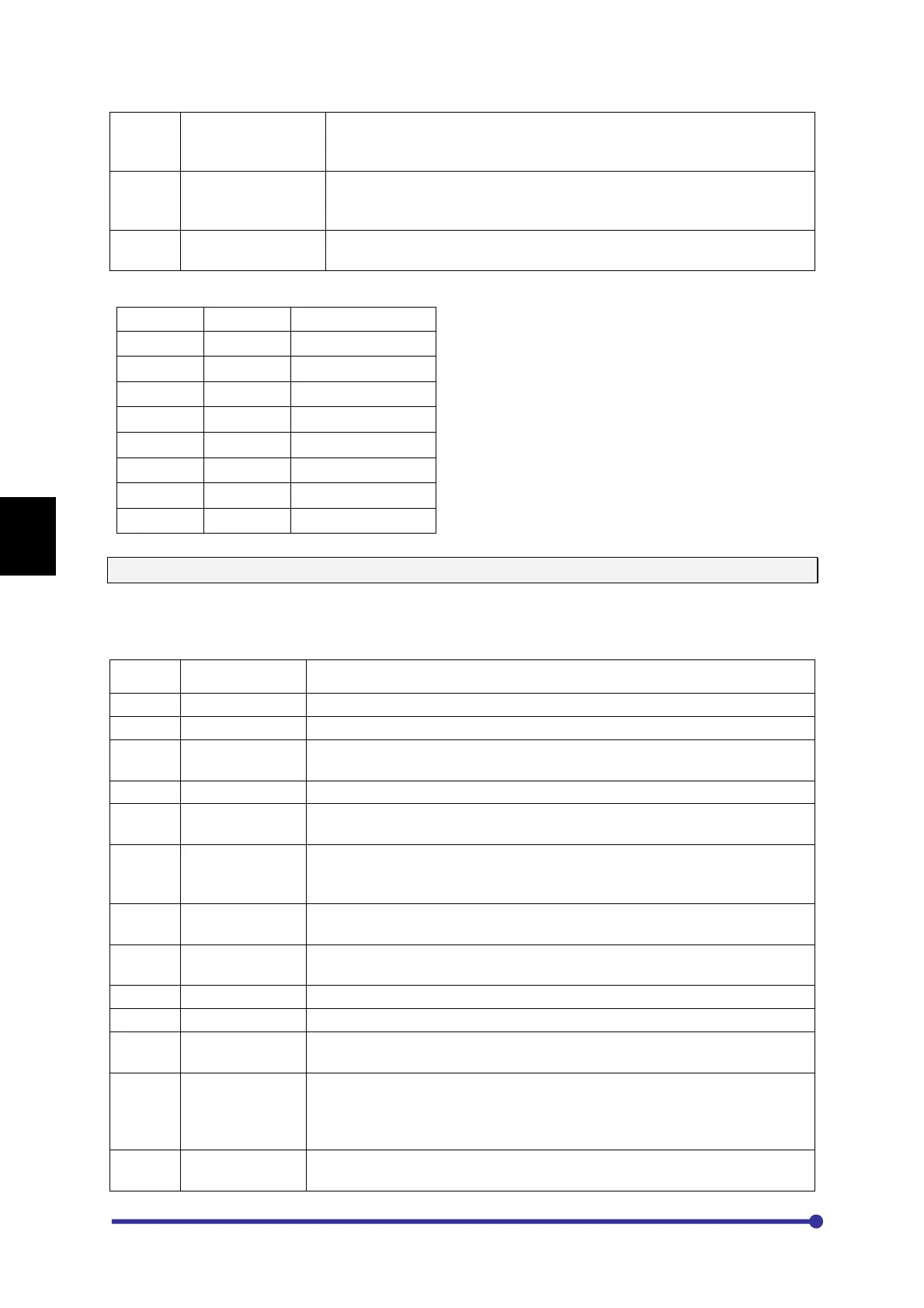
40 Forward Jog This is a forward jog command. No need t
o set extra direction PSI.
(Note: If option 2:JOG or 13:Reverse is selected in any PSI, then
40:Forward Jog PSI is not selected and vice versa).
41 Reverse Jog This is a Reverse jog command.
No need to set extra direction PSI.
(Note: If option 2:JOG or 13
:Reverse is selected in any PSI, then
41:Reverse Jog PSI is not selected and vice versa).
42 MBRK Answer This is a feedback signal from external brake
external brake command.
The default selection is as under.
PSI1 2 Jog Select
PSI2 10 Emergency stop
PSI3 11 Fault Reset
PSI4 4 Preset i/p-0
PSI5 5 Preset i/p-1
PSI6 6 Preset i/p-2
RUN 24 RUN
STOP 25 STOP
C107 ~ C110: PSO-1 ~ 4
User can configure four programmable sequence outputs for different functions using parameters
C107 ~ C110. The status of the Programmable Sequence Output can be monitored in M308. The
various options are explained as under.
OPTION
NAME FUNCTION
1 Not Used No function is selected.
2 Run This turns ON during running, jogging or DC braking.
3 Local This turns ON when the operation mode is local (operation from
digital operation panel is selected).
4 Reverse Run This turns ON when the motor is reverse running.
5 I-Detection This turns ON when the output current reaches the programmed I-
Detection Level C302 or higher.
6 Freq Attain This turns ON when the o
utput frequency (speed) reaches the set
frequency (speed). The detection reach width is set with frequency
attainment detection width C301.
7 Speed Detect1
This turns ON when the output frequency (speed) value reaches a speed
higher than the speed set with the detection level –1.
8 Speed Detect2
This turns ON when the motor speed reaches a speed higher than that
set in the detection level-2.
9 Acceleration This turns ON during acceleration.
10 Deceleration This turns ON during deceleration.
11 Aux Drive
This turns ON when the auxiliary drive parameter setting is validated by
the sequence input AUXDV.
12 Timer Output This turns ON during running, jogging, pre-
excitation and DC braking. A
programmable off delay (C309
) is provided, so even if the above
op
erations turn OFF, this control will not turn OFF for programmed time.
This is used for external fan/ motor control.
13 Zero Speed
This turns ON when the output frequency (speed) value is below the
level set with zero speed level.




 To Next Page