Amtech
6-132
6
Example 7
This application can be used to monitor feedback on FSV and convert it to other quantity. And
to take sample after every 1-second, 1-minute and 1-hour and display them on separate
Display Parameters.
Samples of 1-second and 1-minute will be reset but samples of 1-hour will be continuously
Increased to measure total input quantity.
Program Code:
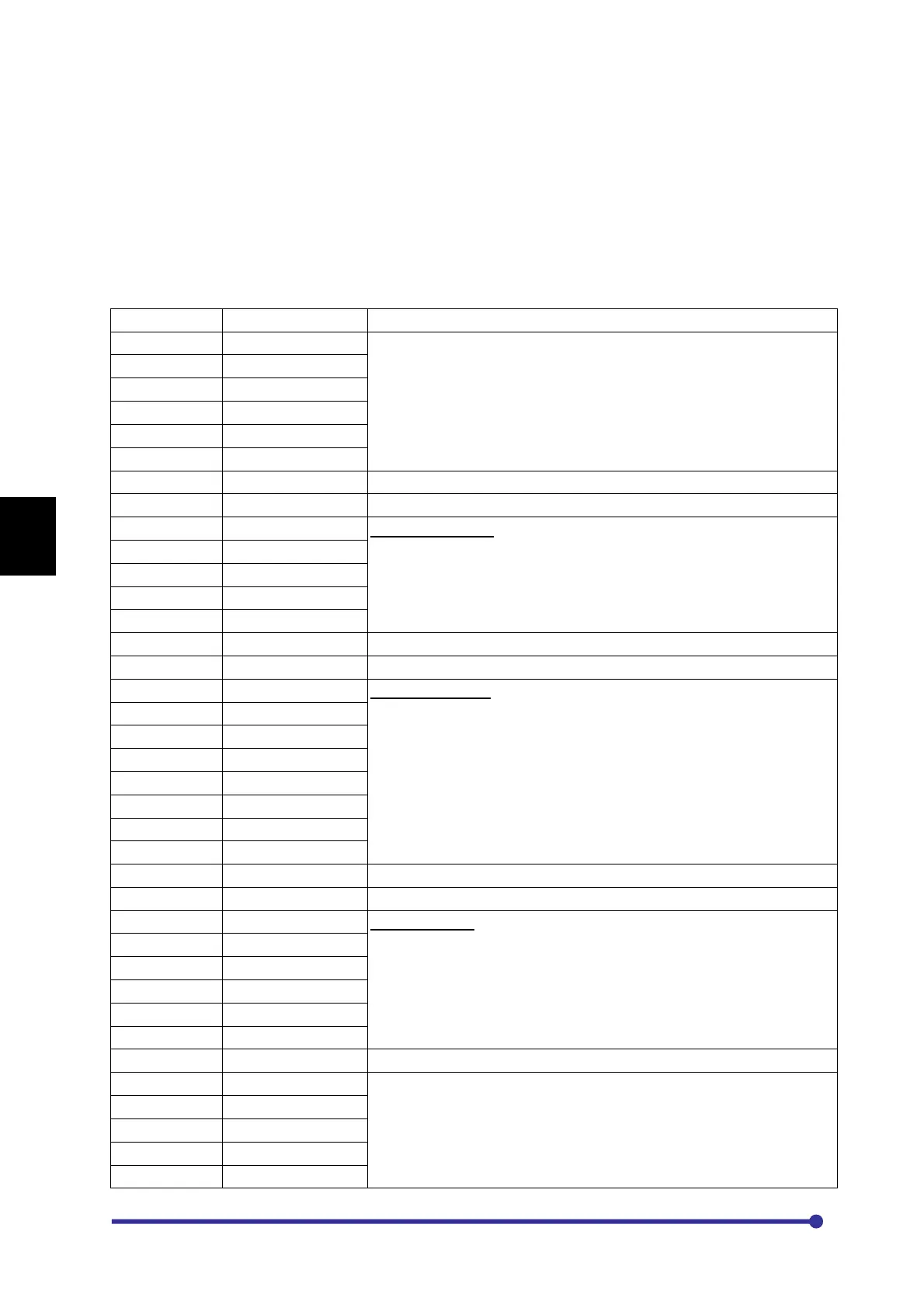
Input from Display Panel into P101 to PA01
P101 016094108000 To find feedback.
P102 001001000100
P103 018001000000
P104 003010000000
P105 028012010011
P106 061001012000
P107 057000000000 Set Timer1 of 1 second
P108 009092000000 Start Timer1
P109 041093000000
-
Find summation of 60 samples and store it into register 5
P110 010093000000
P201 012005005012
P202 006020000000
P203 043000000000
P204 001021000060
P205 037010020021 To check if 60 samples are taken
P206 041010000000
–
If 60 samples are taken then find the average value of feedback
register 5 and store it to register 6.
And again take other 60 samples from register 6 and add it to
register 7.
P207 010010000000
P208 017006005021
P209 012007007006
P210 001005000000
P301 001020000000
P302 006030000000
P303 043000000000
P304 001060000060
P305 037030030060 To check if 60 samples are taken
P306 041030000000
-
If 60 samples are taken then add value of register 7 to register 9.
And display register 9 on Display Para3 which indicate total input
quantity.
P307 010030000000
P308 001030000000
P309 012009009007
P310 061003009000
P401 043000000000
P402 001051010000
P403 037055009051 Whenever register 9 will be greater 10000 it will reset to 0 and
register 56 will be increased by one, which indicates that 10000 of
total quantity input. (If it is increased to 2 that will indicate 20000 of
total quantity input)
P404 041055000000
P405 006056000000
P406 001009000000
P407 010055000000




 To Next Page