www.analog.com
Analog Devices
│
15
MAX30001 Evaluation System Evaluates: MAX30001
MAX30002
MicroSD Log Tab
The MAX30001 EV kit can use the SD card read/write
functionality of the MAX32630FTHR to store and recall
log data to and from a microSD card. This allows data to
be with the USB cable connected or with the USB discon-
nected from the PC host and powering the EV kit with a
battery. To use an SD card, insert the card into connector
CN2 on the underside of the MAX32630FTHR board prior
to starting the GUI.
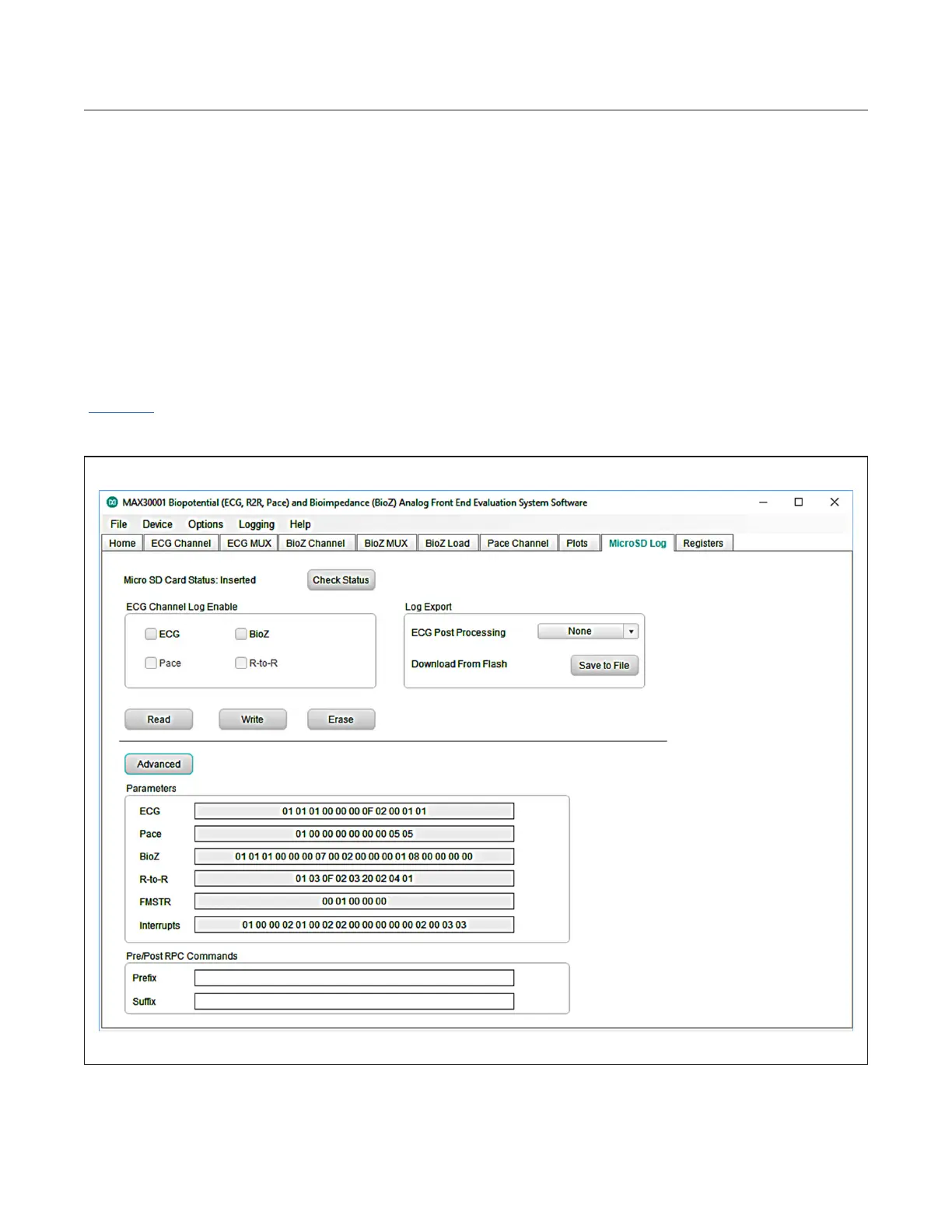
SD card logging is congured in the MicroSD Log tab
(Figure 14). The GUI can save, load, and clear stored
register conguration settings with the Read, Write, and
Erase buttons, respectively. Pressing Advanced displays
the current register contents to be written to an SD card
setting le when Write is pressed. After conrming the
register congurations, select the type of data to save in
the ECG Channel Log Enable box and press Write to
load the measurement parameters to the SD card. Press
SW2 on the MAX32630FTHR board to start logging and
press it a second time to stop logging.
When the EV kit is reconnected to the GUI after logging
data, data from the SD card can be saved to the host PC.
Press Save to File to open a le dialogue and select the
location and le name of the logged data. Data is stored
in a CSV format.
Figure 14. MicroSD Log Tab with Advanced Toggled On.


 To Next Page
 Loading...