POLY, AND OTHER MODES
POLY MODE
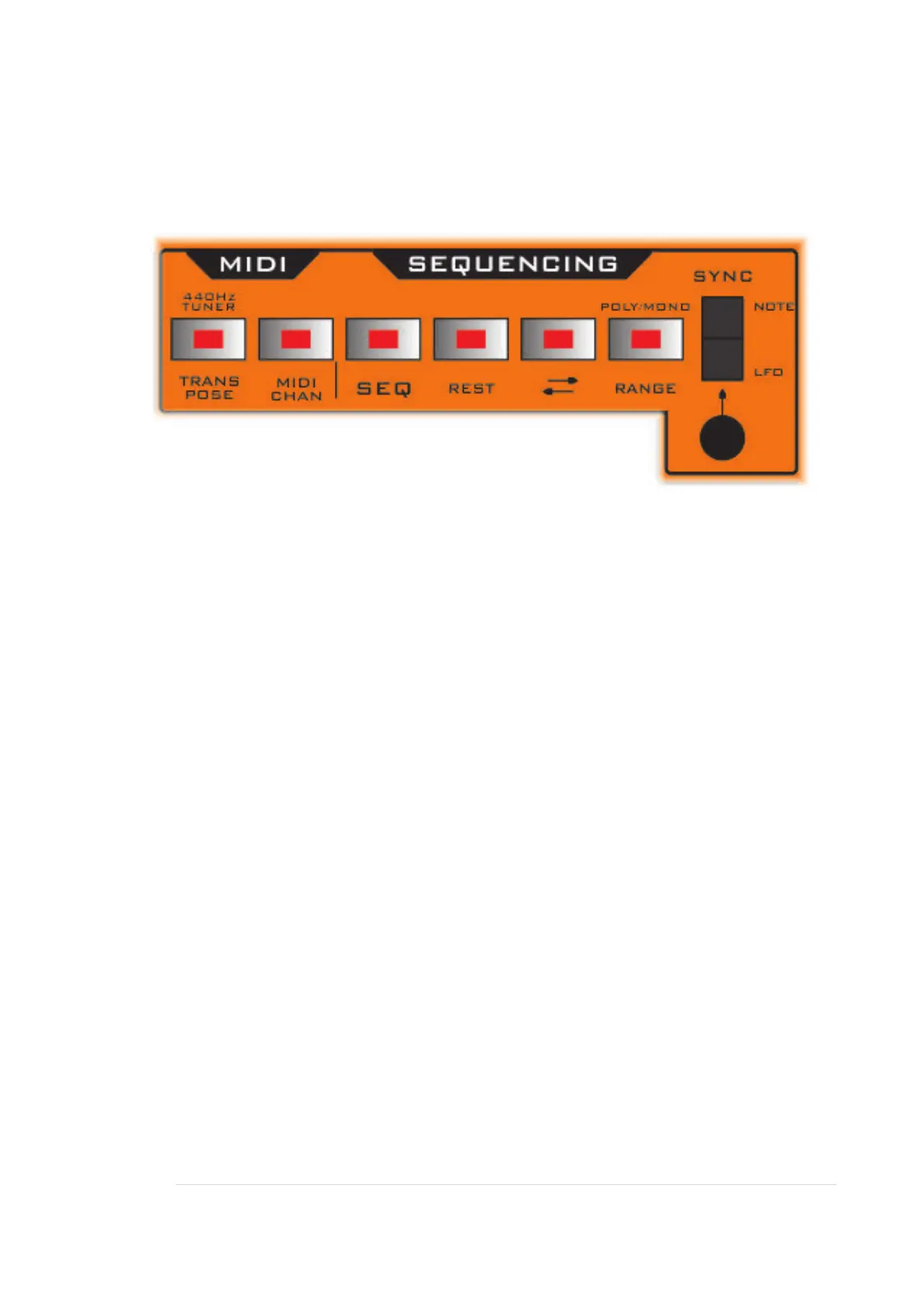
Fusebox X can play in Unison (all 3 VCOs playing the same note) or in Poly.
To activate, first ensure the SEQ is switched off, since the sequencer is a mono
sequencer and still not work in poly mode. (Use a DAW or live playing to play Poly
notes).
Press RANGE to turn on Poly mode (and again to turn off).
Note: If you have chords programmed in a DAW, and find you just get a Unison
playback, then stagger the 3 notes ever so slightly, like a very quick arpeggio. So
nudge each note right just a tiny bit.
Tuner
This gives an audio tone out of the BAR1 jack, at 440Hz, which can be used as a
tuner tone, to aid tuning your oscillators.
Patch this to the mixer so you can hear it running through the synths output.
To turn on, first ensure the SEQ is not running. Then press the TRANSPOSE button
to turn on (and again to turn off).
You would need to ensure the synth is playing an ‘A’ - that it is not transposed.
So connect a MIDI keyboard, and hit A.
Also ensure Tune and Detune knobs are centred, and any other form of transpose or
pitch mod within the synth is off.


 To Next Page